

Collage It Studio
弢 张 · Graphics & Design
Independent analytics for this App Store listing. AppTracker is not affiliated with 弢 张.
Chart standing · US
What changed · US
Listing changes AppTracker has observed for this app in this storefront — new versions, price moves, rating shifts, and store copy.
- Save your cutouts as reusable stickers, with favorites, categories and search. Photo effects and outlines are preserved, and empty transparent margins are trimmed. - Explore six Smart Arrange layouts and keep selected photos in place. - Draw with a new pressure-sensitive graphite pencil, with textured strokes and tapered tips. Continuous strokes share a drawing layer while retaining individual undo steps. - Faster multi-photo selection, dragging, image effects, sticker saving and pencil drawing. - A streamlined single-row toolbar, accessible touch deletion and canvas zoom controls. Pinch zooms the canvas when nothing is selected. - Importing a photo now switches to the selection tool. Drawing into rotated layers preserves existing artwork, and erasers respect locked layers.
In-app purchases · US
No in-app purchases.
Screenshots


About
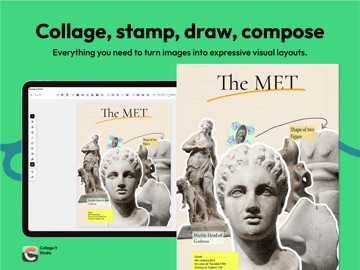
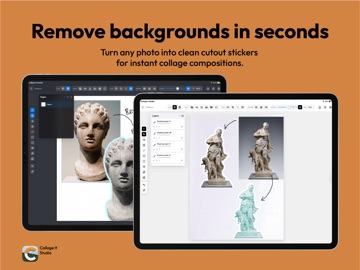
Collage It is a playful, free-form collage studio for iPad. Turn photos, cutouts, stickers, stamps, brushes, type, and textures into personal compositions without forcing your ideas into a template. Cut out photo backgrounds, move every element freely, and build with editable layers across multiple pages. Add tactile details with Y2K and lace frames, paper textures, drawing tools, curved type, Riso print effects, Cyanotype, and Smart Scatter. Make digital scrapbook pages, moodboards, posters, zines, journals, photo layouts, and visual studies. Start from a blank canvas or open one of the editable tutorial projects to see how a composition is built. Features: - Free-form photo collage on a flexible canvas - Photo background removal and cutout stickers - Editable layers, linked groups, and multiple pages - Stamps, frames, notes, shapes, and paper textures - Apple Pencil drawing with editable brush layers and pressure-sensitive graphite pencils - A personal sticker library with favorites, categories and cross-project reuse - Type on a path with live font previews - Riso and Cyanotype photo effects - Smart Scatter and six Smart Arrange layouts for multi-image compositions - Editable tutorial projects - Image and multi-page PDF export - Local project storage with no account required Your projects remain on your device. Collage It does not require an account or upload your work to a server.
What's new · 1.3.0
- Save your cutouts as reusable stickers, with favorites, categories and search. Photo effects and outlines are preserved, and empty transparent margins are trimmed. - Explore six Smart Arrange layouts and keep selected photos in place. - Draw with a new pressure-sensitive graphite pencil, with textured strokes and tapered tips. Continuous strokes share a drawing layer while retaining individual undo steps. - Faster multi-photo selection, dragging, image effects, sticker saving and pencil drawing. - A streamlined single-row toolbar, accessible touch deletion and canvas zoom controls. Pinch zooms the canvas when nothing is selected. - Importing a photo now switches to the selection tool. Drawing into rotated layers preserves existing artwork, and erasers respect locked layers.
Details