

Remote Desktop: RDP & VNC
AN DUNG PHAT TRADING AND SERVICES COMPANY LIMITED · Productivity
Independent analytics for this App Store listing. AppTracker is not affiliated with AN DUNG PHAT TRADING AND SERVICES COMPANY LIMITED.
Chart standing · US
What changed · US
Listing changes AppTracker has observed for this app in this storefront — new versions, price moves, rating shifts, and store copy.
- Smoother RDP: scrolling and moving windows keep up much better - Two-finger scrolling follows your fingers and glides after a flick - The pointer changes shape like on your computer — text cursor, link hand, resize arrows - Share a computer as a file: send it by AirDrop, Messages or Mail, and open it on another iPhone, iPad or PC. Uses the standard .rdp format (also opens in Microsoft Remote Desktop) and .vnc. Passwords are never included - Open .rdp files saved on Windows to add those computers - Touch like a laptop touchpad: press and hold for a right-click, tap then touch-and-drag to click and drag, drag with three fingers - A new toolbar button you can drag to any edge of the screen; tap it to open the toolbar. It no longer sits under the iPad's multitasking button - Haptic feedback when a session is ready, when something needs your attention, and on toolbar actions (Settings › Input › Haptic Feedback) - Stay connected through a short trip out of the app, and choose whether to reconnect after a longer one - Clear reasons when a connection fails, and a prompt to re-enter a wrong password - Verify computers: confirm a PC's certificate on first connection and get warned if it changes - Protection against being downgraded to a weaker login on PCs that use Network Level Authentication - Natural Scrolling setting, and scrolling now goes the right way on Windows PCs - "Prefer Low Latency" in Settings now speeds up RDP sessions
Price & rating history · US
Reconstructed from the listing changes AppTracker has observed in this storefront. A field is charted once it has changed more than once, and each line starts at the value it moved from.
Average rating · ★ 4.00 now · 3 changes on record
Ratings breakdown · US
The star breakdown behind this app's rating in this storefront.
In-app purchases · US
No in-app purchases.
Screenshots


About
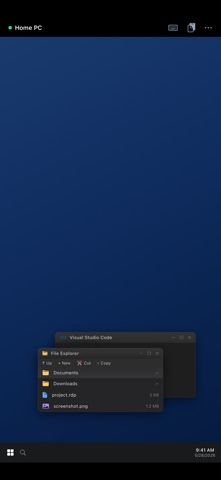
Remote Desktop lets you securely control your Windows PC, server, or Mac from your iPhone and iPad. Built on the industry-standard RDP and VNC protocols, it connects directly to your computers — no account, no cloud middleman, no subscription required to get started. CONNECT YOUR WAY • RDP for Windows (NLA + TLS security) and VNC for Mac, Linux, and Raspberry Pi • Quick Connect — type an address and connect instantly, nothing to set up • Save your PCs, mark favorites, and reconnect in one tap • Auto-reconnect keeps your session alive through network drops BUILT FOR TOUCH • Trackpad and direct-touch modes with adjustable sensitivity • Full gesture set: tap, right-click, middle-click, scroll, pinch-to-zoom, pan • On-screen keyboard plus special keys (Esc, Tab, Ctrl, Alt, Win, F1–F12, Ctrl+Alt+Del, arrows) • Hardware keyboard support • Designed for iPad with a sidebar layout and Split View A REAL DESKTOP, NOT A SLIDESHOW • Crisp Metal-accelerated rendering with fit, fill, native, and integer scaling • Per-connection quality presets, resolution, and color depth • Two-way clipboard sync • Audio redirection • Send files to your PC (they appear under \\tsclient on Windows) KNOW YOUR CONNECTIONS • Usage statistics with charts and per-connection health scores • Smart suggestions to fix unstable or high-latency connections • Exportable PDF usage reports • On-device AI assistant (iPhone/iPad with Apple Intelligence) that explains your usage and helps troubleshoot — running entirely on your device PRIVATE BY DESIGN • No account, no analytics, no tracking • Passwords stored only in the device Keychain • AI runs on-device — your data never leaves your iPhone or iPad Connect to the computers you already own. Remote Desktop never sees your data.
What's new · 1.0.2
- Smoother RDP: scrolling and moving windows keep up much better - Two-finger scrolling follows your fingers and glides after a flick - The pointer changes shape like on your computer — text cursor, link hand, resize arrows - Share a computer as a file: send it by AirDrop, Messages or Mail, and open it on another iPhone, iPad or PC. Uses the standard .rdp format (also opens in Microsoft Remote Desktop) and .vnc. Passwords are never included - Open .rdp files saved on Windows to add those computers - Touch like a laptop touchpad: press and hold for a right-click, tap then touch-and-drag to click and drag, drag with three fingers - A new toolbar button you can drag to any edge of the screen; tap it to open the toolbar. It no longer sits under the iPad's multitasking button - Haptic feedback when a session is ready, when something needs your attention, and on toolbar actions (Settings › Input › Haptic Feedback) - Stay connected through a short trip out of the app, and choose whether to reconnect after a longer one - Clear reasons when a connection fails, and a prompt to re-enter a wrong password - Verify computers: confirm a PC's certificate on first connection and get warned if it changes - Protection against being downgraded to a weaker login on PCs that use Network Level Authentication - Natural Scrolling setting, and scrolling now goes the right way on Windows PCs - "Prefer Low Latency" in Settings now speeds up RDP sessions
Details