

Pin&Spin
Gianluigi Morganti · Travel
Independent analytics for this App Store listing. AppTracker is not affiliated with Gianluigi Morganti.
Chart standing · US
What changed · US
Listing changes AppTracker has observed for this app in this storefront — new versions, price moves, rating shifts, and store copy.
We fixed an issue in Find in Photos that affected anyone using iCloud Photos with Optimize Storage turned on, especially on a cellular or slow connection: tapping + on a discovered place often seemed to do nothing. Now the place is pinned immediately and its photos fill in as they download from iCloud. The results list also loads faster and uses less data.
In-app purchases · US
What this app sells inside itself, grouped by kind and priced for this storefront.
Screenshots


Similar apps
Competitors and close alternatives, as estimated by AppTracker.
 Pin Traveler: Track Travel Map
Pin Traveler LLC
Pin Traveler: Track Travel Map
Pin Traveler LLC
 Pin Your Plate
Marius Wenk
Pin Your Plate
Marius Wenk
 Everpin - Travel Map Journal
Green Lake Technology Ltd
Everpin - Travel Map Journal
Green Lake Technology Ltd
 TravelPin: Save & Plan
Rinor Tafolli
TravelPin: Save & Plan
Rinor Tafolli
 Pinbox - Map Your World
Seasonal Spring
Pinbox - Map Your World
Seasonal Spring
 Tactical Gps. Offline Map
Tigran Mkhitaryan
Tactical Gps. Offline Map
Tigran Mkhitaryan
 Pin365 - Your travel planner
Nicolas Schotten
Pin365 - Your travel planner
Nicolas Schotten
 Pin365 - Your travel map
Nicolas Schotten
Pin365 - Your travel map
Nicolas Schotten
About
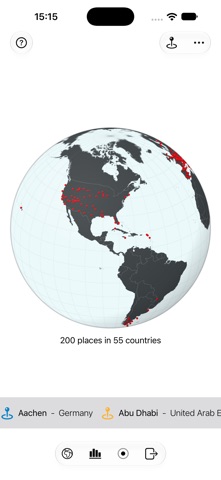
Build a lifetime travel map, one pin at a time. Forgot a trip? Your photos remember: you can turns geotagged pictures into suggested pins. Explore the Globe. The globe spins on its own. Pins on it mark your places, and their names can be scrolled along the ribbon below. • Drag the globe to explore its regions. • Pinch the globe to zoom in and out. • Tap on lands or oceans to zoom in on the region — tap a pin (or a name on the ribbon) to visit the place. • Tap the back button, or double-tap anywhere on the globe, to go back to the spinning globe. Pin your places. Build your own travel record. • Tap "Edit Places" in the toolbar to add, edit, or remove places. • Automatically find places you've visited in your photo library. • Tap "+" to add a new place — drop a pin right on the map and/or enter your info. • Select up to 12 photos from your Photo Album to add to your place. • Select a place on the list to edit it, or swipe to remove it. Take.Control. Use the toolbar buttons to set your preferences and take actions. • Toggle the earth's appearance: stylized or realistic. • Check your progress (places by Continent and Country). • Take a movie clip of a globe revolution and share it with your friends. • Share your places with another device. • Load or remove demo places — or wipe everything and start fresh. • Reopen the quick guide any time. Pin the World is free to try, up to 30 places. Once you reach the limit, you can keep using all of the app's features with your 30 places, or unlock unlimited places with a one-time purchase. No subscriptions. No ads.
What's new · 2.2
We fixed an issue in Find in Photos that affected anyone using iCloud Photos with Optimize Storage turned on, especially on a cellular or slow connection: tapping + on a discovered place often seemed to do nothing. Now the place is pinned immediately and its photos fill in as they download from iCloud. The results list also loads faster and uses less data.
Details