

Bibliome
Joshua Langberg · Productivity
Independent analytics for this App Store listing. AppTracker is not affiliated with Joshua Langberg.
Chart standing · US
What changed · US
Listing changes AppTracker has observed for this app in this storefront — new versions, price moves, rating shifts, and store copy.
Ask on iPhone and iPad now searches your whole synced library, and Bibliome connects to Notesmith. NEW • Ask searches your whole synced library from your iPhone or iPad, including scans and Word files. It works while Bibliome is still indexing, and each source shows a one line preview. It reads text your Mac keeps in sync, so it needs Bibliome 1.8.2 or later on your Mac. • Notesmith connection. A citation opens the cited page, and Note this quote sends the quote to Notesmith (needs Notesmith 1.0.1 or later). • Shortcuts and Siri can find your documents. • On iPad and larger phones, the reader opens beside the list. • Read Aloud and page themes in the reader. • Redaction: remove a box, boxes no longer land inside other words, scanned pages are covered where the ink is, and Select Text tells you when a page is a scan. • Scans are read in any language. FIXED • Citations to documents that aren't downloaded yet now open. • A first citation now shows after the welcome screen. • Search no longer loses the open document on iPad.
In-app purchases · US
No in-app purchases.
Screenshots


About
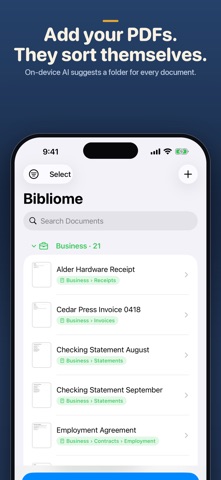
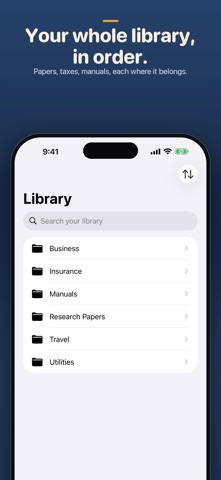
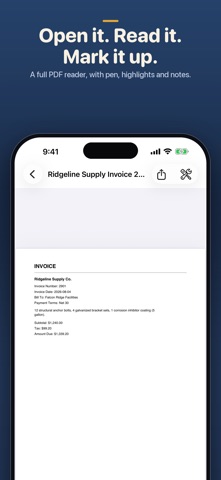
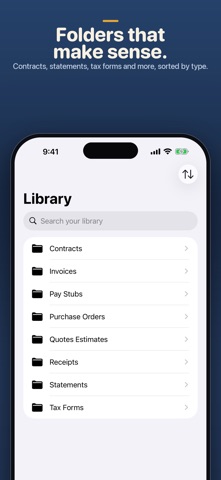
Bibliome is the mobile companion to Bibliome Library for Mac — read, search, mark up, and file PDFs on your iPhone or iPad, synced to your Mac library through your own iCloud. Get Bibliome Library for Mac: https://apps.apple.com/app/id6786826590 It also stands completely on its own, no Mac required. Point it at your documents and Bibliome suggests where each one belongs: manuals, papers, datasheets, statements, receipts, whatever your library is made of. Accept with a tap, and it learns from what you file. No uploading, no accounts, no waiting on a server. WHAT WORKS WITH NO MAC AT ALL • Suggests a category for every document and learns from your filing • Move and re-file with a tap • Searches your whole library by keyword, ranked by meaning • Reads scans with on-device OCR • Scans paper to PDF, converts documents, merges, compresses, and reorders pages • Detects dates, totals, and IDs; builds citations; exports notes • Answers questions with the passages from your own documents that address them WHAT NEEDS APPLE INTELLIGENCE Bibliome's sharpest filing and its written answers use Apple Intelligence, which requires iOS 26 on a supported iPhone or iPad with Apple Intelligence turned on. Without it, every feature above still works exactly the same — this is a hardware difference, not a paywall. There is no subscription and nothing to unlock. PRIVATE BY DESIGN • The app makes no network connections of its own — no servers of ours, no third parties. Your documents never reach us. • All the intelligence runs on your device, offline. • The only data movement anywhere is Apple iCloud, inside your own account: optional library sync, plus a tiny device-presence file (app version and document count — never names or contents) so your devices can notice each other. We can never see any of it. • No ads, no analytics, no tracking. Your documents are yours. ONE LIBRARY, ALL YOUR DEVICES (OPTIONAL) Turn on iCloud sync and your library is shared across iPhone, iPad, and Mac — through your own Apple iCloud account, never a third-party server. Off by default; you're always in control. Bibliome is built for people who keep a real library of documents and want it organized, searchable, and private — without handing it to anyone.
What's new · 1.6
Ask on iPhone and iPad now searches your whole synced library, and Bibliome connects to Notesmith. NEW • Ask searches your whole synced library from your iPhone or iPad, including scans and Word files. It works while Bibliome is still indexing, and each source shows a one line preview. It reads text your Mac keeps in sync, so it needs Bibliome 1.8.2 or later on your Mac. • Notesmith connection. A citation opens the cited page, and Note this quote sends the quote to Notesmith (needs Notesmith 1.0.1 or later). • Shortcuts and Siri can find your documents. • On iPad and larger phones, the reader opens beside the list. • Read Aloud and page themes in the reader. • Redaction: remove a box, boxes no longer land inside other words, scanned pages are covered where the ink is, and Select Text tells you when a page is a scan. • Scans are read in any language. FIXED • Citations to documents that aren't downloaded yet now open. • A first citation now shows after the welcome screen. • Search no longer loses the open document on iPad.
Details