

Qingdu AI: Chinese Reader
Jungsoo Nam · Education
Independent analytics for this App Store listing. AppTracker is not affiliated with Jungsoo Nam.
Chart standing · US
What changed · US
Listing changes AppTracker has observed for this app in this storefront — new versions, price moves, rating shifts, and store copy.
Improved how numbers and symbols are preserved when reading text from photos. - Fixed an issue where numbers could be dropped from extracted text. Improved preservation of half-width and full-width digits, as well as numbers written in Chinese characters. - Improved preservation of punctuation and symbols in dates, times, prices, and percentages. - Improved read-aloud track splitting so numbers containing full-width decimal or thousands separators stay together.
Screenshots

About
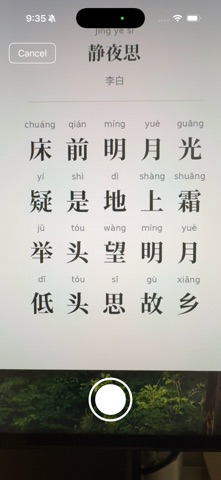
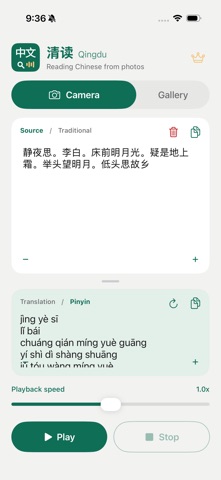
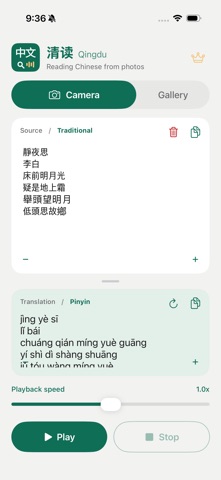
Qingdu is an AI Chinese reader that turns your camera into a fast OCR, pronunciation, and translation assistant. Take a photo of any Chinese characters — textbooks, signs, menus, or notes — and Qingdu instantly recognizes the text with high accuracy, reads it aloud in natural native pronunciation, and provides a translation. Built especially for learners who want to read along and improve as they go. KEY FEATURES - Selective Scanning — Move and resize the camera crop area to recognize only the text you need; your editing mode and last area are remembered - Flexible Playback — Drag the progress bar to a new position, jump between punctuation-based sections, or pause after each section - Fine Speed Control — Listen at 0.1x to 2.0x, adjustable in 0.1x steps - Word Highlighting — Follow spoken words with background highlighting in the source and matching converted text - AI-Powered OCR — Advanced AI recognition delivers exceptionally high accuracy - Pinyin Noise Removal — Automatically filters out pinyin and annotations, extracting only clean Chinese characters - Native Pronunciation — Listen to clear, natural text-to-speech for every character - Instant Translation — Understand what you're reading right away - Edit & Refine — Adjust recognized text for perfect accuracy - Simple & Fast — No login, no account, no clutter. Just open and read WHY QINGDU? Many textbooks print pinyin above or beside the characters, which confuses ordinary OCR tools. Qingdu uses AI to intelligently remove this noise and extract only the Chinese characters you need — giving you clean, accurate results every time. WHO IS IT FOR? Qingdu is designed for learners of Chinese who study with physical textbooks and want a faster, more accurate way to look up, hear, and understand characters. Whether you're a beginner building vocabulary or an intermediate learner reading native materials, Qingdu helps you read with confidence. Start reading Chinese today — just snap a photo and tap. Terms of Use: https://www.apple.com/legal/internet-services/itunes/dev/stdeula/
What's new · 1.5.2
Improved how numbers and symbols are preserved when reading text from photos. - Fixed an issue where numbers could be dropped from extracted text. Improved preservation of half-width and full-width digits, as well as numbers written in Chinese characters. - Improved preservation of punctuation and symbols in dates, times, prices, and percentages. - Improved read-aloud track splitting so numbers containing full-width decimal or thousands separators stay together.
Details