

持った? 忘れ物防止・持ち物チェックリスト
kazunari aoki · Productivity
Independent analytics for this App Store listing. AppTracker is not affiliated with kazunari aoki.
Chart standing · US
What changed · US
Listing changes AppTracker has observed for this app in this storefront — new versions, price moves, rating shifts, and store copy.
• Fixed an issue where the app could show the wrong language • You can now add or remove a scene from Today's scene on Home with one tap • Scenes with notifications turned off now still appear on Home on the days you chose • The bell now takes you straight to unchecked checks and Notification settings, and it's clearer how to turn on notifications
Screenshots



Keywords this app targets
Search terms AppTracker associates with this app — estimates, not search volume. ❝ = in the app's title; a highlighted number is its current position for that term.
Similar apps
Competitors and close alternatives, as estimated by AppTracker.





About
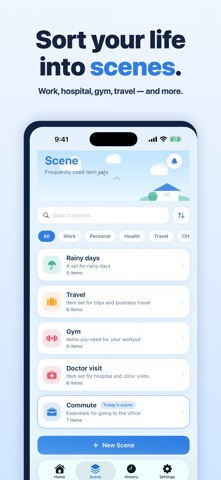
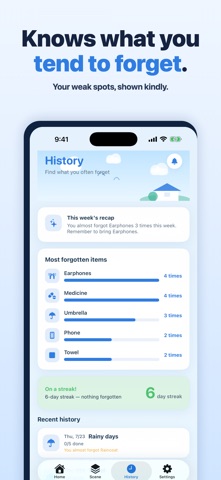
"Oh no, my ID badge." Ever stopped at the station gate and turned back home? "Did I lock the door...?" Ever grown anxious and searched your bag again and again? "Right, it was supposed to rain." Ever arrived soaked, remembering the umbrella on your desk? Mornings are hectic — your mind already on work, your hands getting ready, never enough time. Remembering every single thing to bring is nearly impossible. "Motta?" (Did you grab it?) isn't about becoming a "perfect person" who never forgets. It quietly hands you a system that works even when you do forget. It doesn't blame or scold you. It just stands beside you and asks, "Did you grab this?" ■ Just three steps 1. Create a scene (commute, clinic, gym, travel, rainy day...) 2. Line up what you take for it (keys, wallet, ID badge, medicine record...) 3. Get a notification at departure time, then one tap for "Got it / Later / Not needed" You set it up just once. After that, the app remembers for you. ■ Sort your things by scene What you need differs by day. "Motta?" lets you save a set of items for each scene. ・Commute: keys / wallet / phone / ID badge / pass ・Clinic: insurance card / patient card / medicine record ・Gym: towel / shoes / change of clothes ・Travel: charger / power bank / medication / tickets ・Rainy day: umbrella / spare socks Major scenes have built-in templates. You can also create your own. ■ A gentle notification before you leave At the time you set, today's item list arrives on your home screen. Tap once for "Got it / Later / Not needed" — right from the lock screen, without opening the app. You can also vary notifications by day of the week. ■ A no-blame design Most checklists offer only two choices: got it, or not. But in reality, "I'll grab it later" and "I don't need it today" exist too. ・Got it → removed from the list ・Later → notified again just before you leave ・Not needed → not counted today Check things at your own pace. There's no streak to break. ■ Widget, Apple Watch & history Today's items line up on the home screen widget — tap to mark them "got it" (iOS 17 interactive widgets). With Apple Watch you can check from your wrist. The history records what you forget most, so you can move those items to the top. ■ Premium features ・Weather-linked: on rainy-forecast mornings, it suggests "umbrella" for today's list. ・Calendar-linked: if an event title contains a keyword (meeting, gym, clinic...), it suggests related items, and stays silent otherwise. ・Items with photos: register vague things with a photo. ・iCloud sync: sync your lists across devices with the same Apple ID and with Apple Watch. ■ Pricing Free forever. With up to 3 scenes, 30 items, and 3 notifications, all the basic features are available. For more freedom, Premium (an auto-renewing subscription): ・Monthly: ¥300 / month ・Yearly: ¥2,900 / year Premium removes the limits on scenes, items, and notifications, and unlocks weather linking, calendar linking, items with photos, and iCloud sync. ■ About the auto-renewing subscription ・Payment is charged to your Apple ID account. ・It renews automatically unless auto-renew is turned off at least 24 hours before the current period ends. ・The renewal charge is billed within 24 hours before the period ends. ・Manage or cancel anytime from Settings → Apple ID → Subscriptions on your iPhone. Terms of Use: https://akiaki1984-alt.github.io/app-legal/motta/terms-en.html Privacy Policy: https://akiaki1984-alt.github.io/app-legal/motta/privacy-en.html ■ Privacy "Motta?" stores your item data on your device. Only when you enable Premium iCloud sync is it synced between your own devices through your personal iCloud account. Your data is never sent to third parties. We do not use any advertising SDK or analytics SDK. Support: https://akiaki1984-alt.github.io/app-legal/motta/support-en.html You don't have to have it all together. Leave the worry to "Motta?" and head out at ease. — The Motta? Team
What's new · 1.5.2
• Fixed an issue where the app could show the wrong language • You can now add or remove a scene from Today's scene on Home with one tap • Scenes with notifications turned off now still appear on Home on the days you chose • The bell now takes you straight to unchecked checks and Notification settings, and it's clearer how to turn on notifications
Details