

Thought Organizer - GoalGrid
Takao Sunagawa · Productivity
Independent analytics for this App Store listing. AppTracker is not affiliated with Takao Sunagawa.
Chart standing · US
What changed · US
Listing changes AppTracker has observed for this app in this storefront — new versions, price moves, rating shifts, and store copy.
• Added Home Screen widgets in small (9-cell) and large (81-cell) sizes. Choose a different goal sheet for each widget. • Added Korean language support. • Updated templates and starter examples with content tailored to Japan, the United States, and South Korea in their respective languages. • Improved QR code generation and added clear error messages when a code cannot be generated.
In-app purchases · US
What this app sells inside itself, grouped by kind and priced for this storefront.
Screenshots


About
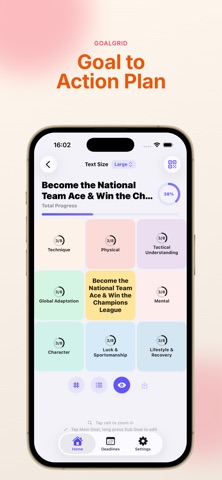
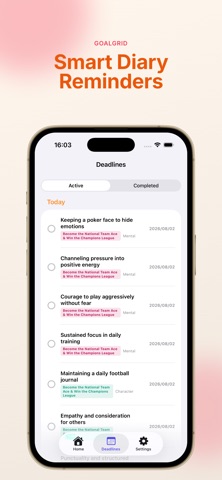
Bring your dreams to life with GridGoal, the ultimate goal-setting app inspired by the proven 9x9 "Mandala Chart" method. Having big dreams is great, but do you often feel stuck wondering, "Where do I start?" GridGoal helps you break down a single "Core Goal" into 8 "Sub-goals," and further decomposes them into 64 "Concrete Actions (ToDos)." By organizing your thoughts step-by-step, your first step for today becomes crystal clear. [Recommended for] Anyone with a big dream or ambition they want to achieve. Students and professionals planning their annual goals. People overwhelmed by disorganized ToDo lists. Visual learners who stay motivated by seeing their progress. [Key Features] ◆ Intuitive Zoom-In/Out UI Dive deeper into your plans by seamlessly zooming into any of the 9x9 grids with a simple tap. ◆ 81-Grid Bird’s Eye View Swap to the full grid mode, beautifully optimized for iPad and large screens, allowing you to overview your entire progress at a single glance. ◆ Visual Motivation Decorate your sub-goals and actions with inspiring images. Ticking off completed tasks gives you visual feedback with checkmarks and real-time progress rates. ◆ Easy Share & Export Share your goal sheets instantly using QR codes, or save them as high-quality images to set as your lock screen wallpaper to keep yourself focused daily. ◆ Deadlines & Notifications Set target dates for each action and receive smart notifications to remind you of your commitments. [GridGoal Premium] Unlock the full potential of your goal-setting journey: No Ads: Clean, distraction-free environment. iCloud Sync: Auto-backup and sync across all your iPhones and iPads. Unlimited Sheets & Categories: Create as many sheets as you need (Free version is limited to 5). CSV Data Export: Backup and manage your data in Excel or other spreadsheets. App Lock: Secure your personal goals using Face ID / Touch ID. Stop wishing and start doing. Turn your dreams into actionable steps today with GridGoal! Terms of Use (EULA): https://www.apple.com/legal/internet-services/itunes/dev/stdeula/
What's new · 1.4.0
• Added Home Screen widgets in small (9-cell) and large (81-cell) sizes. Choose a different goal sheet for each widget. • Added Korean language support. • Updated templates and starter examples with content tailored to Japan, the United States, and South Korea in their respective languages. • Improved QR code generation and added clear error messages when a code cannot be generated.
Details