

Chart standing · US
What changed · US
Listing changes AppTracker has observed for this app in this storefront — new versions, price moves, rating shifts, and store copy.
Approvals • Approve and Reject now appear only when the document is genuinely on your step. If your turn has not come yet, the screen tells you who it is waiting for and where your approval falls in the chain — instead of showing nothing at all. • A document that was turned down now shows the person who rejected it as having rejected it, with their reason highlighted beside their name. It used to appear as an approval. • Every approval step shows who acted, how long ago, and any comment they left. • My Tasks now includes internal transfers and asset handovers, so everything waiting on you is on one screen, filterable by document type. • Amend & resubmit moved to the top bar, and closes once an approver has signed — so an approval can no longer be erased under its owner. Assets & reports • An asset's history is now one card per document, each saying where that document stands. • Data sweep finds four kinds of missing information, not just missing values, and its headline counts open the assets behind them. • Utilization totals now match the asset list exactly, and say what they leave out. • An asset nobody holds no longer shows a holder. Fixes • Clearing a company chip actually clears it. • A status chip filters the list, not just itself. • The pinned approval queue respects the filter above it.
Screenshots
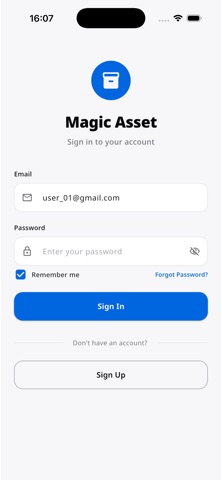
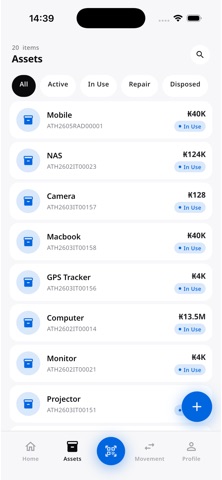
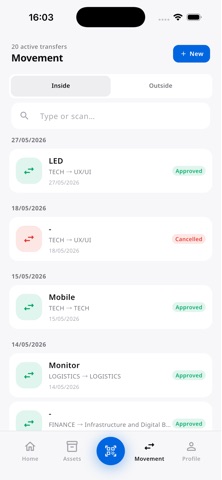
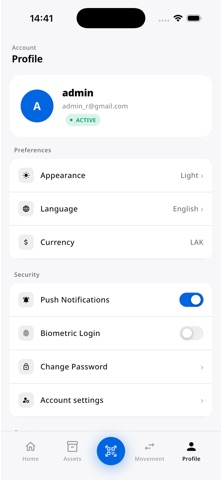
About
Magic Asset is a personal asset tracker that helps you register, locate, and move the items you care about — from electronics and furniture to tools, equipment, and inventory. SCAN & FIND • Open the scanner from any tab and point at a barcode or QR code. • Pull up the asset record instantly with location, status, and history. • Works offline once an asset has been viewed on the device. TRACK MOVEMENTS • Move assets between people or storage locations in a few taps. • See pending, completed, and cancelled movements in one timeline. • Every change is logged with a timestamp and the person responsible. EXTERNAL TRANSFERS • Send assets to another workspace with a full approval workflow. • The sender submits, the receiver approves or rejects with notes. • Approved transfers update ownership and location automatically. ACCOUNT & SECURITY • Sign up with any email — no invitation required. • Enable Face ID or Touch ID for faster, more secure access. • Reset passwords via email verification code. LANGUAGES Magic Asset is available in English, Lao, and Thai. Change the language anytime from your profile. Questions or feedback? Email us at info@aidclaos.com.
What's new · 1.0.11
Approvals • Approve and Reject now appear only when the document is genuinely on your step. If your turn has not come yet, the screen tells you who it is waiting for and where your approval falls in the chain — instead of showing nothing at all. • A document that was turned down now shows the person who rejected it as having rejected it, with their reason highlighted beside their name. It used to appear as an approval. • Every approval step shows who acted, how long ago, and any comment they left. • My Tasks now includes internal transfers and asset handovers, so everything waiting on you is on one screen, filterable by document type. • Amend & resubmit moved to the top bar, and closes once an approver has signed — so an approval can no longer be erased under its owner. Assets & reports • An asset's history is now one card per document, each saying where that document stands. • Data sweep finds four kinds of missing information, not just missing values, and its headline counts open the assets behind them. • Utilization totals now match the asset list exactly, and say what they leave out. • An asset nobody holds no longer shows a holder. Fixes • Clearing a company chip actually clears it. • A status chip filters the list, not just itself. • The pinned approval queue respects the filter above it.
Details