

Central Staffing
Nursa Inc. · Medical
Independent analytics for this App Store listing. AppTracker is not affiliated with Nursa Inc.
Chart standing · US
What changed · US
Listing changes AppTracker has observed for this app in this storefront — new versions, price moves, rating shifts, and store copy.
• A new Schedule: My Schedule, Open and Trades sit side by side, with Day and Week views, page by week or month, and your shifts as cards. A shift you posted or offered to someone shows in yellow until it's settled, and you can take it back off the trade board. • Give a shift to a teammate, or swap with one: open the shift and pick who. They accept, then your manager approves. It works on a shift you already posted, and on a teammate's shift you can offer one of yours in exchange. • Open shifts now include shifts your role can also fill at your facility. • Trades are also under the bell: every open shift you could pick up, plus your own posts. • Can't work a shift? The shift page now asks you to contact your facility supervisor and follow facility policy, instead of a call-out button. • If a manager records you as called out, the shift says so — and if you actually worked it, tap "I worked this shift" or "This isn't right" to dispute it. The Time Clock now explains when a clock-in is refused. • Who's working lists every clinician booked on a shift. • Staff can start a group chat from New Message, and the name field sits at the top. • Reading a message clears it from your inbox and the bell right away. • Android phones now receive push notifications. After you sign in, the app asks once whether to allow notifications so shift changes, pickups and messages reach you. • A notice that a shift of yours changed or was removed now opens that day. • Settings › Location & tracking is one On / Off switch. Clock in needs your phone's location on; the Time Clock says what to turn on. Clock out and breaks don't change. • Shift drive tracking: reminders are scheduled even when the app is closed, signing out ends every recording, and each location fix is uploaded once. The drive tracking screen now lists your phone's battery level among what's recorded and says records are kept 2 years. • Signing out on a shared phone can no longer sign out the next person. • Finishing setup after an invitation: if your email isn't confirmed yet, the app says so and lets you confirm it. • Managers: a reason is optional when you change a shift's times; the call-out sheet says what happened ("Called out — they called in" or "Released by the facility"), and a call-out can be reversed. A call-out can't be recorded over hours someone actually worked. • Managers: a seat filled by an outside clinician shows their name and counts as filled. Approving a give from Needs you no longer freezes the Inbox.
In-app purchases · US
No in-app purchases.
Screenshots




About
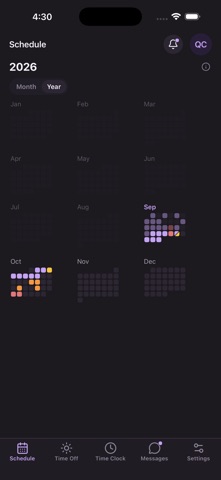
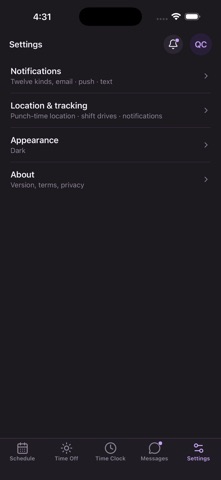
Central Staffing puts your work schedule in your pocket. Built for healthcare professionals, it's a fast, native way to see your upcoming shifts, pick up open shifts as they post, clock in and out, and stay in touch with your scheduler. • See your full upcoming schedule at a glance • Pick up open shifts the moment they're posted • Clock in and out, with on-site confirmation at your assigned facility • Message your scheduler and your team • Request time off and set your availability and shift preferences • View shift details — facility, role, date, and times • Secure sign-in Location: Central Staffing uses your location — including in the background — only to confirm arrival and record on-site time at facilities you are assigned to. Recording is confined to your assigned facility's geofence. Central Staffing requires an account provided by your employer or staffing agency.
What's new · 1.7.6
• A new Schedule: My Schedule, Open and Trades sit side by side, with Day and Week views, page by week or month, and your shifts as cards. A shift you posted or offered to someone shows in yellow until it's settled, and you can take it back off the trade board. • Give a shift to a teammate, or swap with one: open the shift and pick who. They accept, then your manager approves. It works on a shift you already posted, and on a teammate's shift you can offer one of yours in exchange. • Open shifts now include shifts your role can also fill at your facility. • Trades are also under the bell: every open shift you could pick up, plus your own posts. • Can't work a shift? The shift page now asks you to contact your facility supervisor and follow facility policy, instead of a call-out button. • If a manager records you as called out, the shift says so — and if you actually worked it, tap "I worked this shift" or "This isn't right" to dispute it. The Time Clock now explains when a clock-in is refused. • Who's working lists every clinician booked on a shift. • Staff can start a group chat from New Message, and the name field sits at the top. • Reading a message clears it from your inbox and the bell right away. • Android phones now receive push notifications. After you sign in, the app asks once whether to allow notifications so shift changes, pickups and messages reach you. • A notice that a shift of yours changed or was removed now opens that day. • Settings › Location & tracking is one On / Off switch. Clock in needs your phone's location on; the Time Clock says what to turn on. Clock out and breaks don't change. • Shift drive tracking: reminders are scheduled even when the app is closed, signing out ends every recording, and each location fix is uploaded once. The drive tracking screen now lists your phone's battery level among what's recorded and says records are kept 2 years. • Signing out on a shared phone can no longer sign out the next person. • Finishing setup after an invitation: if your email isn't confirmed yet, the app says so and lets you confirm it. • Managers: a reason is optional when you change a shift's times; the call-out sheet says what happened ("Called out — they called in" or "Released by the facility"), and a call-out can be reversed. A call-out can't be recorded over hours someone actually worked. • Managers: a seat filled by an outside clinician shows their name and counts as filled. Approving a give from Needs you no longer freezes the Inbox.
Details