

Fieldbox Backup
Alessandro Casagli · Photo & Video
Independent analytics for this App Store listing. AppTracker is not affiliated with Alessandro Casagli.
Chart standing · US
What changed · US
Listing changes AppTracker has observed for this app in this storefront — new versions, price moves, rating shifts, and store copy.
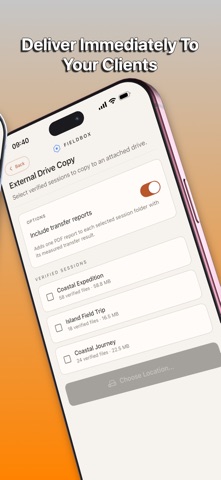
Improved external-drive backups, session records, and endpoint browsing. External Drive Handoff now clearly distinguishes client delivery from backup endpoints. Fixed issues with drive folder selection, interrupted-transfer retries, free-space checks, and transfer report conflicts.
Ratings breakdown · US
The star breakdown behind this app's rating in this storefront.
Screenshots




About
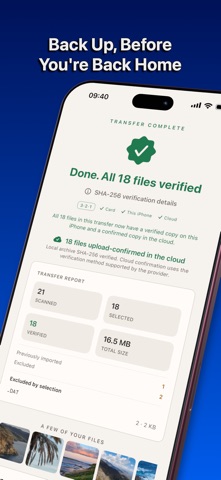
Fieldbox Backup copies your memory card to an archive on your iPhone or iPad, compares source and copied SHA-256 values, then uploads copies to your own cloud accounts. It records which files matched their source at transfer time and which providers confirmed a complete upload. Before a transfer starts, every scanned file has an explicit outcome: selected, already verified in the session, or deliberately excluded. You can adjust the current transfer directly by file type. Every copied file is checked with SHA-256. Fieldbox records a verified local file only when its source and copied values match. Cloud status separately shows when a provider has accepted an upload and confirmed its stored size. S3-compatible storage and Google Drive also require a matching provider-reported SHA-256 hash; Dropbox, OneDrive, and WebDAV report upload/size confirmation where a provider checksum is unavailable. Backup Status shows the current 3-2-1 inventory: three copies, two kinds of storage, and one offsite. Normally that is your original card, a verified copy on your device, and a complete confirmed cloud copy. If you mark a source card formatted, two independently confirmed cloud providers can supply the non-device copies. Connect the cloud you already use: Backblaze B2 and other S3-compatible storage, Dropbox, Google Drive, OneDrive, or WebDAV/NAS. You can see which provider holds a complete copy, with clear status for every transfer. With Fieldbox Pro, files missing from your device can be repaired from the original card or a confirmed cloud copy. Fieldbox downloads to staging and returns a file to the archive only after its SHA-256 matches the recorded source hash. The session activity history records source-card status, cloud-provider changes, confirmed copies, deletions, repairs, and USB Transfers. If a transfer is interrupted, Fieldbox keeps the verified-file checkpoints and resumes only after the reconnected source matches the recorded card identity, selected folder, inventory, and checkpoint evidence. A read-only source recheck can refresh the recorded card coverage later without starting another transfer. Create and export a signed Integrity Record for a point-in-time summary of the session and its recorded evidence. The self-issued device signature provides tamper evidence and signing-key continuity. It is not external certification, trusted time, or proof that a copy still exists. Built for the field: • Works offline. Back up now, sync to the cloud when you have a connection. • Browse and preview your photos, including RAW and HEIC. • Recognizes common camera RAW formats, still images, video, audio, and XMP, XML, or JSON sidecars. This includes 3FR, CR2, CR3, NEF, ARW, RAF, DNG, BRAW, R3D, and other listed formats. • Organize by session and camera, with EXIF and copyright details. • The one-time unlock supports up to three user-selected active sessions that may keep receiving files. Every preserved session remains readable and verifiable, and you can change the active selection later. • Fieldbox Pro adds unlimited local sessions, planning, share and Photos export of working copies, selective local-file removal, verified repair, detailed events, Camera Profiles and Memory Cards management, additional themes, multiple cloud destinations with concurrent uploads, and USB Transfer to external drives. Every non-revoked Pro purchase also includes permanent ownership of the standard Unlock. • Share one cloud account across devices. Fieldbox gives each device a separate top-level area and limits cloud deletion to the current device's area. Review Backup Status and your normal workflow before deciding to reuse a card. Fieldbox never formats, erases, or changes the original source media. Terms of Use (Apple Standard EULA): https://www.apple.com/legal/internet-services/itunes/dev/stdeula/ Fieldbox Terms of Service: https://fieldbox.app/terms.html Privacy Policy: https://fieldbox.app/privacy.html
What's new · 1.7.6
Improved external-drive backups, session records, and endpoint browsing. External Drive Handoff now clearly distinguishes client delivery from backup endpoints. Fixed issues with drive folder selection, interrupted-transfer retries, free-space checks, and transfer report conflicts.
Details