

Kombine: Tasks & Pomodoro
Adam Swiderski · Productivity
Independent analytics for this App Store listing. AppTracker is not affiliated with Adam Swiderski.
Chart standing · US
What changed · US
Listing changes AppTracker has observed for this app in this storefront — new versions, price moves, rating shifts, and store copy.
Kombine now runs on iPad. - Bigger screen, real layouts: tasks, goals, Log and statistics show the list and the details side by side instead of stretching the phone layout - The Today view becomes a grid, and the timer keeps today's tasks and stats next to the clock - A sidebar replaces the tab bar on iPad, so every section is one tap away - Works in any orientation, and in Split View and Slide Over, without losing what you were typing - Log now shows completed tasks too, with switches to show sessions, notes or tasks Fixes - Goals edited on iPhone or iPad now reach the web app. They only synced in the other direction before - Adding a task from a date group (Today, Tomorrow…) keeps that day as the deadline - Archiving a task while offline now syncs once you're back online
Screenshots




About
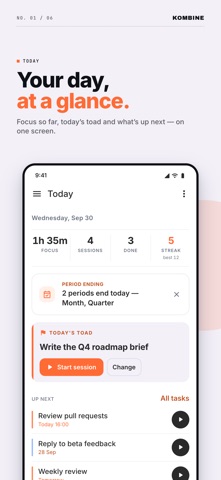
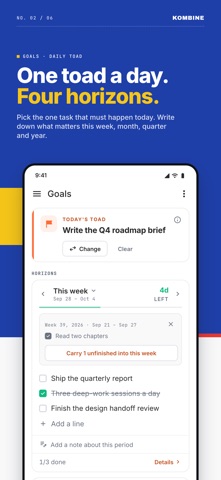
Kombine combines task planning, a Pomodoro timer, and time tracking — so you can plan what needs doing, actually do it, and see where your time went. The key difference: every task has an energy level — low, medium, or high — as well as a priority. When you're drained, filter to low-energy tasks and still move forward. When you're sharp, tackle the hard stuff. It's a small change. It makes a big difference. TODAY Open the app to your day: today's focus time and sessions, your Toad — the one task you'll tackle first — and what's up next. One tap starts a focus session. PLAN Each task takes a deadline, priority, energy level, and tags. Group your list by date, energy, priority, status, or urgency (Eisenhower) — switch any time to see what matters right now. Recurring tasks for the things that come back. Reminders you can act on: start focus or snooze straight from the notification. Import from Todoist or CSV to get started fast. GOALS Set goals for the week, month, quarter, and year. Tick them off, link tasks to them, and when a period ends, review it: keep what you achieved, drop what no longer matters, carry over the rest. Add a note to any period. ACT Three timer modes adapt to how you work: Pomodoro — time-boxed focus blocks with customizable durations and short breaks. Proven and reliable. Flow — open-ended sessions for deep work that needs room to breathe. Adaptive — tell the app how energized you feel; it sets work and break durations to match. Each session links to a task and an activity type — Work, Meeting, Learning, Reading, Writing, Exercise, Creative, Planning, Admin, or your own. Time per task is logged automatically. No manual entry. TRACK The Log is what you actually did, not what you meant to: sessions, notes, and completed tasks on one timeline. Statistics show your focus by week, month, quarter, and year — by activity, by time of day — compared with the same point last period. A streak tracks the days you hit your focus target. Useful patterns surface; bad weeks aren't dramatic, just visible. EVERYWHERE YOU WORK Built for iPhone and iPad, with list and details side by side on the bigger screen. A home screen widget for today's tasks, and a Live Activity that keeps the running timer on your Lock Screen and in the Dynamic Island. Real-time sync across iPhone, iPad, Apple Watch, and the web app — pick up exactly where you left off. Works fully offline; syncs when you're back online. APPLE WATCH Start, pause, or stop a session from your wrist — even without a signal. A complication keeps your active task visible at a glance. Everything reconciles the moment your devices reconnect. PRIVACY No account required to start. All tasks, sessions, and settings are stored locally on your device. Crash reports are sent anonymously for stability monitoring — they contain no task content or personal information. Create an account to sync across devices and restore your data anywhere.
What's new · 1.15.0
Kombine now runs on iPad. - Bigger screen, real layouts: tasks, goals, Log and statistics show the list and the details side by side instead of stretching the phone layout - The Today view becomes a grid, and the timer keeps today's tasks and stats next to the clock - A sidebar replaces the tab bar on iPad, so every section is one tap away - Works in any orientation, and in Split View and Slide Over, without losing what you were typing - Log now shows completed tasks too, with switches to show sessions, notes or tasks Fixes - Goals edited on iPhone or iPad now reach the web app. They only synced in the other direction before - Adding a task from a date group (Today, Tomorrow…) keeps that day as the deadline - Archiving a task while offline now syncs once you're back online
Details