

JustReader
Oleksii Koshkin · Books
Independent analytics for this App Store listing. AppTracker is not affiliated with Oleksii Koshkin.
Chart standing · US
What changed · US
Listing changes AppTracker has observed for this app in this storefront — new versions, price moves, rating shifts, and store copy.
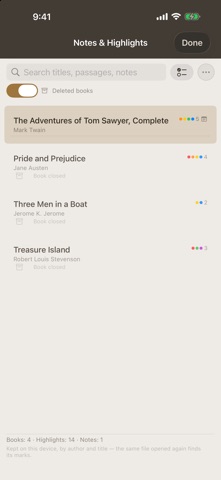
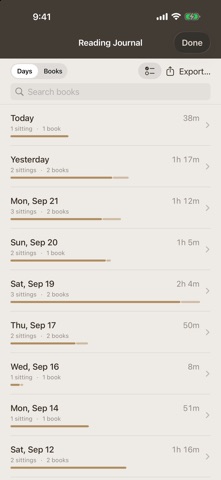
• Two ways to read: Comfort adapts the page automatically, Professional lets you build your own reading IDE • Statistics, the reading journal and all your notes on buttons on the home screen; they outlive closing the book and export to a file • Statistics with charts — for the whole library or the current book • Up to four columns, new page-turn effects Flip, Cards and Sink, page textures and a frame around the text • Reader settings on six tabs, quiet mode, manual translation • Thanks to Elli, one of our readers, for the ideas
In-app purchases · US
No in-app purchases.
Screenshots




About
JustReader is a free, native reader for Mac, iPad, and iPhone. Open a book file and read it the way it should look — one book at a time, no library to manage, no account, no ads. OPENS WHAT YOU HAVE EPUB, FB2, MOBI, HTML, TXT, RTF, DOC/DOCX (Mac), and their ZIP variants — with chapter extraction, footnotes, encoding detection, and embedded images. THE FULL READING EXPERIENCE Nine typefaces and 41 themes across five palettes, plus Typewriter and Terminal. Continuous scroll, paged, or two-page spread. Real hyphenation in Latin, Cyrillic, CJK, Arabic, and Greek. Read Aloud with word-by-word highlighting. On-device translation — nothing leaves your device. Chapter navigation, in-book search, an image gallery, and a fullscreen mode with multiple clock styles. PRIVATE BY DEFAULT No analytics, no telemetry, no tracking, no ads. Files stay on your device. WANT YOUR LIBRARY TO FOLLOW YOU? ContinuousReader is the full version: an iCloud-synced library with your reading position to the exact paragraph on every device, bookmarks and notes, OPDS catalogs, reading statistics, folders, and more. Free.
What's new · 1.6
• Two ways to read: Comfort adapts the page automatically, Professional lets you build your own reading IDE • Statistics, the reading journal and all your notes on buttons on the home screen; they outlive closing the book and export to a file • Statistics with charts — for the whole library or the current book • Up to four columns, new page-turn effects Flip, Cards and Sink, page textures and a frame around the text • Reader settings on six tabs, quiet mode, manual translation • Thanks to Elli, one of our readers, for the ideas
Details