

Tally Counter - Click & Count
heekyung moon · Utilities
Independent analytics for this App Store listing. AppTracker is not affiliated with heekyung moon.
Chart standing · US
What changed · US
Listing changes AppTracker has observed for this app in this storefront — new versions, price moves, rating shifts, and store copy.
Tally Counter 2.0 is rebuilt: tap anywhere on the upper screen to count, targets with rounds (alert, next round or stop), a pad with 2, 4 or 6 counters, sessions with pace and CSV export, and an Undo that takes back the last taps one by one. Your counters and goals from 1.0 are moved over.
Screenshots



About
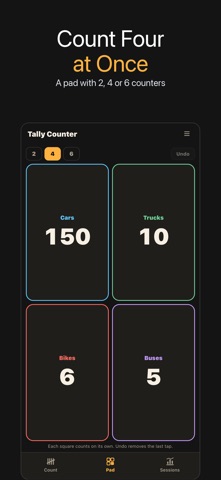
Tally Counter is a click counter for anything you count by hand: reps and sets, laps, knitting rows, prayer beads, visitors at a door, cars at a crossing, stock on a shelf. The whole upper screen is the button, so you can count without looking. ▶ TAP ANYWHERE TO COUNT One touch adds one step (+1, +2, +5 or +10). A drag, a swipe from the edge or a long hold does not count, so the phone in your hand does not add by accident. A different vibration marks every 10 and 100. The screen stays on while you count. Minus and Undo are separate buttons; Undo takes back the last taps one by one. You can also let a two-finger tap subtract one step. ▶ TARGETS AND ROUNDS Give a counter a target such as 12, 33, 99 or 100 and choose what happens when you reach it: • Alert: a strong vibration, and counting goes on • Next round: the count starts again at 0 and the round goes up (Round 2 of 3) • Stop: counting stops at the target Set a number of rounds (for example 3 × 33) and the last round stops at its target. Undo right after a new round gives the previous round back. A limit (for example the seats in a room) can be set separately. ▶ A PAD FOR SEVERAL COUNTERS Show 2, 4 or 6 counters at once, each with its own tap area: cars, trucks and bikes at a traffic count, or several groups at an event. Undo removes the last tap on the pad. ▶ SESSIONS, PACE AND CSV Counting starts a session. Each session shows how many were counted, the pace per minute, the busiest minute and a bar for every 5 minutes. Share a session as text or export all sessions and counters as CSV. ▶ YOUR COUNTS STAY SAFE Every tap is saved on the phone right away. Reset asks first. If you update from an earlier version of Tally Counter, your counters and goals are moved over once, and goals become targets. Tally Counter works offline and needs no account. It is supported by ads: an ad may appear when you open the app (not when you come back in the middle of counting), a banner appears only on the Sessions tab, and an interstitial appears only after you end a session. A count is never interrupted by an ad.
What's new · 2.0.0
Tally Counter 2.0 is rebuilt: tap anywhere on the upper screen to count, targets with rounds (alert, next round or stop), a pad with 2, 4 or 6 counters, sessions with pace and CSV export, and an Undo that takes back the last taps one by one. Your counters and goals from 1.0 are moved over.
Details