

カキネタ
Yuki Inoue · Graphics & Design
Independent analytics for this App Store listing. AppTracker is not affiliated with Yuki Inoue.
Chart standing · US
What changed · US
Listing changes AppTracker has observed for this app in this storefront — new versions, price moves, rating shifts, and store copy.
Added 125 built-in roulette prompts for people, backgrounds, situations, emotions, and props. Combine them with each other or with your own Subjects. The free version starts with two slots for people and backgrounds. Full Version starts with three, including situations. Set a slot to Select to keep its prompt while rerolling the others. Prompt combinations carry over to drawing record notes. Using presets does not consume Subject slots. When saving a record, add the selected prompt as one Subject or choose an existing Subject. Updated the Quick Start Guide. Existing data storage formats and sync logic are unchanged.
In-app purchases · US
What this app sells inside itself, grouped by kind and priced for this storefront.
Screenshots



Keywords this app targets
Search terms AppTracker associates with this app — estimates, not search volume. ❝ = in the app's title; a highlighted number is its current position for that term.
Similar apps
Competitors and close alternatives, as estimated by AppTracker.
 Sketch Ideas - Art Prompts
Nicolae Gherasim
1 shared topic
Sketch Ideas - Art Prompts
Nicolae Gherasim
1 shared topic
 Drawing Desk: Sketch Paint Art
Farida Afrose
1 shared topic
Drawing Desk: Sketch Paint Art
Farida Afrose
1 shared topic
 ArtDeck
Alexandre Alves
ArtDeck
Alexandre Alves
 Draw Every Day
Sam Bleckley
Draw Every Day
Sam Bleckley
 5min Sketch Pro
Kazuaki Matsuda
2 shared topics
5min Sketch Pro
Kazuaki Matsuda
2 shared topics
 Sketchbook®
Sketchbook, Inc
1 shared topic
Sketchbook®
Sketchbook, Inc
1 shared topic
 Simple Sketchbook
Duncan Pollock
Simple Sketchbook
Duncan Pollock
 Sketch Club
blackpawn.com
1 shared topic
Sketch Club
blackpawn.com
1 shared topic
About
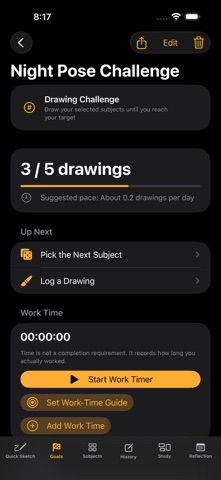
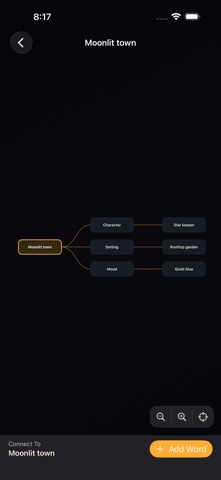
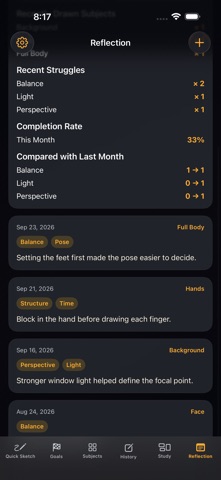
Keep your drawing ideas close, choose what to work on, and see your progress grow. Kakineta is a creative companion for planning illustration projects and building a drawing habit. Save work made on paper or in your favorite drawing app, together with notes about what you learned. COLLECT AND CONNECT IDEAS Save characters, motifs, and compositions with notes and reference images. Organize them into categories. Connect words in a mind map with automatic layout, so you can focus on developing the idea. FIND YOUR NEXT PROMPT Combine 125 built-in prompts for people, backgrounds, situations, emotions, and props, or mix them with your saved subjects. Keep a prompt fixed while rerolling the other slots. Start before adding your own subjects, draw with the timer, and carry the combination into your artwork record notes. The free version supports up to two roulette slots; Full Version supports up to six. TRACK GOALS AND CREATIVE TIME Use quests for drawing counts, textbook progress, repeated practice, group artwork, and more. See and stop your active work timer from any screen. Add or edit work time manually, then return to an unfinished quest or artwork with Continue Working. KEEP A CREATIVE JOURNAL Save finished pieces and works in progress to your gallery. Record what went well and what was difficult. Keep original character settings, references, and artwork together. Share an image with your record to X or other apps. STUDY THE DIFFERENCES — FULL VERSION Compare a reference with your own artwork. Move, scale, rotate, crop, adjust opacity, add notes, and draw redlines. CONTINUE ON IPHONE AND IPAD Use iCloud with the same Apple Account to sync subjects, artwork records, quests, and mind maps. Mind maps sync while the app is open. Comparison Study data is stored separately on each device. Export and import backups. Importing keeps your current data and adds missing items. Update all your devices to the latest version before importing across devices. START FOR FREE The free version includes up to 20 subjects, one reference image per subject, one active quest, and three mind maps. A one-time Full Version purchase expands these limits and unlocks Comparison Study. No ads. No tracking. From a small idea to your next finished piece, keep creating at your own pace.
What's new · 1.5.5
Added 125 built-in roulette prompts for people, backgrounds, situations, emotions, and props. Combine them with each other or with your own Subjects. The free version starts with two slots for people and backgrounds. Full Version starts with three, including situations. Set a slot to Select to keep its prompt while rerolling the others. Prompt combinations carry over to drawing record notes. Using presets does not consume Subject slots. When saving a record, add the selected prompt as one Subject or choose an existing Subject. Updated the Quick Start Guide. Existing data storage formats and sync logic are unchanged.
Details