

Tally: Habit & Cost Counter
Dao Nguyen · Productivity
Independent analytics for this App Store listing. AppTracker is not affiliated with Dao Nguyen.
Chart standing · US
What changed · US
Listing changes AppTracker has observed for this app in this storefront — new versions, price moves, rating shifts, and store copy.
• Smarter Home Screen Widgets: Tap anywhere on a widget to instantly add a tally, or tap the tracker title to open its full Tally view. • Improved Widget Layouts: Tally marks now make better use of the available space, with more balanced spacing for longer tracker names and fuller rows of satisfying tally marks. • Refined Navigation: Navigation controls are now sleeker and more subtle, keeping the focus on your tallies and tracker totals. Plus small visual refinements throughout for a calmer, more polished Tally experience.
Ratings breakdown · US
The star breakdown behind this app's rating in this storefront.
Screenshots



About
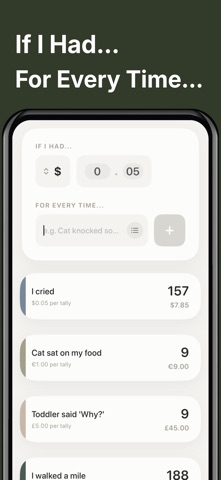
An aesthetic tally counter with real tally marks. Count anything with a tap and watch your tallies accumulate visually. Track habits, workouts, books, savings, sales calls, expenses, everyday moments, or finally answer the question, “What if I had a dollar for every time...?” Unlike a basic counter, Tally gives every count a visual history. Choose from calm color themes, tally directly from your Home Screen, add notes to individual tallies, and even assign a value to every tally to see what they add up to. No complicated setup. No clutter. Just tap and tally. ## FEATURES & FUNCTIONALITY • **Real Tally Marks:** Watch your count build using actual visual tally marks instead of only displaying a number. • **Assign a Value to Every Tally:** Add a custom dollar value to any tracker and automatically see your running total. Track money saved, calculate the cost of a habit, create a reward fund, or make your own digital swear jar. • **Interactive Home Screen Widgets:** Tally without opening the app. Tap anywhere on the widget to add a tally, or tap the tracker title to jump directly into its full Tally view. • **Simple Gesture Controls:** Tap anywhere in a tracker to add a tally, swipe left to undo, and swipe up to open your history. • **Tally History & Notes:** Every tally is time stamped. See your activity over time with visual charts and add notes to individual tallies when you want to remember why something happened. • **47 Calm Color Themes:** Give each tracker its own look with cohesive minimalist palettes inspired by natural materials, colors, and moods. Mix themes across your trackers while keeping your Home Screen calm and coordinated. • **Private by Design:** Your tally data stays on your device. ## SIMPLE PRICING No ads. No forced subscriptions. Use Tally for free, or unlock unlimited tally trackers with a simple one time purchase. ## WHAT CAN YOU TALLY? • Books Read • Workouts Completed • Money Saved • Coffee Skipped • Days Sober • Water Intake • Job Applications • Sales Calls • Plants Watered • Screen Free Days • Cat Mischief Incidents • Every Time My Kid Says “Why” • Anything else you find yourself counting Tally is not about productivity pressure or maintaining perfect streaks. It is simply a satisfying way to notice what adds up.
What's new · 1.1
• Smarter Home Screen Widgets: Tap anywhere on a widget to instantly add a tally, or tap the tracker title to open its full Tally view. • Improved Widget Layouts: Tally marks now make better use of the available space, with more balanced spacing for longer tracker names and fuller rows of satisfying tally marks. • Refined Navigation: Navigation controls are now sleeker and more subtle, keeping the focus on your tallies and tracker totals. Plus small visual refinements throughout for a calmer, more polished Tally experience.
Details