

Networth - Grow your wealth
DIMITRIS KONTARIS CREATIVE LIMITED · Finance
Independent analytics for this App Store listing. AppTracker is not affiliated with DIMITRIS KONTARIS CREATIVE LIMITED.
Chart standing · US
What changed · US
Listing changes AppTracker has observed for this app in this storefront — new versions, price moves, rating shifts, and store copy.
Networth now copes with more of the ways you hold iPhone Duo. • Turn the open phone from wide to upright, or back, and nothing you had open is lost: a note half typed in Edit account, a page in Settings and the section you were in all stay put. • Fold it shut while you edit an account, and the sheet comes with you to the outer display with your note still in it. • When the phone is part folded like a book, your net worth, the chart’s time buttons and the Assets and Liabilities switch now sit together on one page, clear of the fold. At the largest text sizes the sidebar tucks away to give them the wider page. • With the phone held upright or set down like a laptop, the sidebar closes as soon as you move to another section. In the laptop position, the note you are typing stays on the raised half of the screen, above the keyboard. • An account’s chart keeps the time window you picked when you fold or unfold. Also in this update: • On iPhone, the Notes field in Edit account and in a new goal now stays in view above the keyboard while you type, where before it could sit under the keyboard with only its heading showing. • On iPad and on the inner display, choosing Goals or Settings in the sidebar now opens it at the start with its title in view, rather than leaving the last page you had open on screen.
In-app purchases · US
What this app sells inside itself, grouped by kind and priced for this storefront.
Screenshots



About
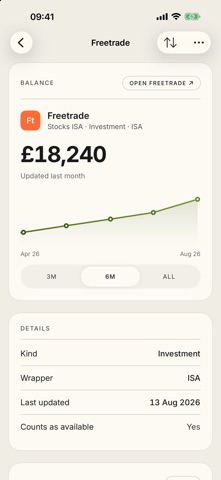
Networth is a private net worth tracker for the UK. Add your accounts once: current accounts, savings, ISAs, pensions, investments, crypto, your home and your mortgage. Then keep the balances up to date, and Networth shows you the whole picture. FOLDED OR OPEN • With iPhone Duo closed, the outer display shows your net worth, the chart and your accounts. • Open the phone like a book, and the inner display adds a sidebar for Goals and Settings, which stays in view beside the page you are on. • Fold or unfold as you go, and Networth keeps the account you had open, the window you chose on the net worth chart and the figures you were typing into Update balances. WHAT YOU SEE • Net worth, and how it has moved over the last month, six months or year. • A balance sheet that adds up: assets by kind, liabilities with the mortgage separated from the rest, and the subtraction spelled out. • Available money: cash and investments you could actually sell this week, not pensions, LISAs or property. • Goals with progress, and milestones the app marks the day you reach them. • Every account on its own page with its history. KEEPING IT UP TO DATE • Update every balance from one list, with the effect on your total shown before you save. • Scan a screenshot from your banking app and Networth reads the balance off it, entirely on your device. • Give the app your mortgage rate and payment and it projects the outstanding balance for you. PRIVATE BY DESIGN • No sign-up, no account, and no server of ours. • Your data lives on your device and, if you choose, in your own private iCloud, which keeps your iPhone and iPad in step. • No analytics, no tracking, no advertising. • Optional Face ID lock. • A Home Screen widget that shows your net worth at a glance. Networth is built for the UK: pounds, ISAs, LISAs and SIPPs.
What's new · 1.0.2
Networth now copes with more of the ways you hold iPhone Duo. • Turn the open phone from wide to upright, or back, and nothing you had open is lost: a note half typed in Edit account, a page in Settings and the section you were in all stay put. • Fold it shut while you edit an account, and the sheet comes with you to the outer display with your note still in it. • When the phone is part folded like a book, your net worth, the chart’s time buttons and the Assets and Liabilities switch now sit together on one page, clear of the fold. At the largest text sizes the sidebar tucks away to give them the wider page. • With the phone held upright or set down like a laptop, the sidebar closes as soon as you move to another section. In the laptop position, the note you are typing stays on the raised half of the screen, above the keyboard. • An account’s chart keeps the time window you picked when you fold or unfold. Also in this update: • On iPhone, the Notes field in Edit account and in a new goal now stays in view above the keyboard while you type, where before it could sit under the keyboard with only its heading showing. • On iPad and on the inner display, choosing Goals or Settings in the sidebar now opens it at the start with its title in view, rather than leaving the last page you had open on screen.
Details