

Carpe Verba: Latin Flashcards
For His Glory LLC · Education
Independent analytics for this App Store listing. AppTracker is not affiliated with For His Glory LLC.
Chart standing · US
What changed · US
Listing changes AppTracker has observed for this app in this storefront — new versions, price moves, rating shifts, and store copy.
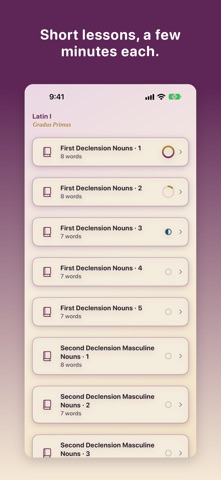
This update is mostly about helping words stick, and about keeping each learner's progress safe. Progress that follows the learner Progress now carries across your iPhone, iPad, and Mac, and it comes back if you delete and reinstall the app, as long as each device is signed in to the same iCloud account. If another device in your home still has an older version of Carpe Verba, please update it too. Until it does, mastery on that device can sync over looking higher than it should. Profiles Deleting a profile no longer brings back an empty one, and the app asks who's studying when it needs to. Shorter lessons Long lessons are now split into short sets of no more than 10 words, so one sitting fits in a few minutes. The free lessons hold the same words as before. Review and mastery A new word stays new until tomorrow, and a correct answer moves a word to a longer gap only when that word is due, so review stays evenly spaced. Mastery is stricter: a word counts as mastered only after it has come back and been answered right on several separate days, with most answers right or the last three right in a row. Flashcards alone can't master a word; a quiz has to confirm it. Your mastery count may go down after this update. Trophies you have already earned stay on your shelf. Learning from mistakes After a wrong answer, the quiz shows the right one with its dictionary entry and what your choice means. Each missed word comes back once at the end for practice. More ways to practice Review can now be done as a quiz or with flashcards. Dictionary Drill is a new, optional way to practice genitives, genders, and principal parts, and it never changes your progress. Quiz choices no longer put two answers that mean the same thing side by side. Accessibility Larger text sizes fit better throughout the app, and VoiceOver no longer reads some cards and buttons twice. With a keyboard on iPad or Mac, press Space to flip a flashcard, 1 or the right arrow for Knew it, and 2 or the left arrow for Still learning. In a quiz, press A to D or 1 to 4 to choose an answer. Thank you for studying with us. We would love your feedback.
Ratings breakdown · US
The star breakdown behind this app's rating in this storefront.
In-app purchases · US
What this app sells inside itself, grouped by kind and priced for this storefront.
Screenshots




About
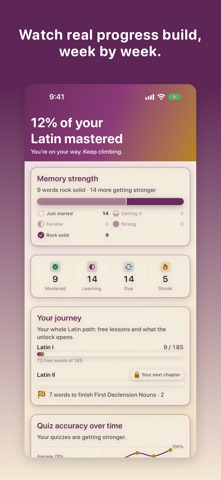
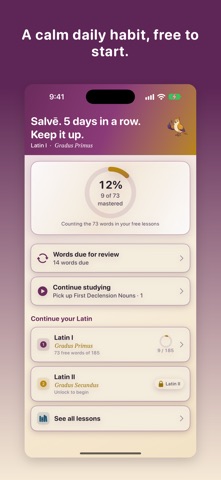
Latin vocabulary that finally sticks. Carpe Verba helps your student remember the beginning classical Latin words they learn, not just recognize them for a day, through short, confidence-building sessions that fit a busy school schedule. Built for classical and classical-Christian homeschools and classrooms, grades 3 through 8, Carpe Verba follows the standard sequence of beginning Latin, organized into first-year (Latin I) and second-year (Latin II) vocabulary. If your student is learning Latin through a classical curriculum, the words, order, and grammar build the way they already study in class. START FREE, UNLOCK ONCE Begin free with the opening Latin I lessons and every study mode, with no trial timer and no surprise paywall mid-lesson. When you are ready for more, a single one-time Full Access purchase opens every other lesson: the rest of Latin I plus all of Latin II. One purchase, no subscription, ever. LEARN THE WAY MEMORY ACTUALLY WORKS Carpe Verba uses spaced repetition, a proven learning-science method that schedules each word to come back right before it would be forgotten. Words your student knows well appear less often. Tricky words come back sooner. Lessons are short, a handful of words at a time, so a session fits into a busy day. A word counts as mastered only after your student has answered it correctly more than once. WAYS TO STUDY - Flashcards in both directions, Latin to English and English to Latin, with principal parts - Multiple-choice quizzes. After a wrong answer, your student sees the right one with its dictionary entry, and the missed word comes back once more at the end for practice - Daily review of the words due today, as a quiz or as flashcards, cumulatively across lessons - Dictionary Drill, an optional practice mode for genitives, genders, and principal parts that never changes progress - Mastery and progress tracking so you can see growth lesson by lesson ACCURATE, TEACHER-FRIENDLY CONTENT Every headword includes its meaning and the morphology that matters for grammar lessons, principal parts, genitive, gender, and declension or conjugation, drawn from public-domain classical references. Lessons are grouped by declension and conjugation so practice reinforces the patterns students are learning in class. PRIVATE BY DESIGN Carpe Verba has no accounts, no sign-in, no ads, and no tracking. We do not collect your data. Progress is stored on your device and syncs privately across your own iPhone, iPad, and Mac through your personal iCloud, so a student can study on the couch and review later on a shared family Mac. MADE FOR FAMILIES AND CLASSROOMS - Works on iPhone, iPad, and Mac with one purchase - Family Sharing is supported, so the Full Access unlock can be shared across your household - An optional tip jar lets supporters say thank you; it is never required to use the app - Clean, distraction-free design that keeps the focus on learning Carpe Verba is an independent study aid. It is not affiliated with, endorsed by, or sponsored by any Latin curriculum publisher. Seize the words. Start free today. Privacy Policy: https://forhisglory.llc/privacy Terms of Use (EULA): https://www.apple.com/legal/internet-services/itunes/dev/stdeula/
What's new · 1.2.0
This update is mostly about helping words stick, and about keeping each learner's progress safe. Progress that follows the learner Progress now carries across your iPhone, iPad, and Mac, and it comes back if you delete and reinstall the app, as long as each device is signed in to the same iCloud account. If another device in your home still has an older version of Carpe Verba, please update it too. Until it does, mastery on that device can sync over looking higher than it should. Profiles Deleting a profile no longer brings back an empty one, and the app asks who's studying when it needs to. Shorter lessons Long lessons are now split into short sets of no more than 10 words, so one sitting fits in a few minutes. The free lessons hold the same words as before. Review and mastery A new word stays new until tomorrow, and a correct answer moves a word to a longer gap only when that word is due, so review stays evenly spaced. Mastery is stricter: a word counts as mastered only after it has come back and been answered right on several separate days, with most answers right or the last three right in a row. Flashcards alone can't master a word; a quiz has to confirm it. Your mastery count may go down after this update. Trophies you have already earned stay on your shelf. Learning from mistakes After a wrong answer, the quiz shows the right one with its dictionary entry and what your choice means. Each missed word comes back once at the end for practice. More ways to practice Review can now be done as a quiz or with flashcards. Dictionary Drill is a new, optional way to practice genitives, genders, and principal parts, and it never changes your progress. Quiz choices no longer put two answers that mean the same thing side by side. Accessibility Larger text sizes fit better throughout the app, and VoiceOver no longer reads some cards and buttons twice. With a keyboard on iPad or Mac, press Space to flip a flashcard, 1 or the right arrow for Knew it, and 2 or the left arrow for Still learning. In a quiz, press A to D or 1 to 4 to choose an answer. Thank you for studying with us. We would love your feedback.
Details