

QuickSave - Links, Screenshots
Zhiqi Pan · Productivity
Independent analytics for this App Store listing. AppTracker is not affiliated with Zhiqi Pan.
Chart standing · US
What changed · US
Listing changes AppTracker has observed for this app in this storefront — new versions, price moves, rating shifts, and store copy.
Links - Changing a link's address keeps its name until the new page loads - The address editor stays open until you tap Done or Cancel, and scrolls into view above the keyboard - A link you renamed keeps your name when its page is fetched again - A link that cannot load says so from the first failed try, and after a failed Retry, on its own line under the row - Reddit, Instagram, Threads and YouTube links keep the title and author they could read when the rest of the page is blocked Tags - In Tags and Smart lists, touch and hold a row to drag it into place iCloud sync - A picture that showed a download icon after syncing from another device is downloaded again - Some items whose changes had stopped syncing between devices sync again Agent Access - When another app takes the agent address, an alert tells you, and the notice stays until you copy the connect prompt again - Agent search follows your Fuzzy search setting Accessibility - VoiceOver reads the title and text of List rows that show a picture Also fixed - Offline, the screen could stop responding to touches until QuickSave was closed - A link whose preview picture failed to download showed a blank card; Refetch title & preview now repairs it - Undoing an address change, or changing it twice in a row, could leave the other page's title or picture on the link - Swiping a tag in Tags opened Rename instead of Untag and Delete - Merging items raised a "1 new item" pill over the row you were looking at - After rotating the screen, a Masonry card could appear clipped on its right and bottom
Screenshots


About
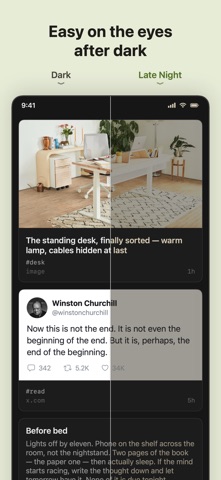
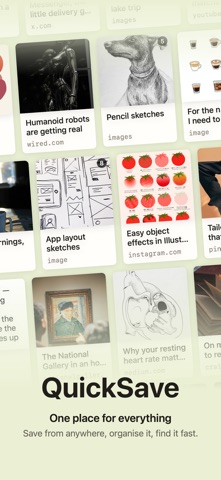
QuickSave is one quiet home for everything worth keeping. Links, posts, screenshots and notes, all in a single private stream — not scattered across read-later apps, Photos and Notion. Save it now, find it later. No feed to scroll, no algorithm, no noise. SAVE FROM ANYWHERE • Share from any app in one tap, from Safari, X, Threads or Pinterest • Add links, notes and images by hand • Import screenshots and photos straight from your library ORGANISE & FIND • Freeform tags, with filter chips built from the tags you actually use • Smart lists that gather what matters • Full-text search across titles, notes and tags IMAGES & SCREENSHOTS • Save multiple images per item • Screenshots are copied into QuickSave, so you can clear the originals from Photos and your saves stay • A clean masonry feed that mixes text and images PRIVATE & SYNCED • Your library lives on your devices and syncs over iCloud • No account to create, nothing uploaded to our servers • No subscriptions. No ads. No tracking. WHO IT'S FOR For anyone whose saves are scattered. Readers, designers, investors and builders who want one calm, private place that holds it all. Lifetime access. No subscriptions, no ads.
What's new · 1.21
Links - Changing a link's address keeps its name until the new page loads - The address editor stays open until you tap Done or Cancel, and scrolls into view above the keyboard - A link you renamed keeps your name when its page is fetched again - A link that cannot load says so from the first failed try, and after a failed Retry, on its own line under the row - Reddit, Instagram, Threads and YouTube links keep the title and author they could read when the rest of the page is blocked Tags - In Tags and Smart lists, touch and hold a row to drag it into place iCloud sync - A picture that showed a download icon after syncing from another device is downloaded again - Some items whose changes had stopped syncing between devices sync again Agent Access - When another app takes the agent address, an alert tells you, and the notice stays until you copy the connect prompt again - Agent search follows your Fuzzy search setting Accessibility - VoiceOver reads the title and text of List rows that show a picture Also fixed - Offline, the screen could stop responding to touches until QuickSave was closed - A link whose preview picture failed to download showed a blank card; Refetch title & preview now repairs it - Undoing an address change, or changing it twice in a row, could leave the other page's title or picture on the link - Swiping a tag in Tags opened Rename instead of Untag and Delete - Merging items raised a "1 new item" pill over the row you were looking at - After rotating the screen, a Masonry card could appear clipped on its right and bottom
Details