

LiveCap: Caption & Translate
Daichi Tanabe · Utilities
Independent analytics for this App Store listing. AppTracker is not affiliated with Daichi Tanabe.
Chart standing · US
What changed · US
Listing changes AppTracker has observed for this app in this storefront — new versions, price moves, rating shifts, and store copy.
- Added a screen that shows the other kotomori apps: open it from the menu bar or the header button on Mac, or the header button on iPhone. - Added a way to rate LiveCap: from the menu bar on Mac, or the star button in the header on iPhone. - Fixed text on iPhone that stayed in Japanese even when the app language was English or Spanish (on-screen hints and microphone / speech recognition errors).
Price & rating history · US
Reconstructed from the listing changes AppTracker has observed in this storefront. A field is charted once it has changed more than once, and each line starts at the value it moved from.
Average rating · ★ 3.00 now · 2 changes on record
In-app purchases · US
What this app sells inside itself, grouped by kind and priced for this storefront.
Screenshots

About
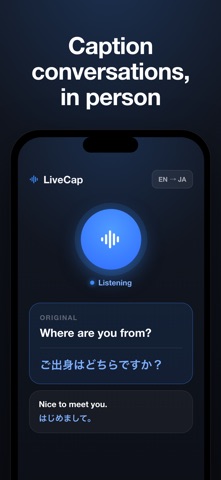
LiveCap turns audio into live, readable captions—and translates them in real time. On your Mac, LiveCap captures the system audio from any app: video calls, online meetings, streaming video, podcasts, lectures, and games. On your iPhone, it captures in-person conversations through the microphone. Either way, you get instant captions you can actually follow. EVERYTHING ON DEVICE Speech recognition and translation run entirely on your device using Apple's built-in engines. Nothing is uploaded, nothing is kept on a server, and it keeps working offline. KEY FEATURES • Real-time captions for any sound on your Mac (system audio) or your voice on iPhone (microphone) • Instant translation shown next to the original text • On-device and offline — private by design • Floating overlay keeps captions visible over any app (Mac) • Export transcripts to Word, Markdown, or Notion • Optional AI summaries of what was said • Interface in English, Japanese, and Spanish, with a UI language you can switch independently GREAT FOR • Following meetings and calls in another language • Watching videos, podcasts, and lectures with captions • In-person conversations and travel • Accessibility and note-taking ONE PURCHASE, ALL YOUR DEVICES Try it free. Unlock unlimited use with a single one-time purchase that works on both iPhone and Mac (Universal Purchase). No subscription. Capturing system audio on Mac uses ScreenCaptureKit and asks for Screen Recording permission. Microphone capture asks for microphone access. Captions are generated on device.
What's new · 1.0.1
- Added a screen that shows the other kotomori apps: open it from the menu bar or the header button on Mac, or the header button on iPhone. - Added a way to rate LiveCap: from the menu bar on Mac, or the star button in the header on iPhone. - Fixed text on iPhone that stayed in Japanese even when the app language was English or Spanish (on-screen hints and microphone / speech recognition errors).
Details