

Classic BASIC
Nathan Baughman · Developer Tools
Independent analytics for this App Store listing. AppTracker is not affiliated with Nathan Baughman.
Chart standing · US
What changed · US
Listing changes AppTracker has observed for this app in this storefront — new versions, price moves, rating shifts, and store copy.
Classic BASIC 1.0.6 is a major update with an improved mobile phone experience, expanded device hardware support, and better GW-BASIC compatibility. • New adaptive editor and terminal workspace with side-by-side programming on larger screens • Major tablet improvements including rotation, resizable layouts, keyboard controls, editing, saving, and draft recovery • Hide the top menu for more terminal space and restore it anytime with MENU ON • Expanded hardware commands for motion sensors, compass, battery, speech, dictation, microphone recording, haptics, clipboard, sharing, importing/exporting files, notifications, device information, network status, and more • Expanded GPS support including speed and additional location data • Improved camera, photo picker, QR/barcode scanner, and flashlight support • Improved external keyboard support and keyboard shortcuts • GW-BASIC compatibility fixes and improved runtime error handling • Better responsiveness when running busy BASIC programs • Expanded built-in help and device command documentation • Seven new hardware demonstration programs Classic BASIC continues to bring classic BASIC programming to modern phone hardware while maintaining the retro terminal experience. Hardware features vary by device and may require permission.
Ratings breakdown · US
The star breakdown behind this app's rating in this storefront.
In-app purchases · US
No in-app purchases.
Screenshots





Keywords this app targets
Search terms AppTracker associates with this app — estimates, not search volume. ❝ = in the app's title; a highlighted number is its current position for that term.
Similar apps
Competitors and close alternatives, as estimated by AppTracker.
 QuackBASIC: Code in BASIC
Ammonite Design Studios Ltd
QuackBASIC: Code in BASIC
Ammonite Design Studios Ltd
 BASIC: programming language
Nikolay Denislamov
1 shared title word
BASIC: programming language
Nikolay Denislamov
1 shared title word
 BBCBasic
Richard Russell
BBCBasic
Richard Russell
 HotPaw Basic
Ronald Nicholson
HotPaw Basic
Ronald Nicholson
 Learn COBOL Programming
Muhammad Mubeen
Learn COBOL Programming
Muhammad Mubeen
 C Programming Pro
ALG Software Lab SIA
C Programming Pro
ALG Software Lab SIA
 CodeRunBox IDE
Chengdu Xingyun Liuma Technology Co., Ltd.
CodeRunBox IDE
Chengdu Xingyun Liuma Technology Co., Ltd.
 My Classic-Retro Console
Raster Field Co., Ltd.
1 shared title word
My Classic-Retro Console
Raster Field Co., Ltd.
1 shared title word
About
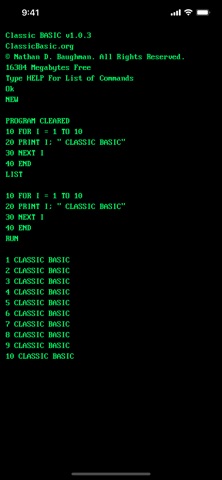
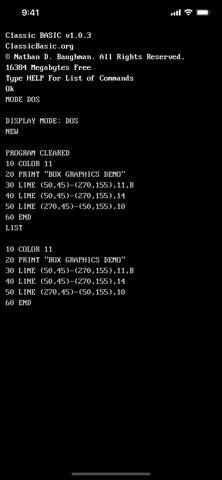
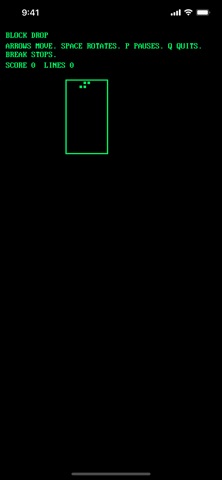
Classic BASIC is a retro-inspired BASIC programming environment designed for modern devices. Write line-numbered BASIC programs, run them instantly, save your work, load built-in examples, explore graphics commands, and learn programming with the included guidebook. Classic BASIC preserves the familiar feel of classic home computers while providing a clean, touch-friendly experience for today's users. Features include: • Traditional line-numbered BASIC programming • Built-in program catalog • Classic commands such as LIST, RUN, SAVE, LOAD, NEW, and CATALOG • Graphics commands for drawing lines, circles, boxes, and screen output • Built-in games including Block Drop and Astro Blaster • Touch game keyboard support for interactive games • External keyboard support with ESC and CTRL+C break commands • Display modes including Green, Amber, and DOS-style color • Built-in programming guide • File support for saving and loading your own programs Classic BASIC is designed for beginners, hobbyists, retro-computing enthusiasts, students, and anyone who wants a simple programming environment that feels immediate, approachable, and fun. Type a line. Run it. Change it. Learn by doing.
What's new · 1.0.6
Classic BASIC 1.0.6 is a major update with an improved mobile phone experience, expanded device hardware support, and better GW-BASIC compatibility. • New adaptive editor and terminal workspace with side-by-side programming on larger screens • Major tablet improvements including rotation, resizable layouts, keyboard controls, editing, saving, and draft recovery • Hide the top menu for more terminal space and restore it anytime with MENU ON • Expanded hardware commands for motion sensors, compass, battery, speech, dictation, microphone recording, haptics, clipboard, sharing, importing/exporting files, notifications, device information, network status, and more • Expanded GPS support including speed and additional location data • Improved camera, photo picker, QR/barcode scanner, and flashlight support • Improved external keyboard support and keyboard shortcuts • GW-BASIC compatibility fixes and improved runtime error handling • Better responsiveness when running busy BASIC programs • Expanded built-in help and device command documentation • Seven new hardware demonstration programs Classic BASIC continues to bring classic BASIC programming to modern phone hardware while maintaining the retro terminal experience. Hardware features vary by device and may require permission.
Details