

Risen - Alarm Clock & Missions
Anh Nguyen · Health & Fitness
Independent analytics for this App Store listing. AppTracker is not affiliated with Anh Nguyen.
Chart standing · US
What changed · US
Listing changes AppTracker has observed for this app in this storefront — new versions, price moves, rating shifts, and store copy.
Ready for iPhone Duo. Open it like a book and Risen fills the inner display — the alarm on one page, the mission on the other, so no key or button ever lands in the fold. Stand it up like a laptop for squats, push-ups or a dance, and the camera and your count face you while you move. Closed, everything fits the outer display, Math keypad included, and camera missions stay upright on either screen. On smaller iPhones like iPhone SE, every Math key now stays on screen. New day. New start.
Price & rating history · US
Reconstructed from the listing changes AppTracker has observed in this storefront. A field is charted once it has changed more than once, and each line starts at the value it moved from.
Average rating · ★ 4.43 now · 12 changes on record
Ratings breakdown · US
The star breakdown behind this app's rating in this storefront.
In-app purchases · US
What this app sells inside itself, grouped by kind and priced for this storefront.
Screenshots



About
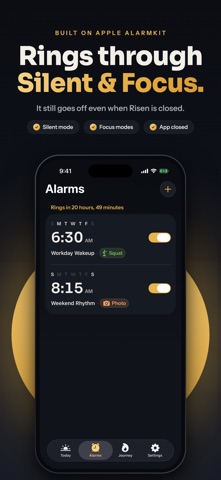
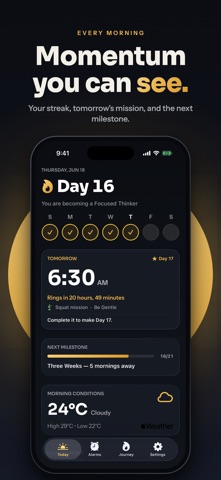
Can't get out of bed? Still hitting snooze in your sleep? Risen won't turn off until you prove you're awake. Pick a mission, and the alarm keeps going until it's done — no snooze button, no half-asleep dismissing, no negotiating with yourself at 6:30 AM. Risen is built with Apple's AlarmKit — the native alarm framework in iOS 26 and iOS 27 — designed for system-level alarm delivery. THE ALARM RINGS. THEN THE MISSION BEGINS. 11 missions: 5 free, 6 with Risen Pro. • Photo (Pro) — shoot the bathroom sink, the coffee machine, your desk • QR & Barcode — scan a code you placed in another room • Math — solve equations before your brain can say no • Exercise (Pro) — squats and push-ups, counted by your camera • Dance (Pro) — put on a song and move; the timer only runs while you do • Steps (Pro) — walk it off, literally • Memory (Pro), Typing, Shake, Tap — pick your poison MADE FOR MORNINGS THAT DON'T COME EASY Heavy sleepers, deep sleepers, students, shift workers, ADHD brains — if waking up is the hardest thing you do all day, Risen was built for you. THEN IT GETS PERSONAL Every successful morning extends your streak. Milestones, morning insights and a progress dashboard turn getting up from a daily fight into a record you don't want to break. Small wins become habits. Habits become identity. RING WITH YOUR OWN SOUND Import any audio file from Files and make it your alarm. Risen trims it to 30 seconds and loops it while the alarm rings. SIRI, SHORTCUTS & WIDGETS Siri knows your alarms by name. Say "skip tomorrow's alarm" to rest a repeating alarm for one morning without breaking your streak. In Shortcuts, create, change, duplicate or delete alarms and pull up your week's record. On iOS 27, Siri knows which alarm is on your screen. Your next alarm and streak on the Lock Screen and Home Screen. When the alarm rings, the mission waiting for you is right there on the Lock Screen as a button. SIMPLE, HONEST PRICING Free to start: Math, QR & Barcode, Typing, Shake and Tap missions, with up to 2 alarms. Risen Pro adds Photo, Exercise, Dance, Steps and Memory, unlimited alarms and mission sequences, every wake-up sound (40+), full history and iCloud sync. Choose monthly, yearly or a one-time purchase. No ads. Ever. Most alarm apps help you wake up. Risen helps you become the person who gets up. Wake up. Stay up. Rise. Privacy Policy: https://getrisen.app/privacy Terms of Use: https://getrisen.app/terms
What's new · 1.2.2
Ready for iPhone Duo. Open it like a book and Risen fills the inner display — the alarm on one page, the mission on the other, so no key or button ever lands in the fold. Stand it up like a laptop for squats, push-ups or a dance, and the camera and your count face you while you move. Closed, everything fits the outer display, Math keypad included, and camera missions stay upright on either screen. On smaller iPhones like iPhone SE, every Math key now stays on screen. New day. New start.
Details