

Koegaki - Meeting Minutes
YANGLI CHEN · Utilities
Independent analytics for this App Store listing. AppTracker is not affiliated with YANGLI CHEN.
Chart standing · US
What changed · US
Listing changes AppTracker has observed for this app in this storefront — new versions, price moves, rating shifts, and store copy.
Fixes a bug where the app could quit right after you tapped record. We're sorry for the trouble. ■ Fixed ・On some devices the app could quit immediately after recording started. The recording file's format didn't match the microphone configuration, so writing failed. ・A recording whose audio was never saved could stay in the list as an "unprocessed recording" that could neither be played nor retried. ・Meeting notes whose audio file is missing are now marked in the list. ・The free-tier remainder no longer flips between "1 hour" and "60 minutes". ■ Improved ・Live transcription during recording can now be turned off in Settings. Turn it off if recording is unstable — recording itself, and transcription after you stop, still work. ・You can now record even on devices or languages that can't be transcribed. The audio is kept, and you can transcribe it later when more languages are supported. ・The recording screen now shows a waveform, and you can name the meeting before you start. ■ This release also includes everything from v1.2 Automatic speaker separation, full backup and restore, basic summaries on devices without Apple Intelligence, in-app display language switching (12 languages), and a fully localized purchase screen.
In-app purchases · US
What this app sells inside itself, grouped by kind and priced for this storefront.
Screenshots



About
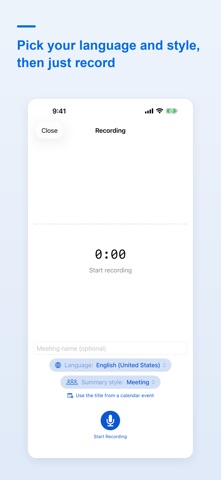
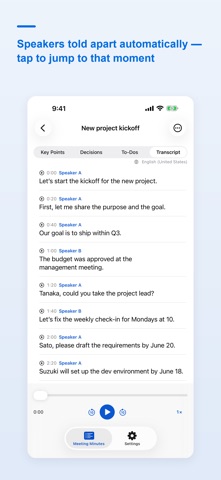
Koegaki turns any meeting into structured notes — entirely on your device. Record, and the on-device AI transcribes as you speak, then organizes what was said into three sections: Key Points, Decisions, and To-Dos. Recording, transcription, and summarization all happen inside your iPhone or iPad. Your audio and text are never sent to any server. No account is required. ■ Features ・In-app recording (continues with the screen off, shown on the Lock Screen and, on supported devices, in the Dynamic Island) ・Live transcription while you record — when you stop, the transcript is already done (can be turned off in Settings) ・Transcription with timestamps (tap a line to jump to that moment in the audio) ・Automatic 3-section summary (Key Points / Decisions / To-Dos) with an auto-generated title ・Automatic speaker separation using pitch and volume — name a speaker once and every line follows ・Jump from any summary item to the utterance it came from ・Summary styles (Meeting / 1-on-1 / Lecture / Interview / Brainstorm) ・On devices without AI summaries, a basic summary is built from excerpts of what was said ・Check off to-dos, or send them to Reminders ・One-tap copy of the summary (per section or all) ・Edit the transcript, the summary, the title, and speaker labels ・Pull the title and attendees from a calendar event ・Start a recording from Siri, Shortcuts, and Spotlight ・Import existing audio (from the Files app, or from another app's share sheet) ・Full-text search across titles, summaries, and transcripts ・Export and share as Text, Markdown, or PDF — speaker names included ・Full backup and restore in a single file, audio included — usable when you change devices ・Playback speed from 0.75x to 2.0x, scrubbing, and audio file management ・Switch the app's display language inside the app (12 languages) ■ Privacy first Everything is processed on-device. No data collection. Even for confidential conversations, you can capture and organize without sending anything to the cloud. ■ One-time purchase (no subscription) The free tier covers up to 60 minutes per month. A single purchase unlocks unlimited recording, transcription, and summarization — no recurring fees, ever. Recordings that go past the free tier are never discarded: they are kept as untranscribed recordings you can transcribe later. ■ Before you buy ・Which languages can be transcribed depends on your device and iOS version. You can see and choose the languages available on your device in the app's settings. Summaries are written in the same language as the transcript. ・AI summaries require an Apple Intelligence capable device (iPhone 15 Pro / 15 Pro Max, iPhone 16 series or later, iPad mini (A17 Pro), and M1 or later iPad). On other devices you get a basic summary built from excerpts instead, and transcription, editing, search and export all still work. ・Requires iOS / iPadOS 26 or later. ・Sufficient free storage is needed to use the on-device AI models. ■ A note about recording Recording a conversation you take part in is not automatically illegal, but we strongly suggest notifying the other party and obtaining consent. For business use, please check your organization's policies and applicable laws. This notice is general information, not legal advice.
What's new · 1.3
Fixes a bug where the app could quit right after you tapped record. We're sorry for the trouble. ■ Fixed ・On some devices the app could quit immediately after recording started. The recording file's format didn't match the microphone configuration, so writing failed. ・A recording whose audio was never saved could stay in the list as an "unprocessed recording" that could neither be played nor retried. ・Meeting notes whose audio file is missing are now marked in the list. ・The free-tier remainder no longer flips between "1 hour" and "60 minutes". ■ Improved ・Live transcription during recording can now be turned off in Settings. Turn it off if recording is unstable — recording itself, and transcription after you stop, still work. ・You can now record even on devices or languages that can't be transcribed. The audio is kept, and you can transcribe it later when more languages are supported. ・The recording screen now shows a waveform, and you can name the meeting before you start. ■ This release also includes everything from v1.2 Automatic speaker separation, full backup and restore, basic summaries on devices without Apple Intelligence, in-app display language switching (12 languages), and a fully localized purchase screen.
Details