
Chart standing · US
What changed · US
Listing changes AppTracker has observed for this app in this storefront — new versions, price moves, rating shifts, and store copy.
Choose how current your status readings should be. The new Status Freshness setting offers Power Saver, Balanced, and Most Current options. Change it from either app, and your preference stays synced across paired devices and guides app and complication refresh timing. More frequent checks may use more battery. Background timing still depends on connectivity, power conditions, and when the system allows Status Watch to run.
Screenshots
About
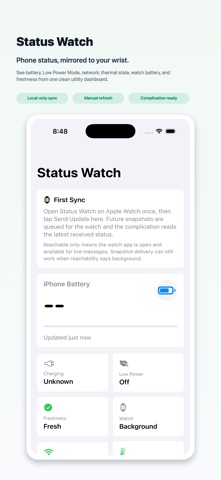
Status Watch keeps important phone status visible on your wrist. Open the watch app or add a complication to your watch face to check phone battery level, charging state, Low Power Mode, network status, Low Data Mode, thermal state, and the freshness of the last update. The companion phone app can send updates manually, and Status Watch also refreshes key status changes while the app is running. Choose which details appear in the complication so your watch face shows the information you care about most. Status Watch also shows watch battery level in complications, making it easier to keep an eye on both paired devices at a glance. Status Watch is designed as a focused utility. It does not require an account, does not use a backend service, does not include analytics, and does not sync your status data to cloud services. Status data stays local and is transferred only between your paired phone and watch.
What's new · 1.5
Choose how current your status readings should be. The new Status Freshness setting offers Power Saver, Balanced, and Most Current options. Change it from either app, and your preference stays synced across paired devices and guides app and complication refresh timing. More frequent checks may use more battery. Background timing still depends on connectivity, power conditions, and when the system allows Status Watch to run.
Details