

Penguin Viewer: Manga Reader
HAEDUN KIM · Books
Independent analytics for this App Store listing. AppTracker is not affiliated with HAEDUN KIM.
Chart standing · US
What changed · US
Listing changes AppTracker has observed for this app in this storefront — new versions, price moves, rating shifts, and store copy.
Update 1.8.3 - adds Change Cover, which you asked for, plus a way to see the update history right inside the app. ■ Change Cover · I added “Change Cover” to the menu that appears when you touch and hold a book in the library. You can pick an image from the Files app or the Photos app and use it as the cover right away. · You can switch a changed cover back to the original at any time with “Restore Original Cover” in the same menu. · With iCloud Sync turned on, changed covers also apply on your iPhone, iPad, and Mac. ■ What’s New · The first time you open the app after an update, it shows you once what changed in that update. · In Settings, under “Support · About”, you can see the full update history for every version so far. ■ Fixes · Fixed an issue where iPhone, iPad, and Mac recognized the same PDF as different books, so your reading position, favorites, and the way you organized My Folders didn't carry over to Mac. Once all your devices are updated to 1.8.3, everything carries over, and the records for your existing PDFs are moved over as they are the first time you open the app after updating. I look forward to your response and your feedback.
Ratings breakdown · US
The star breakdown behind this app's rating in this storefront.
In-app purchases · US
What this app sells inside itself, grouped by kind and priced for this storefront.
Screenshots






About
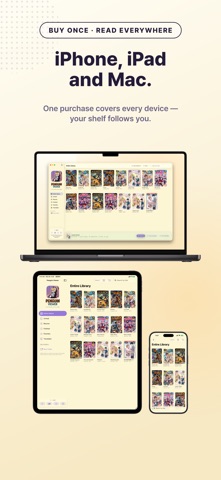
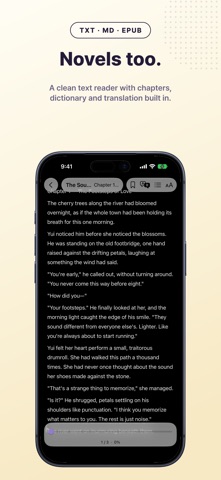
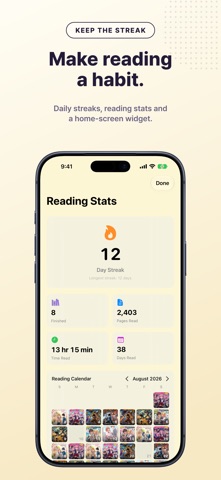
A comic reader for the books you already own. CBZ, CBR, PDF and EPUB open straight from Files, your Mac, or your NAS — no unpacking, no account, no ads, and no internet needed once a book is on the device. Japanese pages you cannot read? Penguin Viewer translates the speech bubbles on your device and paints the English back into the balloon. ■ Manga and novels in one library - Drop in CBZ, CBR, CB7 (7z), ZIP, RAR, PDF or an image folder. TXT, MD and EPUB novels land on the same shelf. - Auto margin cropping fills the screen with books you scanned yourself. ■ A library in your own folders - Make folders like in Finder, nested at any depth, and drag books between them. - New imports land in the open folder, dozens at a time. Move or delete in bulk, or drag books into your own order. - The folder layout and book order follow you over iCloud. Files are not uploaded and use no iCloud storage. ■ Translation that ends on the device - A manga or webtoon bubble is read sentence by sentence, translated, and painted back where the original lettering was. Vertical Japanese is recognized too. - In novels, translate a sentence or page to read beside the original, or look up words. - Translate a book in advance and pages turn with no wait. Nothing is sent anywhere. ■ Read novels your way - Font, size, line spacing, margins and background change in Text and Layout, live. - Jump chapters from the contents. Position and bookmarks carry between devices. ■ Your NAS and server library - Connect over SMB (NAS), WebDAV or OPDS, compatible with Komga and Kavita. - OPDS-PSE streaming resumes at your page without downloading, so a huge library takes no storage. - Reading position syncs over iCloud, and server credentials stay in the device keychain. ■ Read it the way you want - Single Page, Two-Page, or Smart Two-Page picking by screen ratio, plus right-to-left binding. - Webtoons scroll vertically, or run 120Hz auto-scroll through a binge. Pan sideways while zoomed in. - Multi-gigabyte volumes turn without stutter, and pinch zoom works in spreads too. - A night theme blacks out the reader on your schedule, and Mac turns pages from the keyboard. ■ A library that sorts itself - Smart shelves file books as unread, reading or finished, and ComicInfo groups a scattered series. - Set grid columns and cover size, sort by recently opened, search by title, author or series. ■ A record that grows as you read - Reading statistics, streaks and milestones build the habit. - The reading calendar shows how much you read, iOS widgets show today's, and Face ID locks the app, hiding books from widgets and search. ■ Local AI Translation Benchmark - Measure how fast your iPhone, iPad or Mac translates a manga page. Run it from Translation in Settings. - The result is a single PVScore. A bigger number means a faster device. - The results screen is CRT arcade, scanlines and all. Beat your best and NEW RECORD appears. - Save and share the score as a PNG card, device name and chip included. - Enter a nickname (up to 12 characters) to see the worldwide PVScore top 500. ■ Honest pricing - Almost everything is free. The free library holds 30 books, and sharing the app opens 10 more. - The benchmark and leaderboard are free, with unlimited runs. - An unlimited library is one lifetime Pro purchase, not a subscription. No ads anywhere. ■ Privacy by default - Local first: files, translation, statistics and benchmark results stay on the device. - Leaderboard posts send nickname, score, run log and device info (model, chip, RAM, OS), all shown first. - Linking MyAnimeList sends it your title searches and volumes read. - No account, no sign-up, not a single tracking SDK. Open it and read. - Export your library and reading history, and restore it on a new device. ■ Good to know - Penguin Viewer supplies no manga or novels. It reads files you already own. - The interface comes in 17 languages. Requests left in reviews get built quickly. Novel reading came out of one.
What's new · 1.8.3
Update 1.8.3 - adds Change Cover, which you asked for, plus a way to see the update history right inside the app. ■ Change Cover · I added “Change Cover” to the menu that appears when you touch and hold a book in the library. You can pick an image from the Files app or the Photos app and use it as the cover right away. · You can switch a changed cover back to the original at any time with “Restore Original Cover” in the same menu. · With iCloud Sync turned on, changed covers also apply on your iPhone, iPad, and Mac. ■ What’s New · The first time you open the app after an update, it shows you once what changed in that update. · In Settings, under “Support · About”, you can see the full update history for every version so far. ■ Fixes · Fixed an issue where iPhone, iPad, and Mac recognized the same PDF as different books, so your reading position, favorites, and the way you organized My Folders didn't carry over to Mac. Once all your devices are updated to 1.8.3, everything carries over, and the records for your existing PDFs are moved over as they are the first time you open the app after updating. I look forward to your response and your feedback.
Details