

Ask Milo: AI Chat Assistant
Luong NGUYEN · Productivity
Independent analytics for this App Store listing. AppTracker is not affiliated with Luong NGUYEN.
Chart standing · US
What changed · US
Listing changes AppTracker has observed for this app in this storefront — new versions, price moves, rating shifts, and store copy.
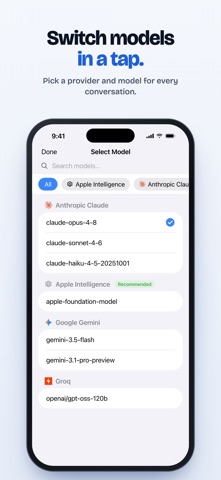
This update lets you use your own OpenAI-compatible server and any model ID your provider offers, and shows each provider’s official logo. - Connect an OpenAI-compatible server over HTTPS: enter its address and exact model ID, with an optional API key. MILO asks your permission before sending it your prompts. - Pick a suggested model or type any model ID your provider offers, in chat or Settings. Your choice is kept after restarts and updates. - With web search on (Brave, Tavily or TinyFish in Settings → Tools), ask MILO to search the web in your message, for example “search the web for…”. It no longer searches on its own. - Providers show their official logos in onboarding, the model picker, chat, History, Settings and Help, sized to match your text. VoiceOver says which model filter is selected. - When a request fails, Settings, chat and Siri, including Siri in CarPlay, tell you whether to check your API key, model, account access or billing. Error messages no longer show the provider’s raw response. - Newer Claude models, including ones you enter by ID, use Claude’s default creativity setting. - If you use a cloud AI provider, open MILO after updating and allow AI Data Sharing again. Until then, Siri will ask you to open the app.
In-app purchases · US
No in-app purchases.
Screenshots



About
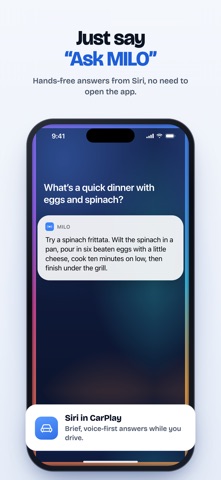
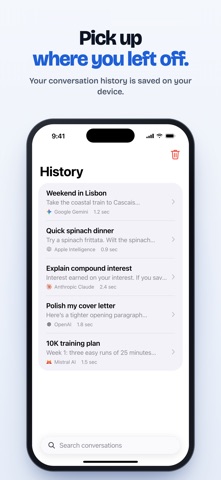
Talk to GPT, Gemini, Claude, Mistral, Groq, and 200+ AI models in one app — by voice and through Siri, including Siri in CarPlay. Switch providers anytime and stay in control of what is shared. KEY FEATURES • Multi-Provider AI — Use Google Gemini, Anthropic Claude, OpenAI, Mistral, Groq, or OpenRouter (200+ models). Switch anytime. • Siri Integration — Ask Milo anything hands-free, no need to open the app. • Voice-first AI through Siri in CarPlay — brief, driver-safe answers while you drive. • Voice Dictation — Speech-to-text for fast, hands-free chat. • Persistent History — Conversation history is saved locally on your device. • Bring Your Own Keys — API keys are stored securely in iOS Keychain and used only for direct requests to your selected provider. • Clear AI Data Permission — Before cloud AI is used, Milo explains what prompt/context data is sent, identifies the third-party AI providers, and asks for your permission. Milo is built for people who want one place to talk to many AI models — at home, at your desk, or on the road. Note: Cloud AI features require your own API key from at least one supported provider and permission to send prompts/context to that provider. On-device Apple Intelligence, where available, does not send prompts to third-party AI services.
What's new · 1.2.0
This update lets you use your own OpenAI-compatible server and any model ID your provider offers, and shows each provider’s official logo. - Connect an OpenAI-compatible server over HTTPS: enter its address and exact model ID, with an optional API key. MILO asks your permission before sending it your prompts. - Pick a suggested model or type any model ID your provider offers, in chat or Settings. Your choice is kept after restarts and updates. - With web search on (Brave, Tavily or TinyFish in Settings → Tools), ask MILO to search the web in your message, for example “search the web for…”. It no longer searches on its own. - Providers show their official logos in onboarding, the model picker, chat, History, Settings and Help, sized to match your text. VoiceOver says which model filter is selected. - When a request fails, Settings, chat and Siri, including Siri in CarPlay, tell you whether to check your API key, model, account access or billing. Error messages no longer show the provider’s raw response. - Newer Claude models, including ones you enter by ID, use Claude’s default creativity setting. - If you use a cloud AI provider, open MILO after updating and allow AI Data Sharing again. Until then, Siri will ask you to open the app.
Details