

AnalogDAW: Multitrack Studio
Jason Shimkoski · Music
Independent analytics for this App Store listing. AppTracker is not affiliated with Jason Shimkoski.
Chart standing · US
What changed · US
Listing changes AppTracker has observed for this app in this storefront — new versions, price moves, rating shifts, and store copy.
AnalogDAW 1.3 keeps your sessions intact everywhere you open them. • Ready for iPhone Duo — AnalogDAW adapts to both displays, every fold and orientation, with crisp playheads and waveforms at any display scale. • Missing plug-ins are clearly marked — an instrument or effect that isn't installed, can't run on this device, or fails to load now reads "Name — Unavailable" with the reason. Its settings, and the track's arm and monitoring, stay safely in the session. • Plug-ins come back on their own — install a missing plug-in and AnalogDAW finds it and reloads it, or choose Refresh Audio Units to update every plug-in menu at once. • Record arm is locked once you press Record, including during the count-in, so the tracks you're recording can't change mid-take. • A recording made with no tracks armed always lands on its own new track. • An instrument that never finishes loading now times out and is marked unavailable, instead of leaving its track waiting. • Sample-rate mismatch prompts now offer the rate your interface is actually running at. • Many stability fixes for undo, snapshots, freezing, and session recovery.
In-app purchases · US
No in-app purchases.
Screenshots



About
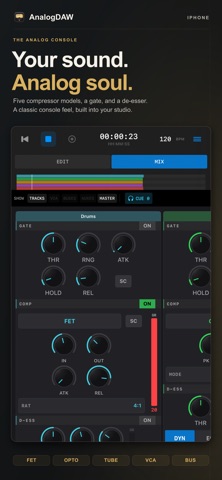
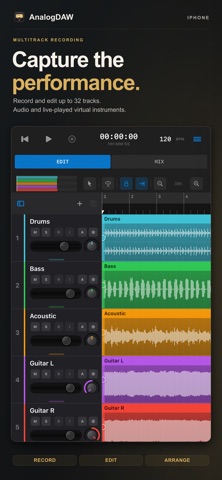
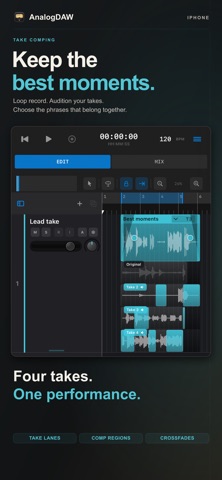
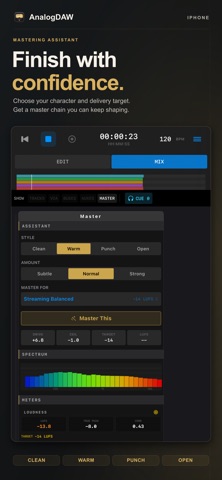
AnalogDAW is a multitrack recording studio built around the feel of a classic analog console. Record audio and virtual instruments, comp your best takes, and mix through warm, analog-modeled EQ, dynamics, and saturation — then export a mastered mix or stems ready for any platform. PERFORMANCE-FIRST BY DESIGN AnalogDAW captures real performances — it doesn't manufacture them. It's the recording workflow behind the classic, timeless records: track a great take, choose your best moments, and mix. By design, it leaves out the features that sand the humanity out of a record. No automatic pitch correction. No timing quantization, time-stretching, or grid that drags your audio into place. And it is not a MIDI sequencer — no piano roll, no step sequencer, no note editing. Virtual instruments are performed live and recorded as audio, exactly like miking an amp, so an instrument take is a real performance, not something to clean up later. The result keeps the human feel — the reason a record sounds alive. A REAL MIXING CONSOLE Every track flows through a full analog-style channel strip: preamp with COLOR harmonics, filter, gate, FET/OPTO/TUBE/VCA/BUS compressor models, console EQ, saturation, pan, and fader. Classic console-style EQ voicings, tape-style master saturation, bus compression, and a true-peak limiter give your mix the glue and character of outboard gear — no extra plugins required. RECORD ANYTHING Capture up to 32 tracks of audio from your interface at your project's sample rate, or record virtual instruments live by playing a hosted Audio Unit instrument from a MIDI controller or the on-screen keyboard. Loop recording and take comping keep every pass so you can assemble the best moments. EDIT WITH CONFIDENCE A clip-based timeline with takes, comping, fades and crossfades, region gain, slip editing, and beat/bar snapping. Multi-selection, channel ganging, and full undo/redo keep big sessions fast and forgiving. Crash recovery, automatic save backups, and missing-asset relinking protect your work. MIX AND ROUTE LIKE A PRO 8 mix buses, 6 aux sends, 4 cue buses, VCA-style ganging, and a dedicated master chain. Host your favorite Audio Unit (AUv3) effects as inserts. Automatic plugin delay compensation keeps everything phase-aligned. Automation lanes ride levels and parameters over time. MIX WITH YOUR HANDS Connect a hardware control surface and run the whole console from real motorized faders and knobs. AnalogDAW supports Mackie Control (MCU) surfaces and simple MIDI controllers mapped with MIDI Learn. EXPORT THAT MEASURES UP Bounce a full mix or per-track stems at 44.1, 48, 88.2, or 96 kHz and 16-, 24-, or 32-bit. Every export writes a report with integrated LUFS loudness, true-peak, stereo correlation, sample rate, and bit depth — so you know your master meets spec before you send it. BUILT FOR macOS and iOS Self-contained session packages move cleanly across your devices — open, edit, and save through Files. PRIVACY FIRST AnalogDAW collects no data and contains no tracking, ads, or accounts. Your audio and sessions stay on your devices and the storage you choose. KEY FEATURES • Performance-first workflow — no pitch correction, quantization, or time-stretching • Performed-and-recorded instruments (no MIDI sequencer, piano roll, or step editor) • Up to 32 audio + instrument tracks • Console-style EQ, FET/OPTO/TUBE/VCA/BUS compressors, gate, de-esser, saturation • Tape-style master bus, bus compression, true-peak limiter • Audio Unit (AUv3) effect inserts and instrument hosting • Loop recording with full take comping • Automation lanes; fades, crossfades, region gain, slip editing, beat/bar snapping • 8 buses, 6 aux sends, 4 cue buses, VCA ganging • Control-surface support — Mackie/MCU surfaces and generic MIDI Learn • Mix and per-track stem export with a loudness/true-peak report • No accounts, no ads, no data collection or subscription Make records that sound like records. Download AnalogDAW and start your session.
What's new · 1.3
AnalogDAW 1.3 keeps your sessions intact everywhere you open them. • Ready for iPhone Duo — AnalogDAW adapts to both displays, every fold and orientation, with crisp playheads and waveforms at any display scale. • Missing plug-ins are clearly marked — an instrument or effect that isn't installed, can't run on this device, or fails to load now reads "Name — Unavailable" with the reason. Its settings, and the track's arm and monitoring, stay safely in the session. • Plug-ins come back on their own — install a missing plug-in and AnalogDAW finds it and reloads it, or choose Refresh Audio Units to update every plug-in menu at once. • Record arm is locked once you press Record, including during the count-in, so the tracks you're recording can't change mid-take. • A recording made with no tracks armed always lands on its own new track. • An instrument that never finishes loading now times out and is marked unavailable, instead of leaving its track waiting. • Sample-rate mismatch prompts now offer the rate your interface is actually running at. • Many stability fixes for undo, snapshots, freezing, and session recovery.
Details