

Live.AI — Still to Live Photo
Yanlei fan · Photo & Video
Independent analytics for this App Store listing. AppTracker is not affiliated with Yanlei fan.
Chart standing · US
What changed · US
Listing changes AppTracker has observed for this app in this storefront — new versions, price moves, rating shifts, and store copy.
• 4K Ultra HD video support added • New "System Messages" feature • Added Indonesian, Vietnamese, Dutch, and Polish • Bug fixes
Ratings breakdown · US
The star breakdown behind this app's rating in this storefront.
Screenshots


About
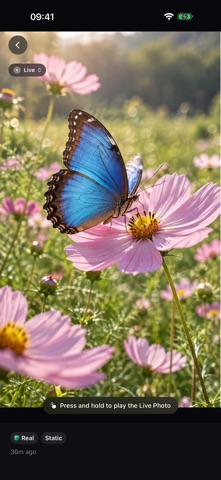
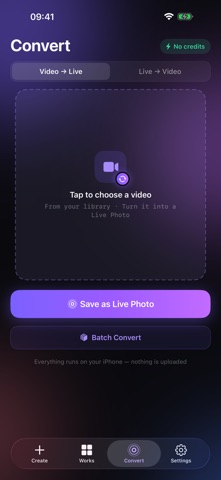
Turn a still photo into a Live Photo that plays with a press and hold in Photos. Live.AI uses AI-generated motion to bring portraits, pets, travel memories, and landscapes to life. CREATE IN FOUR STEPS 1. Choose one photo or select up to 9 for a batch 2. Pick a visual style, camera movement, and quality 3. Add an optional motion prompt, then start cloud generation 4. Get notified when it is ready and save the Live Photo to Photos MADE FOR YOUR MOMENTS • Keep a portrait natural with subtle movement • Add depth to travel and landscape shots with zoom, pan, or orbit • Animate pet photos, artwork, and favorite memories • Choose from realistic, anime, cyberpunk, oil painting, vaporwave, and dreamy looks MORE CONTROL, LESS REPETITION • Create one Live Photo or process up to 9 photos with shared settings • Track every item in a batch and save completed results together • Stop pending items; photos that have not started do not use credits • Adjust the style, camera direction, movement amount, quality, and custom prompt • Regenerate a result with different settings • Leave the app while generation runs and receive a notification when it finishes PHOTOS-READY OUTPUT Live.AI pairs the generated motion with your still image so Photos recognizes the result as a Live Photo, not a GIF. Press and hold to play it. After saving, you can use the sharing and Live Wallpaper options supported by your device and iOS version. New users receive trial credits. Each generation uses credits, and failed generation tasks return them automatically. Cloud results expire after 30 days, so save finished Live Photos to your library promptly. AI results can vary with the source image and selected settings. CONVERT, FREE AND ON DEVICE • Live Photo to video: export as MP4 to share anywhere • Video to Live Photo: trim a clip, pick the cover frame, get a real Live Photo • Runs entirely on your device — no upload, no credits, no sign-in required
What's new · 1.4.1
• 4K Ultra HD video support added • New "System Messages" feature • Added Indonesian, Vietnamese, Dutch, and Polish • Bug fixes
Details