

ClipNest - Clipboard Tool
ONNELLAB · Utilities
Independent analytics for this App Store listing. AppTracker is not affiliated with ONNELLAB.
Chart standing · US
What changed · US
Listing changes AppTracker has observed for this app in this storefront — new versions, price moves, rating shifts, and store copy.
- Refined the screens for searching and editing saved text. - Choose from nine languages in Settings and see the storefront price on the Pro purchase button. - Updated the shared colors, screen layouts, keyboard-pasting examples, and store information.
In-app purchases · US
What this app sells inside itself, grouped by kind and priced for this storefront.
Screenshots


About
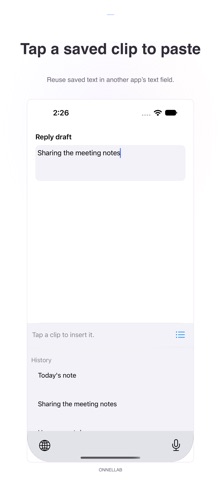
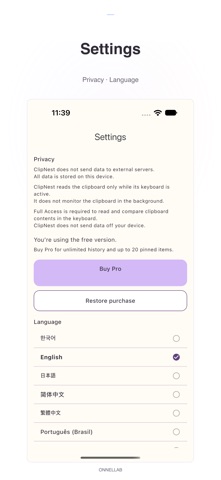
Find copied text again and tap a saved clip in the ClipNest keyboard to paste it. ClipNest is a local clipboard tool for iPhone and iPad. When the ClipNest keyboard opens, it checks and saves your current copied text. Pin useful snippets to reuse addresses, emails, links, and replies you type often. Key features • Save copied text when the keyboard opens • Tap a saved clip to paste from the keyboard • Pin frequently used snippets • Search saved text in the main app • Edit clips and delete individual items in the main app • Move identical text to the latest position instead of creating another item Free and Pro Save up to 30 clips total, including pinned clips; up to 5 can be pinned. At the free storage limit, new items stop being saved; existing items are not automatically deleted. Pro is a one-time purchase that removes the clip count limit and lets you pin up to 20 items. No ads or subscriptions. See the price shown in the store. Setup and privacy Add the ClipNest keyboard in iOS Settings and enable Full Access to use it. ClipNest checks the clipboard when its keyboard becomes active, without continuous background monitoring. Clips are stored on your device. Clip contents and search queries are not sent to external servers, and search queries are not saved.
What's new · 1.0.5
- Refined the screens for searching and editing saved text. - Choose from nine languages in Settings and see the storefront price on the Pro purchase button. - Updated the shared colors, screen layouts, keyboard-pasting examples, and store information.
Details