
Chart standing · US
What changed · US
Listing changes AppTracker has observed for this app in this storefront — new versions, price moves, rating shifts, and store copy.
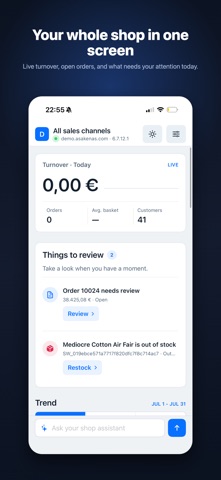
Dashboard figures now come from your live shop: today’s turnover, real channel shares, shop status, and new customers over 7 days. Open today’s orders or the full order list, check sales by language, and switch appearance between System, Light, and Dark. Performance.
Screenshots




About
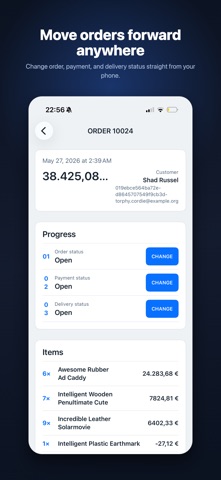
Shopware Admin App is a native dashboard for your Shopware 6 store. Connect securely with your shop's Admin API and keep your business in your pocket. KEY FEATURES Dashboard • Orders, revenue, products and customers at a glance • Interactive orders and turnover charts with flexible date ranges (24 hours, 7, 14 and 30 days) • Top selling products of the last 30 days • Low stock alerts so you never run out • Sales by language to see where your customers buy Sales channel filter • Switch between your storefronts and see metrics for each one, or all combined Order management • Tap any order to see line items and customer details • Change order, payment and delivery status directly from your phone, with only the valid next steps shown Shop tools • Toggle maintenance mode per sales channel • Activate or pause promotions instantly • Review newsletter signups and new customer registrations • Check your shop status: Shopware version, storefront availability and the shop log PRIVACY FIRST Your credentials are stored only in the device Keychain and are sent solely to your own Shopware server. No data is collected, no analytics, no third parties. The app is open source. REQUIREMENTS A Shopware 6 store and an Admin API integration (Settings > System > Integrations). Terms of Use: https://www.apple.com/legal/internet-services/itunes/dev/stdeula/ Privacy Policy: https://asakenas.com/shopware-admin-app/privacy/
What's new · 1.2.2
Dashboard figures now come from your live shop: today’s turnover, real channel shares, shop status, and new customers over 7 days. Open today’s orders or the full order list, check sales by language, and switch appearance between System, Light, and Dark. Performance.
Details