

DeviceShelf
Christof Müller · Utilities
Independent analytics for this App Store listing. AppTracker is not affiliated with Christof Müller.
Chart standing · US
What changed · US
Listing changes AppTracker has observed for this app in this storefront — new versions, price moves, rating shifts, and store copy.
• Every CVE finding now shows what it rests on (the port, the text the device sent, the affected versions) and its CVSS score. • An open Docker port 2375 is checked before it is reported. Only a Docker daemon that answers counts as high risk. • The security report now also lists the CVEs found by a paired desktop app.
Price & rating history · US
Reconstructed from the listing changes AppTracker has observed in this storefront. A field is charted once it has changed more than once, and each line starts at the value it moved from.
Price · Free now · 2 changes on record
In-app purchases · US
What this app sells inside itself, grouped by kind and priced for this storefront.
Screenshots




About
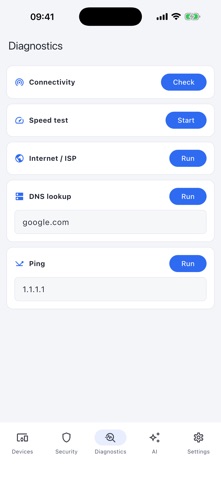
DeviceShelf shows you every device on your network — what it is, what it exposes, and whether it's a risk. No account, no telemetry, no hidden cloud. Your network data stays on your device. WHAT YOU GET • See every device: name, vendor, type, IP and open ports, discovered over Bonjour and port probing. • Security at a glance: a risk score with plain-language findings — open Telnet, exposed SMB, weak defaults, aging TLS certificates, known CVEs. • Diagnostics that answer real questions: ping, speed test, DNS lookup, and your public IP and ISP. • Ask the built-in assistant about your network in plain language. Bring your own AI key — nothing is sent unless you turn it on. • Watch devices come and go, with per-device uptime. PAIR WITH YOUR COMPUTER OR SERVER iOS limits how deeply an app can scan a network. Connect to DeviceShelf on your Mac or PC, or to a 24/7 DeviceShelf server, and this app pulls the full inventory — every device's vendor, name and MAC — plus its security report and timeline. One license covers desktop, server and mobile. PRIVATE BY DESIGN No sign-up. No tracking. Nothing leaves your device unless you enable an optional feature. License checks work offline. OPTIONAL AI, CLEAR CONSENT If you configure a cloud AI provider, DeviceShelf asks before sending anything. The consent screen shows the provider, endpoint, and exact data categories first: your question or selected network/device signals such as IP addresses, pseudonymised MAC addresses, host/device names, vendors, open ports, service banners, certificate names, OS hints and security findings. Local providers such as Ollama do not need cloud consent. Try it free for 7 days. One-time purchase, no subscription.
What's new · 1.5.43
• Every CVE finding now shows what it rests on (the port, the text the device sent, the affected versions) and its CVSS score. • An open Docker port 2375 is checked before it is reported. Only a Docker daemon that answers counts as high risk. • The security report now also lists the CVEs found by a paired desktop app.
Details