

Shiftmate - シフト表をかんたん作成
Toshihiro Nakao · Business
Independent analytics for this App Store listing. AppTracker is not affiliated with Toshihiro Nakao.
Chart standing · US
What changed · US
Listing changes AppTracker has observed for this app in this storefront — new versions, price moves, rating shifts, and store copy.
- Now available in English, with U.S. dollars and U.S. federal overtime rules. You can also set a custom rule
In-app purchases · US
What this app sells inside itself, grouped by kind and priced for this storefront.
Screenshots




About
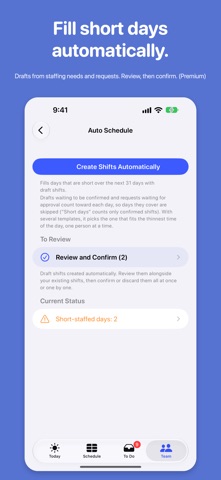
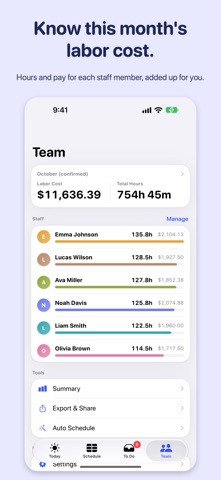
Still building the schedule on paper, a whiteboard or a spreadsheet? Shiftmate puts it in your pocket: tap AM or PM and the week fills in, and short-staffed days and hours stand out at a glance. Made for small shops with a handful to about 20 staff. Add your staff's names and you're ready. Cafes, restaurants, salons, retail stores, studios and tutoring schools: if you build the schedule yourself, you can start today. No account needed. [BUILD THE SCHEDULE] - A staff-by-day grid, just like a paper schedule. Tap a template (AM, Mid, PM, Full Day) to add a shift - Copy last week in one go, and confirm draft shifts all at once - Switch between Day, Week and Month. The week view has a table and a heatmap of headcount by hour - In the Day view, press and hold a shift bar and drag its edges to change the time [SEE WHERE YOU'RE SHORT] - Set staffing needs by weekday and by time of day (for example, 3 people from 11a to 2p every day) - Short days turn red; hours below your needs get a dashed outline - "Add Here" suggests the shift that covers the most missing hours, and who is available to work it - Alerts for hours with no one on shift, long runs of days in a row, short breaks and short rest between shifts [COLLECT STAFF REQUESTS] - Staff can check their own shifts and send shift requests, day-off requests and swap requests - Weekly Requests let staff send a whole week at once. Set a deadline, and late requests are marked - Approve or decline everything from the To Do tab - Each staff member has a personal PIN, so no one can change someone else's shifts [FILL GAPS AUTOMATICALLY] (Premium) - Creates draft shifts for short days from your staffing needs and staff requests - Respects weekly hour limits, days each person can't work, rest between shifts and fairness across the team - Nothing is final until you review and confirm [LABOR COST AND HOURS] - Hours and estimated labor cost for each staff member, totaled automatically - U.S. federal (FLSA) overtime: hours over 40 in a week at 1.5x. Or set a custom rule with daily overtime, night premiums and break minimums - Set your payroll closing day; monthly totals follow your pay period - Staff can see their estimated pay for the period - Estimates of gross pay only. Taxes and deductions are not included [TODAY AT A GLANCE] - The Today screen shows who's working, when, and today's labor cost - Tomorrow's shortages show up here too - A Home Screen widget shows today's crew without opening the app - Optional reminder the day before each workday [SHARE AND EXPORT] - Add confirmed shifts to the calendar on your device - Share the schedule as an image or PDF, or send a calendar file (.ics) staff can add to their calendar (Premium) - Export a summary CSV with hours, overtime and night hours by pay period (Premium) [ON SUPPORTED DEVICES] - Find shifts by staff name from your device's search - Ask for today's or tomorrow's shifts, or someone's next shift, by voice - Type requests in plain words in the To Do chat ("Emma is off next Tuesday"). It turns them into proposed changes, and nothing is saved until you tap Apply. Everything stays on your device [PRIVATE AND OFFLINE] - Your data stays on your device and works without a connection - Lock the manager screens with an admin PIN (biometric unlock supported) - No sign-up required [PREMIUM (ONE-TIME PURCHASE)] Without Premium, you can have up to 3 active staff. Premium adds unlimited staff, multiple locations, sync and backup across your devices, automatic scheduling, and schedule sharing and export. Buy once and restore it on your other devices.
What's new · 1.4.0
- Now available in English, with U.S. dollars and U.S. federal overtime rules. You can also set a custom rule
Details