

Screen Mirroring for All TVs
Funsol Technologies FZE LLC · Utilities
Independent analytics for this App Store listing. AppTracker is not affiliated with Funsol Technologies FZE LLC.
Chart standing · US
What changed · US
Listing changes AppTracker has observed for this app in this storefront — new versions, price moves, rating shifts, and store copy.
Bug fixes and performance improvements.
Price & rating history · US
Reconstructed from the listing changes AppTracker has observed in this storefront. A field is charted once it has changed more than once, and each line starts at the value it moved from.
Average rating · ★ 4.15 now · 32 changes on record
Ratings breakdown · US
The star breakdown behind this app's rating in this storefront.
Screenshots



About
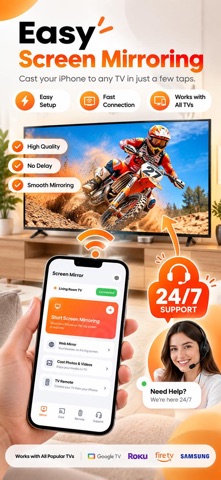
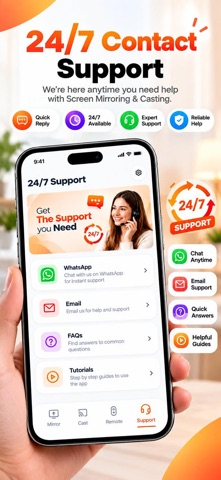
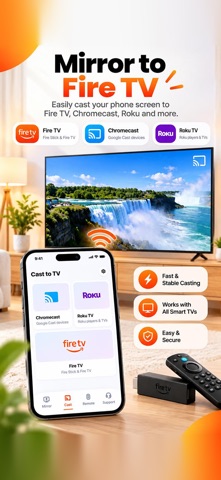
Connecting your iPhone to a Smart TV shouldn't be complicated. Easy Cast & Mirror to Any TV makes it simple with one-tap mirroring, in-app tutorials, and 24/7 support whenever you need help. Mirror your iPhone or iPad to a compatible Smart TV and enjoy videos, photos, presentations, websites, and more on a bigger screen. With a simple connection experience and step-by-step guidance, you can get started without complicated setup. EASY SCREEN MIRRORING Mirror your iPhone or iPad screen to a compatible Smart TV or supported streaming device. Follow the guided connection steps and enjoy your phone's screen on a larger display. ONE-TAP MIRRORING Connect to your available TV with a simple, guided experience. Select your TV, follow the instructions, and start mirroring in just a few taps. IN-APP TUTORIALS Not sure how to connect your iPhone to your TV? Follow our step-by-step tutorials to learn how to connect and use screen mirroring with your compatible TV. 24/7 SUPPORT Need help connecting your iPhone to your TV? We're here to help. Get support through WhatsApp or email whenever you need assistance. If you're having trouble finding or connecting to your TV, our support team can guide you through the connection process. WATCH VIDEOS ON THE BIG SCREEN Enjoy supported videos on your TV instead of watching everything on your phone. Share entertainment with family and friends and enjoy a more comfortable viewing experience. SHARE PHOTOS & MEMORIES Show photos and personal videos from your iPhone on your TV. Share travel memories, family moments, special events, and more with everyone around you. SHARE YOUR PHONE SCREEN Mirror websites, presentations, documents, apps, and other content from your iPhone or iPad to a compatible TV. HOW IT WORKS Connect your iPhone or iPad and TV to the same Wi-Fi network. Open Easy Cast & Mirror to Any TV. Search for available compatible devices. Select your TV and follow the on-screen instructions. Start mirroring and enjoy your content on the big screen. COMPATIBILITY Easy Cast & Mirror to Any TV works with compatible Smart TVs and supported streaming devices. Compatibility and available features may vary depending on your TV model, device settings, Wi-Fi network, and supported technology. For the best experience, keep your iPhone or iPad and TV connected to the same Wi-Fi network. Some TVs may require you to allow or confirm the connection on the TV screen. PREMIUM ACCESS Upgrade to Premium to unlock available premium features and enjoy the complete experience. SUBSCRIPTION INFORMATION Payment will be charged to your Apple ID account at confirmation of purchase. Subscriptions automatically renew unless auto-renewal is turned off at least 24 hours before the end of the current subscription period. Your account may be charged for renewal within 24 hours before the end of the current period. You can manage or cancel your subscription anytime through your Apple ID account settings. DISCLAIMER Easy Cast & Mirror to Any TV is not affiliated with or endorsed by any TV, streaming device, or technology brand. Compatibility and available features may vary depending on device, model, network, and region. Privacy Policy: https://docs.google.com/document/d/1KjvgZ7fw5DAZKJ3vxZf3x8Uy7zeaFKqIn9CYuoczG3g/edit?usp=sharing Terms of Use: https://docs.google.com/document/d/1pWnlyBlSLtWE5f6jm0FrumZ_BuXIEaDDSe_s2WLcfrc/edit?usp=sharing Support: https://docs.google.com/document/d/1f_ydIA8JjgvGGPRnrgeUImIQnqBCbDhnCUIw_E5sRAQ/edit?usp=sharing
What's new · 1.1.4
Bug fixes and performance improvements.
Details