

NetMusic - Local Music Player
良 徐 · Music
Independent analytics for this App Store listing. AppTracker is not affiliated with 良 徐.
Chart standing · US
What changed · US
Listing changes AppTracker has observed for this app in this storefront — new versions, price moves, rating shifts, and store copy.
NetMusic 1.6.2 brings your lyrics closer and makes listening to your own music more convenient. • Lyrics on the Lock Screen Turn on Lock Screen Lyrics in Settings to see the current line in the player and Control Center. The artist returns when lyrics are unavailable. • Optional multi-line Live Activity Choose Live Activity to show the previous, current and next lyric in a dedicated card. Artist Line remains available. • More dependable playback controls Improved pause behavior while music is loading, seeking or switching tracks, so you can pause and resume with more confidence.
Price & rating history · US
Reconstructed from the listing changes AppTracker has observed in this storefront. A field is charted once it has changed more than once, and each line starts at the value it moved from.
Average rating · ★ 4.33 now · 2 changes on record
Ratings breakdown · US
The star breakdown behind this app's rating in this storefront.
Screenshots




About
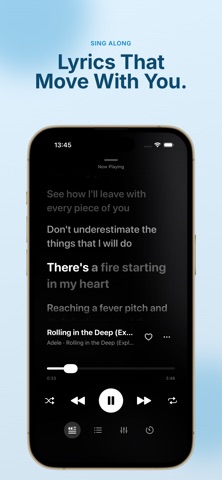
Bring all the music you own into one private library. NetMusic connects cloud drives, NAS shares, self-hosted music servers and Wi‑Fi imports, so your collection is ready to stream or save for offline listening. Also available on Apple TV: enjoy your cloud, NAS and server music on the big screen. CONNECT YOUR MUSIC • Baidu Netdisk, Google Drive and OneDrive • WebDAV, SMB and FTP • Navidrome and Subsonic, including server playlists and favorite sync • Wi‑Fi Transfer from a browser LISTEN YOUR WAY • Browse songs, albums, artists, playlists, favorites and listening history • Stream in the background, use smart caching, or download tracks and playlists for offline playback • Follow synced lyrics, artwork and your Up Next queue • Browse and control your library in CarPlay, including favorites, shuffle, repeat and Up Next • Control playback from the Lock Screen, Control Center and Home Screen widgets • Play MP3, AAC, M4A, MP4, FLAC, WAV, ALAC, AIFF, CAF, OGG and Opus, with Pro support for APE, DSF and DFF SYNC ACROSS DEVICES With Pro and iCloud Sync enabled, sync supported source settings, song and folder selections, personal playlists and track order across iPhone, iPad and Apple TV. Set up Baidu Netdisk, Google Drive or OneDrive on iPhone or iPad, then sync the authorization securely to Apple TV. Requires NetMusic 1.6.0 or later on each device, the same Apple Account, and iOS/iPadOS 17 or tvOS 17 or later. Audio files, downloads, listening history, metadata edits and custom artwork are not synced. LOCAL-FIRST AND PRIVATE Your library, listening history, lyrics, artwork, cache and download records are stored on your device. Only supported data you choose to sync is sent to your private iCloud account. NetMusic has no ads or tracking, and the developer does not collect your data. FREE AND PRO Core features are free, with no daily listening limit. Pro unlocks multiple-source management, unlimited playlists, advanced formats, word-by-word lyrics, immersive playback transitions and iCloud Sync. Choose a monthly or annual auto-renewing subscription, or a lifetime unlock. A free trial may be available to eligible accounts. Subscriptions renew unless canceled in Apple Account settings at least 24 hours before the end of the current period. NetMusic does not provide music. Only connect to content you own or are legally allowed to access. Terms of Use (EULA): https://www.apple.com/legal/internet-services/itunes/dev/stdeula/ Privacy Policy: https://netmusicapp.com/privacy
What's new · 1.6.2
NetMusic 1.6.2 brings your lyrics closer and makes listening to your own music more convenient. • Lyrics on the Lock Screen Turn on Lock Screen Lyrics in Settings to see the current line in the player and Control Center. The artist returns when lyrics are unavailable. • Optional multi-line Live Activity Choose Live Activity to show the previous, current and next lyric in a dedicated card. Artist Line remains available. • More dependable playback controls Improved pause behavior while music is loading, seeking or switching tracks, so you can pause and resume with more confidence.
Details