

Tracejar: Private Journal
同纬 张 · Lifestyle
Independent analytics for this App Store listing. AppTracker is not affiliated with 同纬 张.
Chart standing · US
What changed · US
Listing changes AppTracker has observed for this app in this storefront — new versions, price moves, rating shifts, and store copy.
NEW: Private Album A locked, encrypted home for the photos that don't belong in your camera roll. • Add photos from your library and Tracejar encrypts them on your device before saving. They never appear in Photos or in your timeline. • Unlock with your Tracejar passcode, or with Face ID once you've entered the passcode on that device. • Syncs between your iPhone and iPad through your own private iCloud. Only encrypted data ever leaves your device. • Swipe between photos, pinch to zoom, and save or share one only when you choose. • Switch to another app and the album locks itself. Also new: a new device signed in to your iCloud asks for your passcode the first time, so installing Tracejar there doesn't open your journal. Please remember your passcode. There is no way to recover it, and without it no one, including us, can open the photos in your Private Album. New passcodes need at least 6 characters.
Screenshots




About
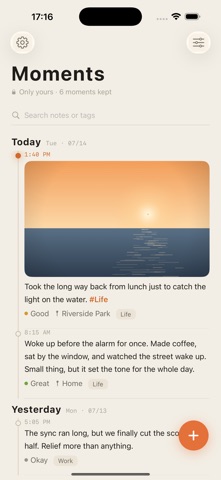
Tracejar is a private journal that's yours alone, with an encrypted photo album built in. A PRIVATE ALBUM FOR YOUR PHOTOS Some photos don't belong in your camera roll. Add them to Tracejar's Private Album and they're encrypted on your device before they're saved, with a key only your passcode can unlock. They never show up in Photos or in your timeline. Swipe through them, pinch to zoom, and save or share one only when you choose. The album syncs between your iPhone and iPad through your own private iCloud, and only encrypted data ever leaves your device. Switch away and it locks itself. There is no back door: forget your passcode and no one, including us, can open those photos. SPEAK IT. DON'T TYPE IT. Tap the microphone and just talk. Your words land in the entry as you speak, in dozens of languages, ready to edit. Record a voice note and get its transcript too, or turn any voice note you already have into text with one tap. Transcription runs entirely on your device. (Voice to text requires iOS 26 or later.) A WHOLE PAGE IN ONE SCREENSHOT Long-press Screen Recording in Control Center, choose Tracejar, and scroll. Stop, tap the notification, and Tracejar stitches everything into one tall image: a long chat, an article, a receipt, a travel plan. You can also stitch a screen recording you already have, or a few screenshots. Save it to Photos, share it, or keep it with today's entry. TRULY PRIVATE • No accounts, no sign-up, no tracking, no analytics, no ads, and no third-party SDKs. • Entries live on your device and, if you choose, in your own private iCloud. We never see them, because we don't have servers. • Voice, screenshots and Private Album encryption all happen on your device. FACE ID LOCK & DECOY MODE (optional) Lock the app with Face ID so only you can open it. Turn on Decoy Mode and, if Face ID doesn't recognize you, Tracejar shows an ordinary-looking, empty-feeling timeline instead of a lock screen, so a glance at your phone reveals nothing. You return to your real entries by long-pressing the settings icon and entering your passcode (or with Face ID). Your passcode is never stored in readable form, and a new device signed in to your iCloud asks for it once before it shows your journal. EVERYTHING ELSE • Text, photos, videos, voice notes, mood, tags, and (optionally) where you were • Tap any photo to zoom in, save it to Photos, or share it • Real-time #hashtag highlighting while you write • Long-press to paste text or an image straight into an entry • "On This Day" to revisit past entries • Export everything to CSV whenever you want • Two looks: a warm "Standard" theme or a monospaced "ASCII terminal" • Left- and right-hand layouts, on iPhone and iPad No ads. No subscriptions. No account. Just a quiet place that's only yours.
What's new · 1.3
NEW: Private Album A locked, encrypted home for the photos that don't belong in your camera roll. • Add photos from your library and Tracejar encrypts them on your device before saving. They never appear in Photos or in your timeline. • Unlock with your Tracejar passcode, or with Face ID once you've entered the passcode on that device. • Syncs between your iPhone and iPad through your own private iCloud. Only encrypted data ever leaves your device. • Swipe between photos, pinch to zoom, and save or share one only when you choose. • Switch to another app and the album locks itself. Also new: a new device signed in to your iCloud asks for your passcode the first time, so installing Tracejar there doesn't open your journal. Please remember your passcode. There is no way to recover it, and without it no one, including us, can open the photos in your Private Album. New passcodes need at least 6 characters.
Details