

OnePhoto: Photo Cleaner
Freedom Dimension (shenzhen) Technology Co., Ltd · Photo & Video
Independent analytics for this App Store listing. AppTracker is not affiliated with Freedom Dimension (shenzhen) Technology Co., Ltd.
Chart standing · US
What changed · US
Listing changes AppTracker has observed for this app in this storefront — new versions, price moves, rating shifts, and store copy.
• List or two-column album layouts with multiple cover photos. • Swipe through screenshot results and use compact cleanup controls. • Improved album filing, review position and cleanup transitions. • Photo access after onboarding and theme-aware Settings icons. • Complete version history with release dates.
Screenshots




About
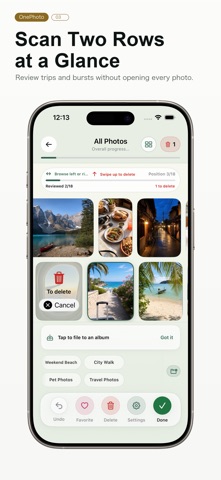
OnePhoto helps you review and organize your iPhone photo library with a swipe-first workflow. Swipe left or right to browse, then swipe up to add an item to Pending Deletion. Nothing is deleted immediately: review the full batch and confirm before OnePhoto requests changes in Photos. ORGANIZE • Start from all photos, videos, screenshots, favorites, albums, or timeline groups • Browse the library in a familiar grid and select multiple items • Add photos to albums, update favorites, share, or queue items for deletion • Sort from newest to oldest or oldest to newest ADVANCED CLEANUP • Review similar-photo candidates, large files, screenshots, and videos • Compress images and videos on device with quality and size controls • Review cleanup history, storage results, and progress PRIVACY AND CONTROL • No account required • Photos and videos are not uploaded to our servers • Cleanup decisions stay on your device • You confirm before deletion requests are sent to Photos Core swipe cleanup and album organization are free. Advanced queues, on-device compression, themes, and long-term statistics require Pro. Annual Pro and Lifetime Pro are available in the app. Terms of Use: https://www.apple.com/legal/internet-services/itunes/dev/stdeula/
What's new · 1.60
• List or two-column album layouts with multiple cover photos. • Swipe through screenshot results and use compact cleanup controls. • Improved album filing, review position and cleanup transitions. • Photo access after onboarding and theme-aware Settings icons. • Complete version history with release dates.
Details