

Aria – Music Notation Editor
Jack Gruber · Music
Independent analytics for this App Store listing. AppTracker is not affiliated with Jack Gruber.
Chart standing · US
What changed · US
Listing changes AppTracker has observed for this app in this storefront — new versions, price moves, rating shifts, and store copy.
Video Export & Annotations! Turn your scores into videos for YouTube, Reddit, Reels, or TikTok. Set your sheet music over a beautiful backdrop, or watch the notes fall onto a glowing piano play-along style. This update also lets you annotate your music with Apple Pencil, and adds a metronome count-in, MuseScore Studio's reverb, and smoother playback. New: - Video export. Turn any score into a video in a few taps: open Share, choose Video, and pick your style. · Play-along piano: the notes fall onto a keyboard and each key lights up the moment it plays, with its own color for every staff. Great for tutorials, covers, and practice videos. · Scrolling score: your sheet music glides by in time with the music, or turns pages right on cue. · Beautiful backgrounds: set your music over one of 13 nature photos, use a photo of your own, or keep the classic look of paper. · Made for every platform: export 16:9 for YouTube or 9:16 for Reels and TikTok. Vertical videos keep the music clear of the captions and buttons those apps put on top. Every video plays with your own mix, exactly as you hear it in the app. - Annotations (iPad). In View mode, write, draw, or highlight on your score with Apple Pencil or your finger. Each mark is attached to its spot in the music, so if the layout changes, it moves with its measure and stays over the right beat. Choose colors and line widths, erase, and undo. Your marks are saved with the score. - Count-in. Touch and hold the metronome button to turn on a one-bar count-in. - Page slider. In View mode, drag the page slider to jump anywhere in a long score. - Fermatas. Fermatas have their own button. They go on notes and rests, work across a selection, and you can drag them to another note. - Drag slurs and hairpins. Drag either end to a new note, with a guide showing where it will land. Improved: - Reverb. Playback now uses MuseScore Studio's default reverb, so scores sound much closer to desktop. - Smoother playback. Fewer dropouts while pages draw or you edit. The cursor stays in sync with the audio, the last notes ring out, and loops repeat seamlessly. - Swing. Swing markings now swing in playback, including in parts and transposed views. - Chord symbols. Dragging a chord symbol now brings its fret diagram along. - Scores with large images in the title frame open faster. - The app is about 90 MB smaller.
Price & rating history · US
Reconstructed from the listing changes AppTracker has observed in this storefront. A field is charted once it has changed more than once, and each line starts at the value it moved from.
Average rating · ★ 4.92 now · 5 changes on record
Ratings breakdown · US
The star breakdown behind this app's rating in this storefront.
In-app purchases · US
What this app sells inside itself, grouped by kind and priced for this storefront.
Screenshots



About
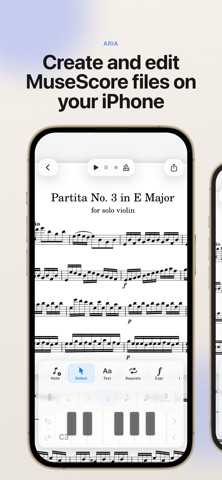
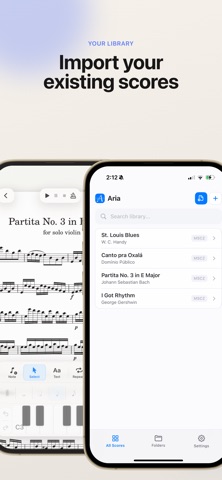
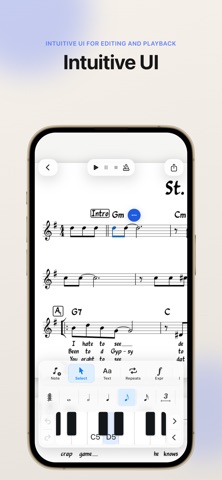
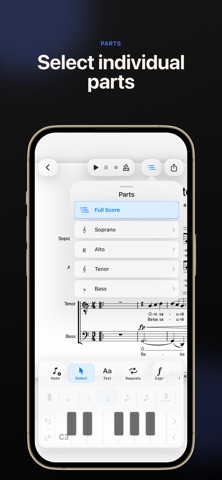
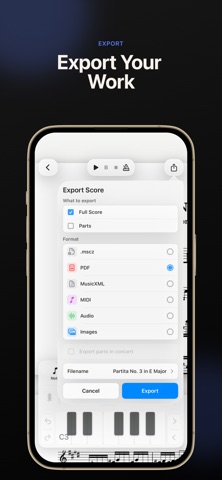
Aria is a notation editor for iPhone and iPad that lets you create, edit, and play back MuseScore files on the go. Open existing MuseScore and MusicXML files, make changes with intuitive touch-based notation controls, play back your score, organize your library, manage individual parts, and export your music when you’re ready to share. Built for musicians who want a lightweight, mobile-friendly way to review, create, and revise scores wherever they are. Features: * Open mcz and MusicXML score files * Create new scores from templates * Edit notes enter notes with touch controls, Apple Pencil, or Midi controller * Play back scores locally * View and manage individual parts * Export and share your work, as Mscz, Pdf, MusiXML, audio, and more.. Aria is an independent app and is not affiliated with or endorsed by MuseScore, Muse Group, or any related project. Aria is open-source software licensed under the GNU GPLv3. Source code, license notices, and build instructions are available here: https://github.com/hdi200/aria
What's new · 7
Video Export & Annotations! Turn your scores into videos for YouTube, Reddit, Reels, or TikTok. Set your sheet music over a beautiful backdrop, or watch the notes fall onto a glowing piano play-along style. This update also lets you annotate your music with Apple Pencil, and adds a metronome count-in, MuseScore Studio's reverb, and smoother playback. New: - Video export. Turn any score into a video in a few taps: open Share, choose Video, and pick your style. · Play-along piano: the notes fall onto a keyboard and each key lights up the moment it plays, with its own color for every staff. Great for tutorials, covers, and practice videos. · Scrolling score: your sheet music glides by in time with the music, or turns pages right on cue. · Beautiful backgrounds: set your music over one of 13 nature photos, use a photo of your own, or keep the classic look of paper. · Made for every platform: export 16:9 for YouTube or 9:16 for Reels and TikTok. Vertical videos keep the music clear of the captions and buttons those apps put on top. Every video plays with your own mix, exactly as you hear it in the app. - Annotations (iPad). In View mode, write, draw, or highlight on your score with Apple Pencil or your finger. Each mark is attached to its spot in the music, so if the layout changes, it moves with its measure and stays over the right beat. Choose colors and line widths, erase, and undo. Your marks are saved with the score. - Count-in. Touch and hold the metronome button to turn on a one-bar count-in. - Page slider. In View mode, drag the page slider to jump anywhere in a long score. - Fermatas. Fermatas have their own button. They go on notes and rests, work across a selection, and you can drag them to another note. - Drag slurs and hairpins. Drag either end to a new note, with a guide showing where it will land. Improved: - Reverb. Playback now uses MuseScore Studio's default reverb, so scores sound much closer to desktop. - Smoother playback. Fewer dropouts while pages draw or you edit. The cursor stays in sync with the audio, the last notes ring out, and loops repeat seamlessly. - Swing. Swing markings now swing in playback, including in parts and transposed views. - Chord symbols. Dragging a chord symbol now brings its fret diagram along. - Scores with large images in the title frame open faster. - The app is about 90 MB smaller.
Details