

Nomo - AI Status & Usage
Pok Man Li · Developer Tools
Independent analytics for this App Store listing. AppTracker is not affiliated with Pok Man Li.
Chart standing · US
What changed · US
Listing changes AppTracker has observed for this app in this storefront — new versions, price moves, rating shifts, and store copy.
More ways to answer your coding agents from your iPhone. • Approve a plan and choose how the agent carries on: accept edits automatically, or switch to auto mode • Type your own answer to a question with Other…, and add a note to it • See more detail about an option before you pick it • On a plan, "Deny with note…" now reads "Keep planning…", which is what it does Fixed • Usage could freeze on an old reading and keep showing it as current • A session left at an empty prompt could show Running for up to half an hour The new answer choices and the session fix come with the latest Nomo plugin on your computer.
In-app purchases · US
What this app sells inside itself, grouped by kind and priced for this storefront.
Screenshots



Similar apps
Competitors and close alternatives, as estimated by AppTracker.


About
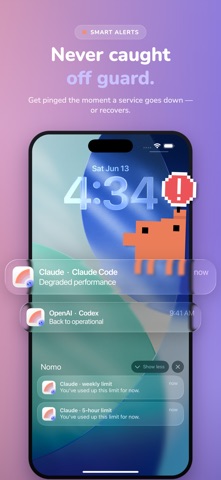
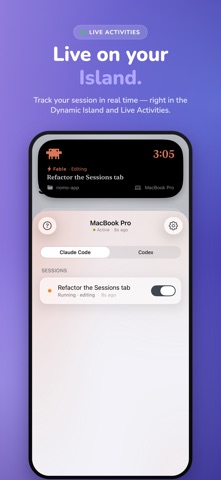
See when AI is down and how much you have left — at a glance, on your Home Screen. Nomo is a fast, private companion for people who live in AI tools. It tracks live service status, your usage limits, and your coding-agent sessions, and surfaces them where you actually look: widgets, the Lock Screen, notifications, and the Dynamic Island. LIVE STATUS Know the instant a provider has an outage. Nomo reads public status pages and shows a clear up / degraded / down signal, with the last 30 days of uptime and beautiful animated widgets you can drop on any Home Screen. USAGE LIMITS Keep your rate limits in view. Sign in with the provider's own login and Nomo shows your session and weekly usage on a widget and in the app — so you never hit a wall mid-task. Your tokens stay on your device; they're never sent to us. CODING SESSIONS (Nomo Pro) Pair your computer with a quick QR scan and watch your coding-agent sessions run live — working, done, or waiting on you — on the Lock Screen and in the Dynamic Island, with the active model and session title. Get a heads-up the moment an agent finishes or needs a decision — and answer it right there, without going back to your desk. On the same Wi-Fi, updates can travel directly between your phone and your computer for lower latency. PRIVATE BY DESIGN Sessions are end-to-end encrypted with AES-256-GCM. The encryption key is created on your computer and transferred only by scanning the QR code — it never leaves your devices. Our relay is blind: it stores only encrypted data it cannot read. Decryption happens on your phone. SMART ALERTS Choose which services to watch and get notified when status changes or your usage runs low. Alerts are dynamic and battery-friendly. WORKS WITH THE TOOLS YOU USE Nomo supports 5 providers today — Claude (Anthropic), OpenAI (ChatGPT / Codex), Cursor, Grok (xAI), and Gemini (Google) — for live status and usage, plus live coding sessions for Claude Code, Codex and OpenCode. More on the way. NOMO PRO Unlock live Sessions with Nomo Pro, an auto-renewing subscription. Status, usage widgets, and alerts are free. JUST WANT A LOOK? Turn on sample data in Settings to see Usage, Sessions, and the widgets filled with placeholder content — no account or pairing required. Available in English, Spanish, Japanese, Korean, and Chinese (Simplified & Traditional). — Unofficial app. Not affiliated with, endorsed by, or sponsored by Anthropic, OpenAI, Cursor (Anysphere), xAI, or Google. Status data comes from their public status pages. All product names and trademarks are the property of their respective owners. Terms of Use (EULA): https://www.apple.com/legal/internet-services/itunes/dev/stdeula/
What's new · 2.3.0
More ways to answer your coding agents from your iPhone. • Approve a plan and choose how the agent carries on: accept edits automatically, or switch to auto mode • Type your own answer to a question with Other…, and add a note to it • See more detail about an option before you pick it • On a plan, "Deny with note…" now reads "Keep planning…", which is what it does Fixed • Usage could freeze on an old reading and keep showing it as current • A session left at an empty prompt could show Running for up to half an hour The new answer choices and the session fix come with the latest Nomo plugin on your computer.
Details