

Golden Hour Sun Tracker
heekyung moon · Photo & Video
Independent analytics for this App Store listing. AppTracker is not affiliated with heekyung moon.
Chart standing · US
What changed · US
Listing changes AppTracker has observed for this app in this storefront — new versions, price moves, rating shifts, and store copy.
Golden Hour Finder has been rebuilt. • Light: a sky dial with golden hour, blue hour, twilight and the sun and moon paths for your spot. • Find: pick a direction, height and light, and search the next 1–12 months for the dates the sun or moon lines up (up to 60 per search). Aim phone uses the direction the back camera faces when you hold the phone upright. • Spots: times are shown in each spot's own time zone, and your earlier places are carried over as spots. • Alerts: reminders before saved shoots and before golden hour.
Screenshots

About
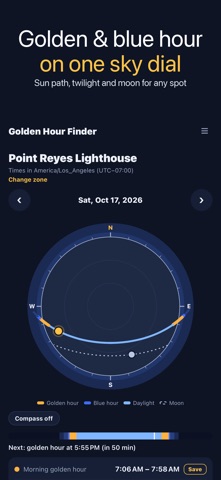
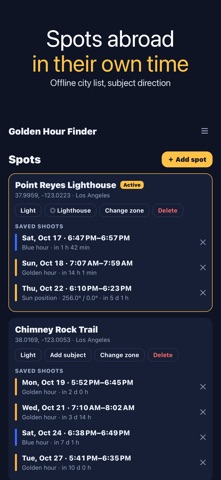
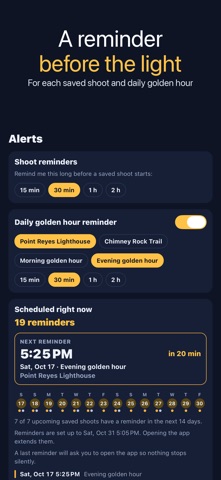
Golden Hour Finder shows golden hour, blue hour, sunrise, sunset and twilight for the places you shoot, and it does something most sun apps don't: tell it where you want the sun or moon, and it finds the dates and times when that happens. ▶ FIND THE DATE Want the sun setting right behind a lighthouse, or a nearly full moon rising over a bridge? Set the direction (drag on the sky dial, point your phone, or type degrees), the height above the horizon and the light you want: golden hour, blue hour, dark sky or any. For the moon you can also ask for at least 50, 90 or 98 percent lit. Golden Hour Finder searches the next 1 to 12 months and lists up to 60 matching moments per search, each with its start, end and best time. Save the one you like as a shoot. ▶ TODAY'S LIGHT AT ANY SPOT A top-down sky dial draws today's sun path in colour (golden, blue, daylight) with the moon path dotted and the sun's current position. Below it: golden hour and blue hour for morning and evening, sunrise, sunset, solar noon, day length, civil, nautical and astronomical twilight, moonrise, moonset and how much of the moon is lit. Swipe to the next or previous day. Turn on the compass to turn the dial the way your phone faces. ▶ SPOTS WITH THEIR OWN TIME ZONE Add a spot by searching a built-in list of cities (works offline, many languages), by your current location, or by typing coordinates. Times are always shown in the spot's time zone, so you can plan a trip abroad from home. A time zone suggested from coordinates is clearly marked until you confirm it. Add a subject point, such as a lighthouse or a peak, and its direction fills in the search for you. ▶ REMINDERS Get a reminder 15 minutes to 2 hours before a saved shoot, and an optional daily reminder before golden hour at one spot. The Alerts tab shows exactly what is scheduled and until when. ▶ GOOD TO KNOW • Golden hour here means the sun between 6° above and 4° below the horizon; blue hour means 4° to 6° below. The definition is shown in the app. • Positions are calculated for a flat horizon. Hills, buildings, trees and weather are not included, so check that your subject really lines up. • Compass readings depend on your phone's sensor and can be off by several degrees near metal or magnets. • Aim phone in Find takes the direction the back camera faces when you hold the phone upright, and the direction of the top edge when the phone lies flat. • All calculations run on your phone; the city list comes from GeoNames (CC BY 4.0).
What's new · 1.1.1
Golden Hour Finder has been rebuilt. • Light: a sky dial with golden hour, blue hour, twilight and the sun and moon paths for your spot. • Find: pick a direction, height and light, and search the next 1–12 months for the dates the sun or moon lines up (up to 60 per search). Aim phone uses the direction the back camera faces when you hold the phone upright. • Spots: times are shown in each spot's own time zone, and your earlier places are carried over as spots. • Alerts: reminders before saved shoots and before golden hour.
Details