

AI Journal & Life Coach - NBHD
Michael Jones · Productivity
Independent analytics for this App Store listing. AppTracker is not affiliated with Michael Jones.
Chart standing · US
What changed · US
Listing changes AppTracker has observed for this app in this storefront — new versions, price moves, rating shifts, and store copy.
Constellation, in motion Your lessons now drift past on their own, with a small map of your whole sky. Swipe to look around, tap a star to visit it, or tap Fly to take the ship yourself. Flying no longer drops you into a neighbor's sky by surprise. Choose your tabs In You, pick which three parts of NBHD sit in the tab bar. Whatever is off the bar stays one tap away. The tab bar is now the standard iPhone one, so it sits where you expect on every iPhone. See the move in a workout During a live workout the moving figure is large; tap it for the steps. You can delete a set mid-workout, and editing weight or reps no longer makes the screen jump. Projects that bend Let a step go with a note for whoever picks it up, ask for a second look before a step counts as done, and see what needs someone. Your own steps show your photo. To-dos in order Horizons lists your to-dos soonest first, one short page at a time. Fixes: tables, headings and bold text now read properly in messages with neighbors and in your own pasted notes. Long text stays editable right to the last line. A message you just sent in a new chat no longer blinks away. The wake-up sunrise shows when you come back to the app. Tabs always respond to the first tap. Plus clearer VoiceOver names, bigger tap targets and many small reliability fixes.
Screenshots


About
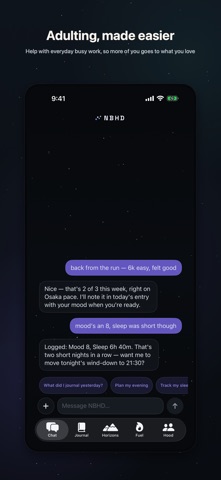
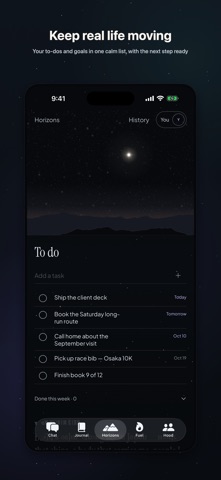
NBHD is a private assistant you talk to — by text or voice — that actually holds your life together: the goals you're chasing, the training week you're in, the people you show up for. Say "back from the run, felt good" and it logs the session, notes your mood, and adjusts tonight's plan. Everything it learns lands in your space — journal, goals, check-ins — shaped around you, readable anytime. • Chat — talk or dictate anywhere; when your assistant writes a report or note to your journal, jump straight there with one tap. Choose Private Mode to run responses on-device. • Journal — goals, check-ins, and daily notes your assistant actually follows up on, in a quiet, readable vault. • Neighborhood — small things, shared: a calm feed from the few people you choose, under your own sky. • Fuel — your training week at a glance: what's done, what's next, and the calendar behind it. • Horizons — your North Star up top, active goals and momentum at a glance, and patterns your assistant has noticed. • Constellation — your lessons mapped as stars; watch ideas cluster and connect, then fly through them. • Core — a guided meditation composed for you, voiced aloud, whenever you need ten minutes. New here? Look around Yuki's space — a full preview of a lived-in NBHD — before you create your own. NBHD requires a Neighborhood United account.
What's new · 2.2.2
Constellation, in motion Your lessons now drift past on their own, with a small map of your whole sky. Swipe to look around, tap a star to visit it, or tap Fly to take the ship yourself. Flying no longer drops you into a neighbor's sky by surprise. Choose your tabs In You, pick which three parts of NBHD sit in the tab bar. Whatever is off the bar stays one tap away. The tab bar is now the standard iPhone one, so it sits where you expect on every iPhone. See the move in a workout During a live workout the moving figure is large; tap it for the steps. You can delete a set mid-workout, and editing weight or reps no longer makes the screen jump. Projects that bend Let a step go with a note for whoever picks it up, ask for a second look before a step counts as done, and see what needs someone. Your own steps show your photo. To-dos in order Horizons lists your to-dos soonest first, one short page at a time. Fixes: tables, headings and bold text now read properly in messages with neighbors and in your own pasted notes. Long text stays editable right to the last line. A message you just sent in a new chat no longer blinks away. The wake-up sunrise shows when you come back to the app. Tabs always respond to the first tap. Plus clearer VoiceOver names, bigger tap targets and many small reliability fixes.
Details