

LazyBinger: Voice TV Remote
Wonderlink SL · Utilities
Independent analytics for this App Store listing. AppTracker is not affiliated with Wonderlink SL.
Chart standing · US
What changed · US
Listing changes AppTracker has observed for this app in this storefront — new versions, price moves, rating shifts, and store copy.
WHEN THE SCAN COMES BACK EMPTY It is almost always the "Local Network" permission declined — and iOS never asks again. The app now notices on its own and shows the exact path through Settings, instead of scanning into the void. Also: a clear message when there is no Wi-Fi, screens that could show up in the wrong language, and the usual fixes. Thanks for binging lazily
Price & rating history · US
Reconstructed from the listing changes AppTracker has observed in this storefront. A field is charted once it has changed more than once, and each line starts at the value it moved from.
Average rating · ★ 4.50 now · 5 changes on record
Ratings breakdown · US
The star breakdown behind this app's rating in this storefront.
Screenshots


About
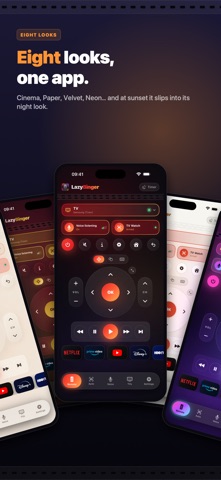
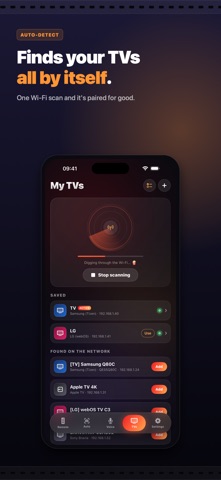
LazyBinger turns your iPhone into a universal smart TV remote — built for people who watch TV in bed and refuse to reach for anything. ZERO SETUP, FOR REAL Run one scan: LazyBinger finds every TV on your Wi-Fi by itself. Samsung (Tizen), LG (webOS), Sony Bravia, Roku, Fire TV, Apple TV, TCL, Hisense, Philips, Panasonic, VIZIO, Xiaomi, Nvidia Shield, Chromecast with Google TV… Google TV sets get full native control: the TV shows a 6-digit code, you type it once, paired forever. A REAL REMOTE Volume, channels, arrows or touchpad, play/pause, back, home — plus a keyboard to type your Netflix or YouTube searches straight from your iPhone (no more hunting letters with a D-pad). One-tap app launch: Netflix, Prime Video, YouTube, Disney+. TV off? LazyBinger wakes it up (Wake-on-LAN). MAGIC WORDS (Premium) Turn on listening mode, put the phone down, watch your show. Say "sleepy time": the TV switches off, the app closes, good night. Say "pause", "louder", "next episode"… Words are fully customizable, recognition works in 30 languages, and you can even record your own sounds — a finger snap, a whistle. Want a combo? Chain up to 5 actions behind a single word or on-screen cue — one trigger, a whole sequence. CAMERA AUTO-PILOT (Premium) Prop your iPhone facing the TV: the camera reads the screen, spots the "Skip intro" or "Next episode" button and clicks it for you. Automatic TV screen lock-on (tracking survives zoom and small bumps), adjustable matching. You don't move a muscle. SLEEP TIMER "Turn off the TV in 30 minutes" — and it will. So will you, probably. Start it by voice or by hand, push it back +15 min, cancel with one tap. ON EVERY SCREEN Made for iPad: turn it sideways and the whole remote fits on one screen, in two columns — what you read on the left, what you press on the right. On Apple Watch, the full remote on your wrist, free. And on the Lock Screen, a Live Activity keeps the keys one tap away, no unlocking. EIGHT LOOKS (Premium) Cinema, Champagne, Night light, Smoked glass, Velvet, Paper, Retro, Neon. The whole app changes, not just the remote. Pick one for the day and one for the night: it slips from one to the other by itself at sunset. FREE TO BINGE, PREMIUM TO SLEEP The full remote is free, forever. The automations that let you fall asleep (voice, camera, night mode) are Premium — one-time purchase or subscription, cancel anytime. PRIVACY Everything stays local: voice recognition can run 100% on-device, the camera records nothing, and no data ever leaves your Wi-Fi. LazyBinger. The couch was already too far. Terms of Use (EULA): https://www.apple.com/legal/internet-services/itunes/dev/stdeula/
What's new · 3.1.1
WHEN THE SCAN COMES BACK EMPTY It is almost always the "Local Network" permission declined — and iOS never asks again. The app now notices on its own and shows the exact path through Settings, instead of scanning into the void. Also: a clear message when there is no Wi-Fi, screens that could show up in the wrong language, and the usual fixes. Thanks for binging lazily
Details