

HanziCue
Reynol Martinez de Lara · Education
Independent analytics for this App Store listing. AppTracker is not affiliated with Reynol Martinez de Lara.
Chart standing · US
What changed · US
Listing changes AppTracker has observed for this app in this storefront — new versions, price moves, rating shifts, and store copy.
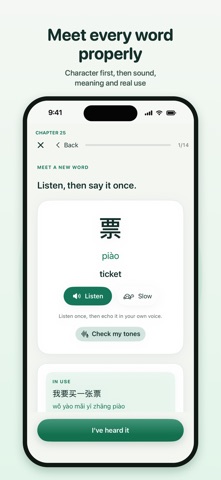
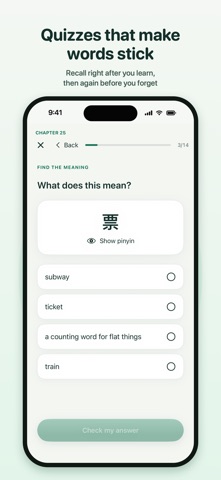
• Tone Gym: train your ear with hundreds of words, several voices, instant feedback and a pitch drawing for every answer. Track your minutes toward the point where research shows gains level off. • Character first: new words show the character before its pinyin and meaning, and quizzes keep pinyin one tap away so you really read. • Each new word is now quizzed right after you meet it. • Optional spaces between words in stories make early reading easier. • Widget: Chinese by default, plus "Quiz me first" — see the word, try to recall it, then the answer appears. Home Screen widgets have a Show button. • Better answer choices that use words you just learned, not the same first words every time. • Clear Pinyin and English buttons, a fresher design with one consistent font, and a cleaner pinyin display. • Only the best Mandarin voices are offered, and Premium or Enhanced voices you download are used automatically. • Handwriting practice is now optional (Profile › Chinese course).
In-app purchases · US
What this app sells inside itself, grouped by kind and priced for this storefront.
Screenshots





About
Learn Mandarin step by step, then keep useful words close with HanziCue’s Lock Screen and Home Screen widgets. A GRADUAL CHINESE COURSE Follow 300 chapters across 37 stages, with 2,740 vocabulary entries and translated examples. Practice listening, sentence building, recall, dictation and speaking. Explore 64 supported story journeys and twelve guided conversations. Review earlier material with a daily plan and scheduled practice. LEARN, USE AND RETURN Meet words in context, build sentences, follow connected conversations and record your own replies. The extended course includes unfamiliar checkpoint sentences and returns to earlier language. Choose a starting chapter or revisit an earlier lesson while keeping your main path. An in-app learning plan explains how to combine understanding, speaking and review. CHECK YOUR TONES Say a word and see your pitch drawn over the correct tone shape for each syllable, with a short tip when a tone drifts. Five pronunciation lessons cover tone pairs, zh/ch/sh, ü and the tone changes of real speech. This is pitch feedback, not a full pronunciation score. YOUR WORDS, YOUR DECKS Import your own Anki packages or CSV vocabulary. Keep Chinese and Japanese decks, pronunciation, media and review history together. Words introduced in the Mandarin course appear in a dedicated deck, ready for widget practice. WIDGETS THAT FIT YOUR DAY Choose Lock Screen rectangular, circular or inline widgets, plus Home Screen sizes. Configure language, decks and pronunciation or meaning visibility. Tap a word to open its deck and review it. iOS controls widget refresh timing; updates cannot be guaranteed on every unlock. LISTEN AND SPEAK Choose an installed Mandarin voice, with a female narrator preferred automatically. Hear on-device speech, use slower Mandarin playback when useful, record your own replies and compare. Optional on-device transcription helps you inspect a recording; it is not a pronunciation score. FREE TO START The first eight Mandarin chapters, personal deck reviews, imports and Japanese study are free. HanziCue Pro includes the full Mandarin course and widgets. Choose the available monthly subscription or lifetime purchase. Existing Pro customers receive the expanded course as part of their access. No separate account is required. Learning records and recordings stay on your device. Course completion records practice, not a guarantee of fluency. Terms of Use: https://www.apple.com/legal/internet-services/itunes/dev/stdeula/ ## Review instructions HanziCue 2.1 expands the original Mandarin course to 300 chapters, 37 stages, 2,740 vocabulary entries and 1,857 course steps. There are also 64 supported story journeys and twelve guided conversations. No login is required. The first eight chapters and personal deck reviews/imports are free. Existing monthly and lifetime Pro purchases unlock the full course and widgets; product identifiers and purchase benefits are unchanged. Restore Purchases is in Profile. Please test purchase access using StoreKit. To inspect added content, open Course, choose Explore, and jump to chapter 121 or later. A practice visit preserves the main path; Start here changes its starting point. Existing saved course progress and personal decks are retained. Voice & audio is in Profile and the Course toolbar. Speech synthesis and optional recording/transcription run on device; transcription is not a pronunciation score. The icon includes light and dark appearances. To add a Lock Screen widget, edit a Lock Screen, add HanziCue and choose a widget size. iOS controls widget refresh timing. The app has no account system.
What's new · 2.3
• Tone Gym: train your ear with hundreds of words, several voices, instant feedback and a pitch drawing for every answer. Track your minutes toward the point where research shows gains level off. • Character first: new words show the character before its pinyin and meaning, and quizzes keep pinyin one tap away so you really read. • Each new word is now quizzed right after you meet it. • Optional spaces between words in stories make early reading easier. • Widget: Chinese by default, plus "Quiz me first" — see the word, try to recall it, then the answer appears. Home Screen widgets have a Show button. • Better answer choices that use words you just learned, not the same first words every time. • Clear Pinyin and English buttons, a fresher design with one consistent font, and a cleaner pinyin display. • Only the best Mandarin voices are offered, and Premium or Enhanced voices you download are used automatically. • Handwriting practice is now optional (Profile › Chinese course).
Details