

Prism Password Manager
Thomas Gysemans · Productivity
Independent analytics for this App Store listing. AppTracker is not affiliated with Thomas Gysemans.
Chart standing · US
What changed · US
Listing changes AppTracker has observed for this app in this storefront — new versions, price moves, rating shifts, and store copy.
Prism reaches 1.0 with a much easier move from another password manager: you can now import a KeePass .kdbx database (key files included), during onboarding or from the new Import screen. Google Drive sync has been reworked: the merge view now covers notes, categories and settings with clear per-item choices, and conflicts or failed uploads get actionable banners. Pending edits are saved when you quit or background the app, and you can restore Prism's automatic backup from the login screen.
In-app purchases · US
No in-app purchases.
Screenshots




Keywords this app targets
Search terms AppTracker associates with this app — estimates, not search volume. ❝ = in the app's title; a highlighted number is its current position for that term.
Similar apps
Competitors and close alternatives, as estimated by AppTracker.
 1Password: Password Manager
AgileBits Inc.
3 shared topics · 3 shared title words
1Password: Password Manager
AgileBits Inc.
3 shared topics · 3 shared title words
 Password Manager iPassSafe+
Moshe Netanel
3 shared topics · 3 shared title words
Password Manager iPassSafe+
Moshe Netanel
3 shared topics · 3 shared title words
 Proton Pass - Password Manager
Proton AG
3 shared topics · 3 shared title words
Proton Pass - Password Manager
Proton AG
3 shared topics · 3 shared title words
 Keeper Password Manager
Callpod Inc.
2 shared topics · 3 shared title words
Keeper Password Manager
Callpod Inc.
2 shared topics · 3 shared title words
 PanicVault - Password Manager
Pierre Stanislas
2 shared topics · 3 shared title words
PanicVault - Password Manager
Pierre Stanislas
2 shared topics · 3 shared title words
 Password Manager Data Vault
Ascendo Inc.
2 shared topics · 3 shared title words
Password Manager Data Vault
Ascendo Inc.
2 shared topics · 3 shared title words
 PassVult: Passwords Manager
Pleme PTY LTD.
3 shared topics · 1 shared title word
PassVult: Passwords Manager
Pleme PTY LTD.
3 shared topics · 1 shared title word
 LastPass Password Manager
LastPass US LP
2 shared topics · 3 shared title words
LastPass Password Manager
LastPass US LP
2 shared topics · 3 shared title words
About
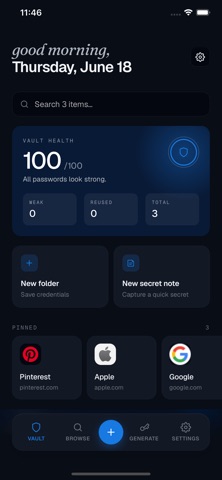
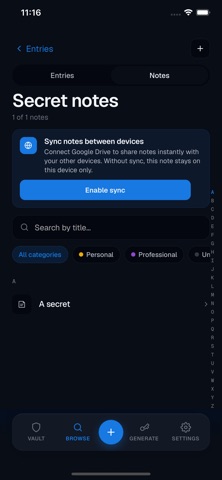
Take back control of your security. Prism keeps your passwords, payment cards and private notes in a single encrypted vault that lives on your device, not on someone else's server. No account to create, no subscription to pay, no company watching over your shoulder. One-time purchase, no subscription. Own your data forever. WHY PRISM IS DIFFERENT Most password managers store your secrets in their cloud and charge you monthly for the privilege. Prism does the opposite: everything is encrypted and decrypted directly on your device, using a key derived from a master password that only you know. Your vault is one encrypted file, and nobody can read it, not even us. There is no Prism server, no Prism account, and no tracking of any kind. The app only connects to the internet when you explicitly ask it to. EVERYTHING YOU NEED TO STAY SAFE - Store passwords, payment cards and secret notes in one place - Generate strong, unique passwords in one tap, random or easy to pronounce - Security audit: instantly spot weak, reused or too-short passwords - Breach alerts: get warned if one of your passwords appears in a known data leak, checked with a privacy-preserving technique that never sends your passwords anywhere - Unlock with Face ID or Touch ID - Automatic locking after inactivity, and copied passwords are wiped from your clipboard after 30 seconds - Available in multiple languages: English, French, Spanish, Portuguese, German, Swedish and Russian. More are on their way. SYNC ON YOUR TERMS Want your vault on your iPhone, iPad and Mac? Connect Prism to your own Google Drive. Your vault is uploaded to a hidden, app-private space in your Drive, already encrypted, so Google only ever sees scrambled data it cannot open. Edit an entry on one device and it shows up on the others. Prefer to stay fully offline? That works too. Sync is entirely optional, and you can also back up or move your vault yourself with a simple encrypted export file. MADE FOR YOUR APPLE DEVICES Prism runs natively on iPhone, iPad and Mac, so your vault is always at hand. It's a one-time purchase, with no subscription, ever. Prism is also available on other platforms. SECURITY YOU CAN TRUST Prism uses modern, industry-recommended encryption (the same family of techniques trusted by security professionals worldwide) and is built so that your master password and your unencrypted data never leave your device. Because there is no server and no recovery backdoor, even a forgotten master password cannot be exploited by anyone: your vault stays yours alone. GET STARTED IN SECONDS Download Prism, choose a master password, and you're done. Import an existing vault, connect your Google Drive, or just start adding your first passwords. Your security is back under your control. Website: https://prism-security-manager.com Privacy policy: https://prism-security-manager.com/privacy Terms: https://prism-security-manager.com/terms Questions? Write to us at contact@prism-security-manager.com
What's new · 1.0.5
Prism reaches 1.0 with a much easier move from another password manager: you can now import a KeePass .kdbx database (key files included), during onboarding or from the new Import screen. Google Drive sync has been reworked: the merge view now covers notes, categories and settings with clear per-item choices, and conflicts or failed uploads get actionable banners. Pending edits are saved when you quit or background the app, and you can restore Prism's automatic backup from the login screen.
Details