

Recp
Blazej Zyglarski · Food & Drink
Independent analytics for this App Store listing. AppTracker is not affiliated with Blazej Zyglarski.
Chart standing · US
What changed · US
Listing changes AppTracker has observed for this app in this storefront — new versions, price moves, rating shifts, and store copy.
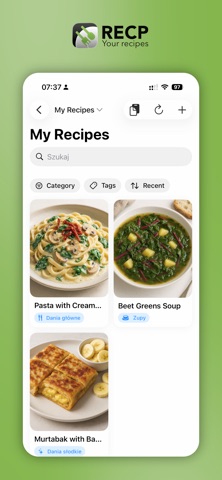
On-device AI Recp can now read recipes and create their photos entirely on your iPhone or Mac. You don't need an API key, and your recipes never go to a server. Download the models once in Settings. You can still use an OpenAI-compatible API if you prefer. • Choose the photo quality: Standard (faster) or High (Stable Diffusion XL, much better looking) • AI photos now take the ingredients into account, so they show the finished dish more accurately • New "Generate new AI photo" button in the recipe editor • Recipe cards show progress while a photo is being created New recipe browsing • View your recipes as a grid or a list • A side rail of colourful category icons with recipe counts lets you filter with one tap. You can expand it or hide it • Each category now has its own colour Smaller improvements • The app opens in the library you looked at last • Press Return in the ingredient editor to add a new row • Refreshing shared libraries is smoother and no longer makes the interface stutter
In-app purchases · US
No in-app purchases.
Screenshots



About
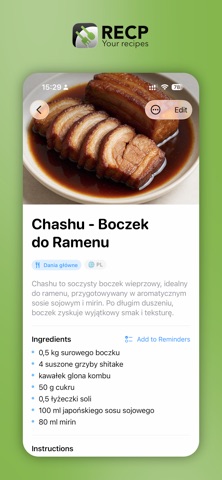
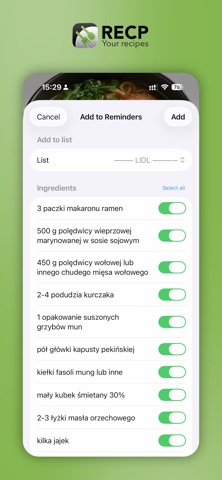
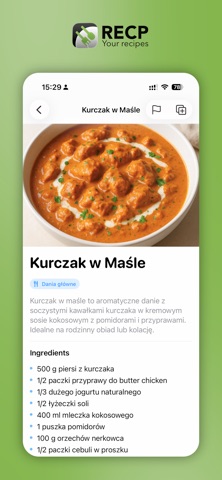
Your recipes, beautifully organized — and truly private. RECP is a recipe manager for iPhone and Mac that keeps everything you cook in one calm, good-looking place. Your recipes live in your own private iCloud and sync automatically across your devices. There are no accounts to create, no analytics, no trackers, and no ads. We never see your data. ORGANIZE THE WAY YOU THINK • Group recipes into libraries — weeknight dinners, baking, the family classics • Tag, categorize, and set a recipe's origin and language • Search instantly across titles, ingredients, and tags • A clean grid on iPhone, a full library-and-detail view on Mac CAPTURE RECIPES IN SECONDS • Paste any recipe text and let AI turn it into a clean, structured recipe — title, ingredients, steps, and a generated photo • Bring your own OpenAI-compatible API key, so the feature is entirely under your control • Or add recipes by hand with a fast, focused editor COOK WITHOUT FRICTION • Clear, scrollable ingredients and step-by-step instructions • Send a recipe's ingredients straight to Apple Reminders to build your shopping list in a tap • Translate a recipe into your language • Export any recipe to a clean PDF SHARE WITH THE PEOPLE YOU COOK WITH • Share a whole library with family or friends through iCloud — everyone invited can add and edit, and changes sync for everyone • Or share a single recipe as a private, read-only web link — anyone with the link can open it in a browser, no app required • Stop sharing, revoke a link, or leave a shared library whenever you like DISCOVER & CONTRIBUTE • Publish a recipe to the public catalogue for others to find • Browse the community and copy great recipes straight into your own library • Publishing is always opt-in — only what you choose becomes public PRIVATE BY DESIGN • Your library is stored in your private iCloud, not on our servers • No tracking, no advertising, no third-party analytics • No sign-up — it just works with your Apple Account Made for iPhone and Mac. Your recipes, everywhere you cook.
What's new · 1.2
On-device AI Recp can now read recipes and create their photos entirely on your iPhone or Mac. You don't need an API key, and your recipes never go to a server. Download the models once in Settings. You can still use an OpenAI-compatible API if you prefer. • Choose the photo quality: Standard (faster) or High (Stable Diffusion XL, much better looking) • AI photos now take the ingredients into account, so they show the finished dish more accurately • New "Generate new AI photo" button in the recipe editor • Recipe cards show progress while a photo is being created New recipe browsing • View your recipes as a grid or a list • A side rail of colourful category icons with recipe counts lets you filter with one tap. You can expand it or hide it • Each category now has its own colour Smaller improvements • The app opens in the library you looked at last • Press Return in the ingredient editor to add a new row • Refreshing shared libraries is smoother and no longer makes the interface stutter
Details