

Booklip — eBook Reader
Kevin Park · Education
Independent analytics for this App Store listing. AppTracker is not affiliated with Kevin Park.
Chart standing · US
What changed · US
Listing changes AppTracker has observed for this app in this storefront — new versions, price moves, rating shifts, and store copy.
- TTS fixes: added Booklip-Info.plist so the audio background mode is really in the build (playback used to stop when the screen turned off), made the lock-screen play button work, and long sentences are no longer cut mid-word — a whole sentence is read and highlighted at once. - Added a Define action that shows the dictionary next to the selection. - Fixed library cards in dark mode: the title and author under each cover were invisible on a hard-coded white card; the card background now follows the light/dark appearance. - Reader: the last line of a page is no longer shown half cut off. A line the bottom edge would cut is hidden and becomes the first line of the next page. - Changed the App Store category from Productivity to Books.
Ratings breakdown · US
The star breakdown behind this app's rating in this storefront.
Screenshots


About
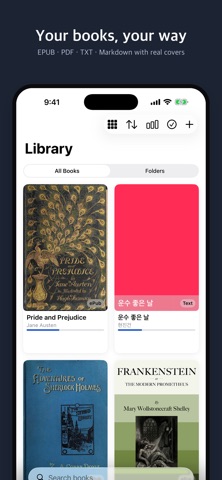
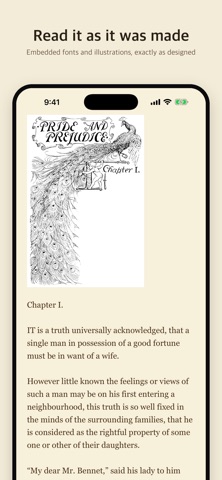
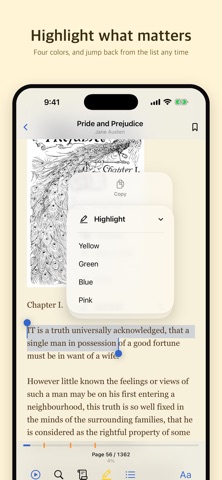
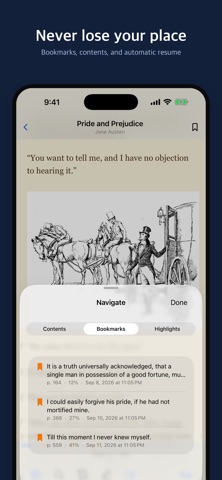
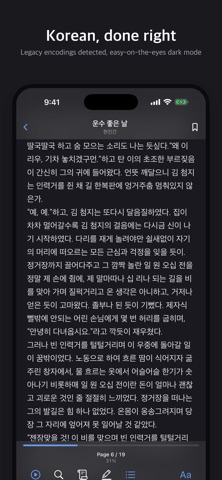
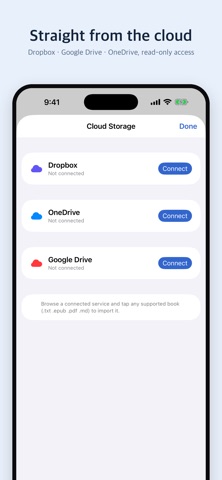
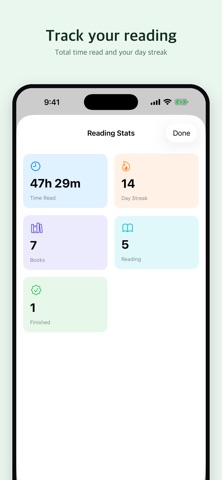
Booklip is a clean, distraction‑free reader for the books you already own. Import your own files, make every page look exactly how you like, and listen hands‑free with built‑in text‑to‑speech. **Read any format** Open EPUB, PDF, TXT, and Markdown files. EPUB embedded fonts are rendered faithfully, so even specially typeset books display correctly. Covers and images come through, and full Unicode support means Korean, English, and mixed‑language books all read beautifully. **Make it yours** Choose your font, size, line spacing, text color, and background — or pick from ready‑made themes for day and night reading. Includes Korean typefaces. Every book remembers its own look. **Listen, don't just read** Built‑in text‑to‑speech reads your books aloud with natural English and Korean voices. Adjust speed and pitch, follow along with on‑screen highlighting, and set a sleep timer to drift off. Auto‑scroll mode keeps the page moving hands‑free. **Find your place** Jump around with the table of contents, drop bookmarks, and highlight passages in four colors. Your reading position is saved automatically. Tap or swipe to turn pages, with a smooth slide or paper page‑turn animation. **Organize your library** Sort and group your books into folders, switch between grid and list layouts, and select multiple books to move or delete at once. See real EPUB covers at a glance. **Bring books from the cloud** Connect Dropbox, Google Drive, or OneDrive and import files directly — browse your folders, pick what you want, and read offline. Access is read‑only, so nothing in your cloud is ever changed or deleted. You can also paste a direct download link to pull in a single file. **Track your habit** See total time read, your day streak, and how many books you're reading or have finished. Everything stays on your device. No account required. No ads.
What's new · 1.5.5
- TTS fixes: added Booklip-Info.plist so the audio background mode is really in the build (playback used to stop when the screen turned off), made the lock-screen play button work, and long sentences are no longer cut mid-word — a whole sentence is read and highlighted at once. - Added a Define action that shows the dictionary next to the selection. - Fixed library cards in dark mode: the title and author under each cover were invisible on a hard-coded white card; the card background now follows the light/dark appearance. - Reader: the last line of a page is no longer shown half cut off. A line the bottom edge would cut is hidden and becomes the first line of the next page. - Changed the App Store category from Productivity to Books.
Details