

NetScan Pro
Matthew Mesropian · Utilities
Independent analytics for this App Store listing. AppTracker is not affiliated with Matthew Mesropian.
Chart standing · US
What changed · US
Listing changes AppTracker has observed for this app in this storefront — new versions, price moves, rating shifts, and store copy.
Ten additions, and everything you labelled carries straight over. • A vendor database 95 times larger. NetScan Pro now ships the full IEEE registry, so the "unknown vendor" rows on your network mostly turn into real names. • Known devices before you scan. The Devices tab shows everything it remembers, with labels, last seen and address history, even on someone else's Wi-Fi. Forget a stale one with a tap. • CSV and JSON export next to Text and PDF: address, hostname, label, vendor, MAC, ports, services, first and last seen. Opens straight into Numbers or a spreadsheet. • Back up your labels and notes. Export them to a file and import on a new phone. The import merges and never removes anything. • Internet Quality history. The last 30 tests, a trend line on the Home strip, and "better than last time". • Network change awareness. Move to another Wi-Fi and NetScan Pro tells you the results on screen are from the old one, with a one-tap rescan. • Filter the device list by type: phones, computers, network gear, media, cameras, smart home, printers. • Share a device summary from its page: address, MAC, vendor, OS guess, open ports, services and history in one text block. • When a scan finds nothing, the app now explains the Local Network permission and takes you to the switch, instead of showing an empty network. • IP Geolocation works again. The lookup now uses a secure connection that iOS allows. Fixed • The "DNS Lookup" Home Screen shortcut did nothing. • The intro can no longer trap you, and the splash screen can be tapped away. If NetScan Pro is earning its keep, it may ask you once for a rating, never during a scan. "Don't ask again" means it.
Screenshots




About
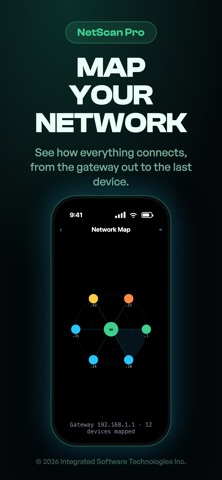
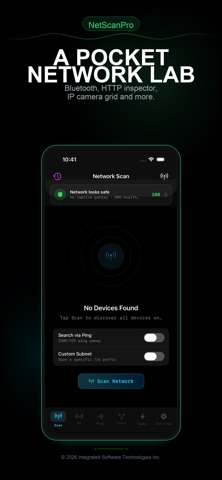
See every device on your Wi-Fi in seconds. Test your internet quality. Find which trackers are watching you — and block them in one tap. NetScan Pro is the network toolkit Apple should have built into iOS. Discover what's on your network: • Scan every device — phones, laptops, smart-home gadgets, cameras, printers • See vendor, OS, open ports, and a 0–100 security rating for each one • Auto-detect Matter / Thread / HomeKit hubs, IP cameras, NAS units, IoT • Identify devices by name, vendor (offline OUI database), or MAC Audit your privacy: • Privacy Audit — see your public IP, ISP, VPN posture, encrypted-DNS status • Tracker check — find which advertising and analytics domains reach your phone • One-tap tracker blocker — install AdGuard, Cloudflare, or Quad9 DNS protection • Works system-wide across every app on your iPhone, not just Safari Diagnose your internet: • Apple-style RPM + bufferbloat test • MTR / traceroute with live latency graphs • Per-port reasons (tcp-connected / tcp-rst / no-response) like nmap • UDP port scanner with protocol-aware probes for DNS, SNMP, mDNS, and more Sysadmin power tools: • DNS Lookup (A / AAAA / MX / TXT / SRV / CNAME) • WHOIS lookup with referral chasing • IP Geolocation with map view • Subnet Calculator (CIDR ↔ range ↔ mask) • Bonjour Browser — every mDNS service the LAN announces • Wake-on-LAN for any device with a known MAC See what's exposed: • Built-in CVE matcher flags vulnerable services (OpenSSH, nginx, IIS…) • WAN exposure check finds devices reachable from the internet via port-forwarding • Default-credential heuristic spots routers / cameras still on factory passwords • Per-device security score from 0–100 Beautiful reports: • Generate a multi-page PDF network snapshot you can share or archive • Export device list as text • AI-powered summary via Apple Intelligence (iPhone 15 Pro and later) iCloud-synced multi-network profiles, background change alerts, custom timing presets (T0–T5), and an Aggressive scan mode that runs every probe at once round out the package. Privacy promise: NetScan Pro runs every scan on-device. No personal data, MAC addresses, or device names ever leave your phone. No analytics. No ads. No tracking. No subscription. Ever. Built by an independent developer who scratches his own itch. — Use NetScan Pro only on networks you own or have permission to scan.
What's new · 1.2
Ten additions, and everything you labelled carries straight over. • A vendor database 95 times larger. NetScan Pro now ships the full IEEE registry, so the "unknown vendor" rows on your network mostly turn into real names. • Known devices before you scan. The Devices tab shows everything it remembers, with labels, last seen and address history, even on someone else's Wi-Fi. Forget a stale one with a tap. • CSV and JSON export next to Text and PDF: address, hostname, label, vendor, MAC, ports, services, first and last seen. Opens straight into Numbers or a spreadsheet. • Back up your labels and notes. Export them to a file and import on a new phone. The import merges and never removes anything. • Internet Quality history. The last 30 tests, a trend line on the Home strip, and "better than last time". • Network change awareness. Move to another Wi-Fi and NetScan Pro tells you the results on screen are from the old one, with a one-tap rescan. • Filter the device list by type: phones, computers, network gear, media, cameras, smart home, printers. • Share a device summary from its page: address, MAC, vendor, OS guess, open ports, services and history in one text block. • When a scan finds nothing, the app now explains the Local Network permission and takes you to the switch, instead of showing an empty network. • IP Geolocation works again. The lookup now uses a secure connection that iOS allows. Fixed • The "DNS Lookup" Home Screen shortcut did nothing. • The intro can no longer trap you, and the splash screen can be tapped away. If NetScan Pro is earning its keep, it may ask you once for a rating, never during a scan. "Don't ask again" means it.
Details