
Chart standing · US
What changed · US
Listing changes AppTracker has observed for this app in this storefront — new versions, price moves, rating shifts, and store copy.
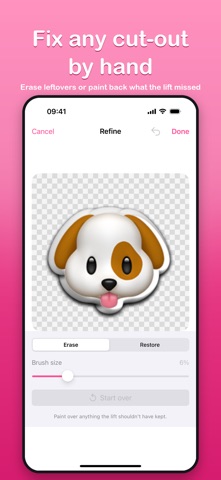
Cutout 1.1 introduces Cutout Pro - one payment, no subscription. Everything that was free before is still free and still unlimited. NEW IN CUTOUT PRO - Animated stickers: turn a video or Live Photo into a looping iMessage sticker, with the subject lifted frame by frame - Refine brush: erase leftovers or paint back detail the automatic lift missed - Pro styling: custom colours, double outlines, and full drop-shadow control - Re-editable stickers: reopen a sticker to fix a typo, swap an effect, or make a variant - Sticker packs: organise your library and switch packs right inside Messages - Backup and restore: save everything to a single file you keep BETTER LIBRARY - Tap any sticker to open it - straight into the editor when it can be edited, otherwise a detail view with every action in one place - New Select mode for moving, sharing or deleting several stickers at once - Favourite the stickers you send most, and reach them from Messages too - Animated stickers now play right in your library Still 100% on-device. No accounts, no analytics, no networking - your photos never leave your phone.
Screenshots




About
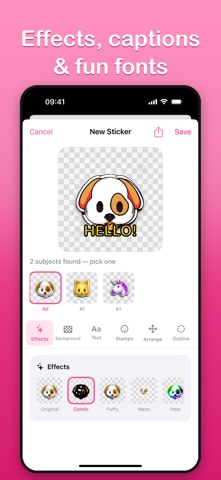
Cutout turns any photo into a sticker you can send right inside iMessage. Pick a photo, and Cutout instantly lifts the subject - a person, pet, or object - onto a clean transparent background. It feels like magic, and it all happens on your device. HOW IT WORKS - Pick any photo from your library. - Cutout uses on-device intelligence to find the subject and lift it out, leaving a crisp transparent cut-out. - Found more than one subject? Choose which one to keep, or grab them all. - Your finished sticker lands in your library, ready to send. SEND STICKERS IN IMESSAGE Your cut-outs show up as stickers right inside the Messages app. Tap to send, or drag one onto a message bubble to place it. Build a personal sticker pack from your own photos - your pet, your friends, your favorite things. 100% ON YOUR DEVICE Everything runs locally. There is no account, no sign-in, no cloud, no analytics, and no tracking. Cutout has zero networking code - your photos never leave your phone. The subject lift uses Apple's on-device frameworks, so it works even in airplane mode. FREE, WITH NO LIMITS - One-tap subject lift, as many stickers as you like - Effects: comic, puffy, neon, holographic, sketch, and glitch looks - Backgrounds: solid colors, gradients, and patterns for a die-cut card look - Captions in six fonts, emoji stamps, and freehand drawing - Outlines and drop shadows, plus batch-lift up to 10 photos at once - Saves stickers as transparent PNGs you can share anywhere CUTOUT PRO - ONE PAYMENT, NO SUBSCRIPTION Everything above stays free forever. If you want more, Cutout Pro unlocks six extras with a single purchase - no subscription, no recurring charge: - Animated stickers: turn a video or Live Photo into a looping sticker, with the subject lifted frame by frame - Refine brush: fix any cut-out by hand - erase leftovers, or paint back the detail the lift trimmed off - Pro styling: any color you like, double outlines, and full control over the drop shadow - Re-editable stickers: reopen any sticker to fix a typo, swap an effect, or spin off a variant - Sticker packs: organize your stickers into named packs and switch between them inside Messages - Backup and restore: save your whole library to a single file you keep, and bring it to a new phone DESIGNED FOR EVERYONE - Full Dark Mode and Dynamic Type support - VoiceOver labels throughout - Reduce Motion support and gentle haptics Make a sticker out of anything. Send it in iMessage. Keep your photos private. That's Cutout.
What's new · 1.1
Cutout 1.1 introduces Cutout Pro - one payment, no subscription. Everything that was free before is still free and still unlimited. NEW IN CUTOUT PRO - Animated stickers: turn a video or Live Photo into a looping iMessage sticker, with the subject lifted frame by frame - Refine brush: erase leftovers or paint back detail the automatic lift missed - Pro styling: custom colours, double outlines, and full drop-shadow control - Re-editable stickers: reopen a sticker to fix a typo, swap an effect, or make a variant - Sticker packs: organise your library and switch packs right inside Messages - Backup and restore: save everything to a single file you keep BETTER LIBRARY - Tap any sticker to open it - straight into the editor when it can be edited, otherwise a detail view with every action in one place - New Select mode for moving, sharing or deleting several stickers at once - Favourite the stickers you send most, and reach them from Messages too - Animated stickers now play right in your library Still 100% on-device. No accounts, no analytics, no networking - your photos never leave your phone.
Details