

Book Highlighter
Alessandro Raccuglia Giaminardi · Books
Independent analytics for this App Store listing. AppTracker is not affiliated with Alessandro Raccuglia Giaminardi.
Chart standing · US
What changed · US
Listing changes AppTracker has observed for this app in this storefront — new versions, price moves, rating shifts, and store copy.
Highlights can be shared as a styled quote card image as well as plain text. Both now go through one screen: a Text/Image selector, then a Content section — title and author, page number, note — whose choices apply to either output. Card themes, fonts, formats (9:16, 4:5, 1:1), backgrounds, and frames appear when Image is selected. - On devices that support Apple Intelligence, the card background can be generated on-device with Image Playground. Hidden on unsupported hardware; the app still runs on the iOS 17 deployment target. - Google Books search now works out of the box: the source is picked in Settings, with no API key to enter. - Book covers are stored with the book, so they appear instantly and are visible offline. - The library sort order is kept between launches. - Highlights imported through the share extension reliably reach the same library as the app. - Failures while saving are now shown instead of being silently discarded.
In-app purchases · US
No in-app purchases.
Screenshots



Keywords this app targets
Search terms AppTracker associates with this app — estimates, not search volume. ❝ = in the app's title; a highlighted number is its current position for that term.
Similar apps
Competitors and close alternatives, as estimated by AppTracker.
 Bright Passages
Nathan Perry
Bright Passages
Nathan Perry
 Book Tracker: Highlighted
Damir Stuhec
Book Tracker: Highlighted
Damir Stuhec
 Quote Vault: Save Book Quotes
Fernando Gamboa
1 shared topic · 1 shared title word
Quote Vault: Save Book Quotes
Fernando Gamboa
1 shared topic · 1 shared title word
 Highlighter for Safari
Denk Alexandru
1 shared title word
Highlighter for Safari
Denk Alexandru
1 shared title word
 BookTree: bookshelf & note
Youngwan Choi
1 shared topic
BookTree: bookshelf & note
Youngwan Choi
1 shared topic
 HomeBooks: Book Tracker
HomeBooks Technologies Inc.
HomeBooks: Book Tracker
HomeBooks Technologies Inc.
 Beresta: Library & Highlights
Dmitriy Laukhin
Beresta: Library & Highlights
Dmitriy Laukhin
 WordGlean - Kindle Highlights
Xu Wang
WordGlean - Kindle Highlights
Xu Wang
About
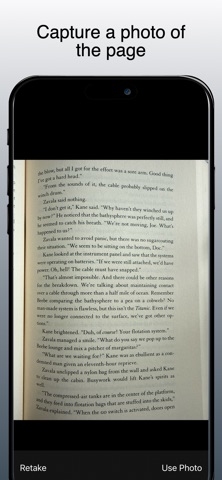
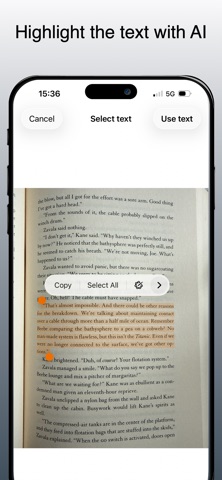
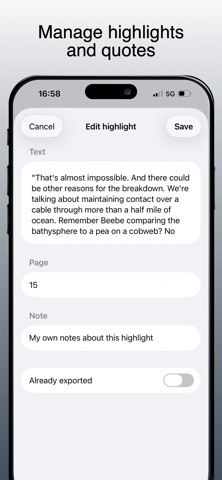
Book Highlighter helps you turn passages from paper books into organized digital highlights, ready to export to Obsidian, Markdown files, or any app through the share sheet. Build a personal library, capture the quotes you want to keep, add page numbers and notes, then export everything as clean Markdown when you are ready. Capture highlights your way Take a photo of a book page, choose an image from your library, or type a passage manually. When you use an image, Book Highlighter uses Apple's built-in Live Text technology so you can select exactly the text you want from the page. Organize by book Search for books by title, author, or ISBN using Open Library, or add a Google Books API key in Settings to use Google Books. Each book can include metadata such as author, year, publisher, ISBN, and cover image. You can add highlights, page numbers, optional notes, and a personal note for the book. Import from other apps Book Highlighter includes an iOS share extension. Select text in another app, open the share sheet, choose Book Highlighter, then save the passage to one of your existing books. Export clean Markdown Write each book to folders you choose as complete Markdown files, or use the standard iOS share sheet for one-shot Markdown, plain text, CSV, RTF, and PDF exports. Generated Markdown files include book metadata, page headings, quotes, notes, and dates, and are overwritten when you update them from the app. Backup and restore Create a JSON backup of your books and highlights, save it wherever you prefer, and import it later with smart merge to avoid duplicate books and duplicate highlights. Private by design Book Highlighter stores your library locally on your device. There is no account, no analytics, and no developer-controlled server for your books, highlights, or notes. Network requests are used only when you search book metadata through Open Library or, if configured by you, Google Books. Book Highlighter is made for readers who still love physical books but want their best passages available in a durable, portable digital format.
What's new · 1.2.0
Highlights can be shared as a styled quote card image as well as plain text. Both now go through one screen: a Text/Image selector, then a Content section — title and author, page number, note — whose choices apply to either output. Card themes, fonts, formats (9:16, 4:5, 1:1), backgrounds, and frames appear when Image is selected. - On devices that support Apple Intelligence, the card background can be generated on-device with Image Playground. Hidden on unsupported hardware; the app still runs on the iOS 17 deployment target. - Google Books search now works out of the box: the source is picked in Settings, with no API key to enter. - Book covers are stored with the book, so they appear instantly and are visible offline. - The library sort order is kept between launches. - Highlights imported through the share extension reliably reach the same library as the app. - Failures while saving are now shown instead of being silently discarded.
Details