
Chart standing · US
Screenshots


About
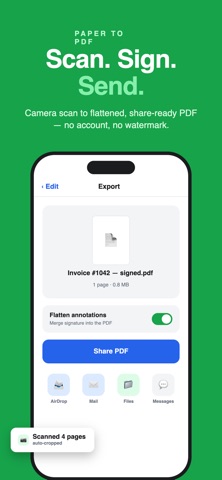
Got a lease, contract, or form to sign? SignPdf gets it signed and sent back in under a minute — no account, no watermark, and nothing ever uploaded. HOW IT WORKS 1. Import any PDF (Files, email attachment) or scan paper with your camera 2. Tap to fill — real PDF form fields are detected automatically 3. Sign with your finger, a typed signature, or a photo of your ink signature 4. Share a flattened, locked-in PDF anywhere FILL ANY FORM • Auto-detects fillable PDF forms (AcroForm) — tap and type • Flat or scanned PDFs too: add text, checkmarks, and dates anywhere • Date stamps in one tap EVERY KIND OF SIGNATURE • Draw with your finger or Apple Pencil • Type it — three signature styles • Photograph your signature on paper — the background is removed automatically, leaving clean ink • Save signatures and initials, set a default, reuse everywhere • Black or blue ink SCAN PAPER TO PDF • Built-in document scanner with automatic edge detection • Multi-page scans become clean PDFs ready to sign PRIVATE BY DESIGN • 100% on-device processing — your documents are never uploaded • No account, no sign-up, no tracking • Signatures stored only on your iPhone EXPORT & SHARE • Flatten annotations so nothing can be moved or edited • Share by email, AirDrop, Messages, or save to Files • Original file stays untouched Perfect for leases, NDAs, contracts, invoices, W-9s, school forms, medical forms, permission slips — any PDF that needs your name on it.
Details