

TextEditor AI: Photo Text Swap
Ebenezer Oteng · Utilities
Independent analytics for this App Store listing. AppTracker is not affiliated with Ebenezer Oteng.
Chart standing · US
What changed · US
Listing changes AppTracker has observed for this app in this storefront — new versions, price moves, rating shifts, and store copy.
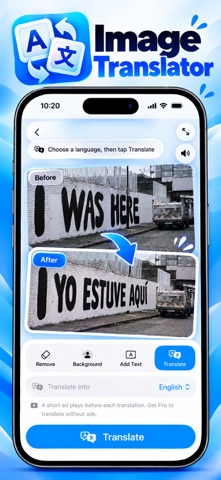
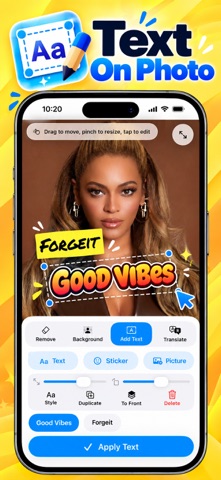
Say more with your photos. • NEW: Add Text. Put text, stickers and pictures on any photo, then move, resize and style each one. • NEW: 50 text style presets to start from. 10 are free, and Pro unlocks all of them. • NEW: Image Translator. Translate every line of text in a photo and have it set back where it was. It runs on your device (iOS 26 or later, on supported devices). • NEW: AI Redraw. Replace a line of text and let AI repaint it into the image, matching the original font, size and color. Try one free edit. Pro members get 7 credits every month, and credit packs are available. • NEW: Auto Match Original in the manual text editor, so your edit blends with the text around it. • Your typed text, style and selection are now kept when you switch between Manual and Smart. • The keyboard's Done key now hides the keyboard in the text editors. • Remove Background is always free. • Bug fixes and performance improvements.
Price & rating history · US
Reconstructed from the listing changes AppTracker has observed in this storefront. A field is charted once it has changed more than once, and each line starts at the value it moved from.
Average rating · ★ 4.58 now · 12 changes on record
Ratings breakdown · US
The star breakdown behind this app's rating in this storefront.
In-app purchases · US
What this app sells inside itself, grouped by kind and priced for this storefront.
Screenshots



Keywords this app targets
Search terms AppTracker associates with this app — estimates, not search volume. ❝ = in the app's title; a highlighted number is its current position for that term.
Similar apps
Competitors and close alternatives, as estimated by AppTracker.
 Art Word: Add Text to Photos
Fitness Labs SRL
Art Word: Add Text to Photos
Fitness Labs SRL
 Text Art: Typography & Word
Appostrophe AB
Text Art: Typography & Word
Appostrophe AB
 Photo Editоr
VIDEO EDITOR PTE. LTD.
Photo Editоr
VIDEO EDITOR PTE. LTD.
 Story Font & Stickers: Inspiro
Polina Hrinchenko
Story Font & Stickers: Inspiro
Polina Hrinchenko
 AI Photo Generator & Editor
3314396 Nova Scotia Limited
AI Photo Generator & Editor
3314396 Nova Scotia Limited
 Add Text on photos
Grey Desk SA
Add Text on photos
Grey Desk SA
 TextStudio - Logo & Effects
Gaudin Ltd
TextStudio - Logo & Effects
Gaudin Ltd
 Add text on photos
Yoshinobu Ikeda
Add text on photos
Yoshinobu Ikeda
About
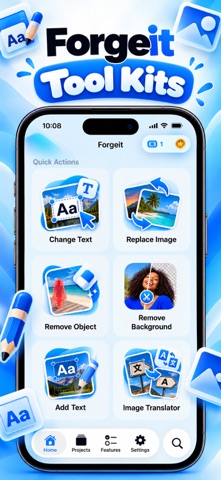
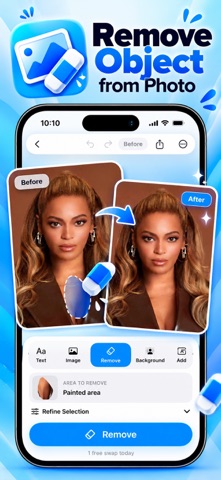
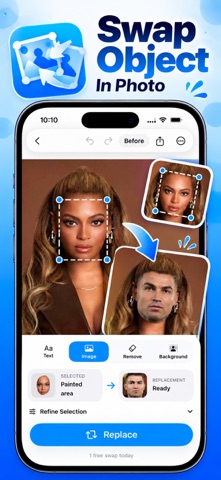
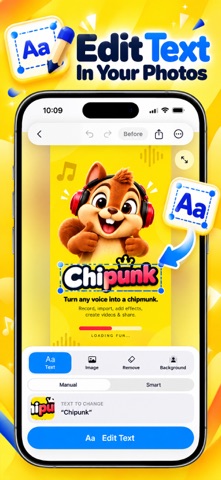
ForgeIt – Edit Text in Photos Change the words in any screenshot or photo. Import an image, tap the text you want to change, and type something new. ForgeIt finds the text for you, then edits it in place so it sits naturally in the picture. CHANGE TEXT IN A TAP • Smart OCR finds the text in your image automatically • Tap any line to edit, replace or erase it • Missed a spot? Draw around it and edit it anyway • Pick fonts, colors and sizes, with bold, italic, underline and strikethrough • Pinch to zoom up to 6x for precise work • Press and hold to compare with the original • Undo and redo any change • Export in high quality AI REDRAW When text sits on a photo, a gradient or a textured background, a plain overlay looks pasted on. AI Redraw repaints your new text into the image, matching the original font, size, weight and color. You get a free edit to try it. Pro includes monthly credits, and extra credit packs are available any time. MORE THAN TEXT • Replace Image: select a picture or element and swap it for another • Remove Object: mark what you don't want and it's gone • Remove Background: cut out your subject. Always free, never gated • Add Text: put text, stickers and pictures on a photo, then move and style each one • Image Translator: translate every line of text in a photo and set it back where it was. It runs on your device using Apple's on-device model (iOS 26 or later, on supported devices) GREAT FOR • Photo captions and posters • Typography and lettering designs • Collages and mockups • Translating signs, menus and notes • Tidying up your own screenshots • Creative, educational and entertainment projects HOW IT WORKS 1. Import a screenshot or photo 2. Tap the text you want to change 3. Type, erase or restyle it 4. Save and share your finished image FORGEIT PRO • Unlimited edits and full-resolution export • Unlimited edit history • All Pro text styles and presets • 7 AI credits every month • No ads • Every future Pro feature Choose a subscription or a one-time lifetime unlock. Subscriptions renew automatically unless canceled at least 24 hours before the end of the current period. Manage or cancel any time in Settings › Apple Account › Subscriptions. RESPONSIBLE USE ForgeIt is made for creative, educational, entertainment, design and personal use. You are responsible for how you create, share and use your edited images. ForgeIt does not support fraud, impersonation, misinformation, forgery, document falsification or any unlawful activity. Please follow all applicable laws and platform policies. Terms of Use: https://www.apple.com/legal/internet-services/itunes/dev/stdeula/ Privacy Policy: https://redizeuz.com/privacy
What's new · 1.7
Say more with your photos. • NEW: Add Text. Put text, stickers and pictures on any photo, then move, resize and style each one. • NEW: 50 text style presets to start from. 10 are free, and Pro unlocks all of them. • NEW: Image Translator. Translate every line of text in a photo and have it set back where it was. It runs on your device (iOS 26 or later, on supported devices). • NEW: AI Redraw. Replace a line of text and let AI repaint it into the image, matching the original font, size and color. Try one free edit. Pro members get 7 credits every month, and credit packs are available. • NEW: Auto Match Original in the manual text editor, so your edit blends with the text around it. • Your typed text, style and selection are now kept when you switch between Manual and Smart. • The keyboard's Done key now hides the keyboard in the text editors. • Remove Background is always free. • Bug fixes and performance improvements.
Details