

Screenshot Organizer: ShotBox
MEHMET CANKER (TR) · Productivity
Independent analytics for this App Store listing. AppTracker is not affiliated with MEHMET CANKER (TR).
Chart standing · US
What changed · US
Listing changes AppTracker has observed for this app in this storefront — new versions, price moves, rating shifts, and store copy.
• Labels — tag any screenshot, then filter your search by label • Create a label in one step, right from the screenshot • Star from the list and open the new Follow-ups collection • Fixed a crash that stopped screenshot details from opening As always, everything stays on your device — private.
Screenshots



About
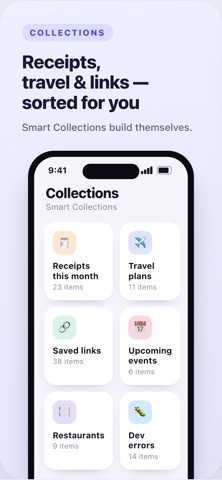
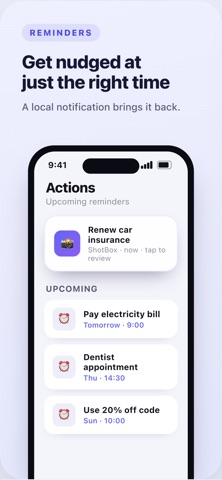
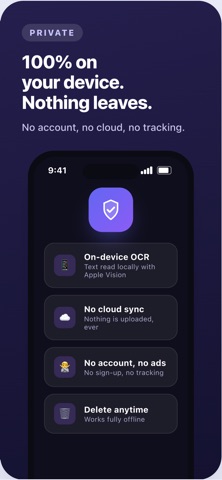
Screenshot Organizer turns the screenshots you already take into a clean, searchable library — automatically. Receipts, flights, links, ideas, error logs… find any of them in seconds. Everything runs on your device. No account, no sign-up, nothing uploaded. WHY YOU'LL LOVE IT • Instant text search — find any screenshot by the words inside it • On-device OCR — text is read locally with Apple's Vision engine • Smart categories — receipts, travel, shopping, work, links and more, sorted for you • Smart Collections — "Receipts this month", "Travel plans", "Saved links" build themselves • One-tap actions — add dates to your calendar, set reminders, copy details, open maps, call numbers • Reminders — set a reminder on any screenshot and get a notification right on time; tap to jump straight back to it • Detected details — prices, dates, addresses, order numbers and links pulled out automatically PRIVATE BY DESIGN • Your screenshots never leave your device • No cloud sync, no tracking, no ads • Delete everything indexed anytime • Works fully offline PREMIUM (optional) Unlock unlimited indexing and analysis, advanced actions, smart collections, data export & backup, and Smart AI summaries. Stop scrolling endlessly through your camera roll — Screenshot Organizer remembers everything for you. Subscriptions auto-renew unless cancelled at least 24 hours before the period ends; your Apple ID is charged for renewal. Manage or cancel anytime in your account settings. Terms of Use and Privacy Policy are available in the app.
What's new · 1.8
• Labels — tag any screenshot, then filter your search by label • Create a label in one step, right from the screenshot • Star from the list and open the new Follow-ups collection • Fixed a crash that stopped screenshot details from opening As always, everything stays on your device — private.
Details